Never available again
View alternatives in the sidebar
View alternatives in the sidebar
According to our mouse expert
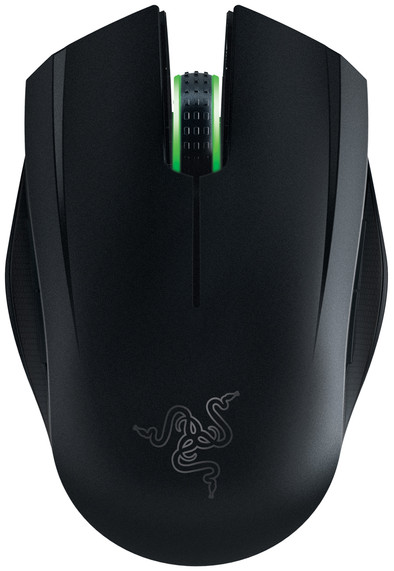
The Razer Orochi is one of the few gaming laptop mice. This fact is striking in itself. Because so many compact gaming mice do not exist. (Which is pretty weird, since quite a few gamers regularly go out with their gaming laptop, for example to LAN parties . A compact mouse that can be easily stored in a laptop bag comes in handy .) No, the main feature of the Razer Orochi is its independence. Use it wirelessly, via Bluetooth 4.0. Or give him a tail and use it wired.
Connection type | Wired | |
Left or right-handed | Left-handed, Right-handed | |
Ergonomic design | ||
Suitable for gaming | ||
Depth | 99 mm | |
Adjustable DPI | ||
Mouse controls | Buttons, Scroll wheel |
5 stars
3
4 stars
3
3 stars
2
2 stars
0
1 star
0
It is really a top mouse for wireless and wired use. However, the Bluetooth 4.0 requirement is a pity, because of this I can't use the mouse well with my older hardware. If you work with that, a Bluetooth 4.0 USB adapter is not an unnecessary luxury.
Jasper
9 November 2016
Automatically translated from Dutch
Mouse works well, accurately and is very nicely designed. Lighting is nice and ergonomics are fine.
It is an expensive mouse compared to the Dell mouse that came with my PC, so I'm surprised it didn't come with a (bluetooth) dongle. And that the connection of the micro USB in the mouse is so special: suppose a cable breaks (and that would not be the first time for me) then I can no longer use it wired...
In short, if you have BT then this is irrelevant and I recommend it wholeheartedly. If you don't have BT, be careful with taking it in and out when using it (like me) on multiple PCs in multiple locations.
R Beunk
27 November 2015
Automatically translated from Dutch
The mouse is light, not too big and clicks smoothly. Hours of gaming is no problem. Varying the color of the light is nice, but I don't look at the mouse so it's a bit nonsensical... Looks nice on my desk next to my Razer Keyboard and mouse pad.
Richard
9 May 2016
Automatically translated from Dutch
Product number | 658902 | |
Manufacturer code | 125330 | |
Brand | Razer | |
Warranty | 2 years | |
Processing of your defect | Carry-in warranty |
Input | Laser | |
Number of buttons | 7 | |
Ergonomic design | ||
Left or right-handed | Left-handed, Right-handed | |
Adjustable DPI | ||
Mouse controls | Buttons, Scroll wheel | |
Suitable for gaming | ||
Recommended for game genre | [FPS] | |
Mouse grip technique | Claw, Fingertips | |
Mouse weights | ||
Programmable buttons | ||
Number of programmable buttons | 7 | |
Lighting peripherals | ||
Color lighting | Green | |
Number of colors lighting | 16.8 million | |
Zone lighting | DPI button | |
Zones separately lit |
Connection type | Wired | |
Braided cable | ||
Cable length | 1 m |
Power supply type | Battery, USB port PC/laptop |
Color | Black | |
Width | 67 mm | |
Height | 35 mm | |
Depth | 99 mm | |
Material | Plastic |