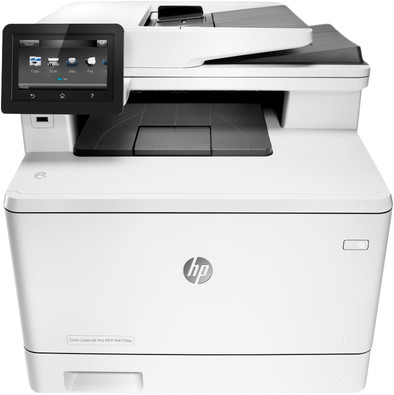
HP Color LaserJet Pro MFP M477fdw
Never available again
View alternatives in the sidebar
View alternatives in the sidebar
According to our printer expert
The HP Color LaserJet Pro MFP M477fdw is an all-in-one laser printer for medium-sized businesses. The printer automatically prints on both sides and has WiFi. You can print, scan, copy, and fax simultaneously via the same printer as the rest of the office. The M477fdw can also be operated via the 10.9cm touchscreen on the front of the printer. This way, you don't have to start the PC first to print an assignment. Even if you often work on your laptop, smartphone, or tablet, the M477fdw offers a solution. Download the HP ePrint app and you can send jobs to the printer wirelessly.
Print technology | Laser | |
Printer type | All-in-one | |
Automatic duplex printing | ||
Automatic document feeder (ADF) | ||
Automatic duplex scanning | ||
Color printer | ||
Maximum print size | A4 | |
Photo paper drawer |
5 stars
245
4 stars
172
3 stars
14
2 stars
2
1 star
2
Print section is great. Beautiful prints super fast. Scanner part is bad. Scan head is skewed (scan skew). Vertical line is correct. Horizontal line deviates up to 3mm. Good to see on graph paper. Diamonds not square. Have contacted HP. They couldn't help it. According to them, the scan head may scan skewed up to a maximum of 3 mm. Unacceptable for me. The white cover plate on the lid is also skewed, so that the glass plate is not completely covered, causing black edges when scanning. Printer is going back.
Martijn Gravesteijn
12 January 2019
Automatically translated from Dutch
After my Xerox printer broke down (broken plastic lid hinge) I had to look for a new printer.
Despite relatively low private usage in general, it was a must for a new device to print double-sided, scan double-sided and have a document feeder. I use these features a lot and missed with my previous Xerox. This all-rounder has it all.
Of course I looked at a Xerox again, but the enormous size and heavy weight turned out to be a disappointment for me. In addition, HP has a larger network when it comes to after sales. I want to place the printer on a cabinet that is not too big and that is simply not possible with the new Xerox, which also did not have all the functionalities. After some searching I came across this beautiful HP. In the distant past I had good experience with HP, but at the time still with inkjet.
I still doubted between this color version or a black and white. The number of color prints have been relatively few in recent years. Nevertheless, I decided to go for color again because I then at least have the choice whether or not to print in color. And by the time the (expensive) toners have to be replaced, I will see further.
What makes me very happy is that the printer can be fully configured via a web interface. After your printer has been added to the network, simply enter the IP address into the browser and you can view and change a huge number of settings. In this way I was able to change the printer at certain points according to my wishes.
For example, it is easy to give a recognizable host name so that the printer in your network is easier to find instead of a jumble of incomprehensible letters and numbers. Really ideal and setting via the browser saves a lot of searching in the window on the printer itself.
I have already made a few prints and these look super sleek and very sharp. I will never print photos with it, you will have to buy another printer for that, but that was not my starting point either. Fax: it is included, but I haven't used a fax for years, so obviously not connected.
A plus is the HP Easy Scan program. This is easy to use to scan any desired document from behind your laptop, also in color. I've set it up to automatically send the scanned document to a folder on my NAS. From that location, I rename it and then place it where I want it. Functions perfectly.
The noise level is very good. My previous printer made more noise and was noticeably slower. A plus is also the speed: you will have a print out of the device in no time, which is really great.
We have both Windows and Mac equipment in our house and the HP works flawlessly in both cases.
For this price, this is really an all-rounder that I am very happy with and which I hope to be able to use for a few more years.
Erika
22 October 2017
Automatically translated from Dutch
Ideal device for the home office. Very practical and versatile.
Philip
29 September 2016
Automatically translated from Dutch
Product number | 683703 | |
Manufacturer code | CF379A#B19 | |
Brand | HP | |
Warranty | 2 years | |
Processing of your defect | Carry-in warranty |
Printer size | Large | |
Width | 41,6 cm | |
Depth | 47,2 cm | |
Height | 40 cm | |
Color | Gray | |
Weight | 23,2 kg |
Printer type | All-in-one | |
Photo printer | ||
Portable (mobile use) | ||
Usage location | Office |
Toner cartridge line | HP 410 | |
Print technology | Laser | |
Number of cartridges/toner cartridges | 4 | |
Color printer | ||
Print speed black (ISO) | 27 ppm | |
Print speed color (ISO) | 27 ppm | |
First black page ready after | 9 seconds | |
Speed class | Very good | |
Usage costs per page | 0,04 euro | |
Maximum print resolution height | 600 dpi | |
Maximum print resolution width | 600 dpi | |
Maximum print size | A4 | |
Automatic duplex printing | ||
Borderless printing | ||
Maximum print size duplex printing | A4 |
Scan functionality | ||
Automatic duplex scanning | ||
Maximum optical scan resolution width | 1200 dpi | |
Maximum optical scan resolution height | 1200 dpi | |
Scanner type | File scanner, Flatbed scanner | |
Maximum scan size | A4 (21x29.7cm) | |
Automatic document feeder (ADF) | ||
Maximum paper size ADF | A4 | |
Scan sizes | A4 | |
Scan speed (PPM) | 26 ppm | |
Color depth output | 30 bpp | |
Scan to | Email address, Network, USB | |
ADF capacity | 50 | |
OCR |
Copying functionality |
Fax functionality | ||
Color fax |
Built-in screen | ||
Color screen | ||
Touchscreen |
Compatible with operating system | Android, Linux, Windows, Windows Phone, iOS, macOS | |
Connection type | Wired, Wireless | |
Apple AirPrint | ||
Email print | ||
WPS (Wireless Protected Setup) | ||
Female standard USB-A port version | 2.0 | |
Number of Ethernet ports | 1 | |
NFC | ||
Built-in WiFi | ||
Bluetooth | ||
WiFi direct | ||
USB port |
Manual input tray | ||
Photo paper drawer | ||
Output capacity output drawer | 150 | |
Maximum print size standard paper tray | A4 | |
Input capacity standard paper tray | 250 | |
Number of standard paper trays | 1 |
Memory card reader |