Qubino Smart Meter
Never available again
View alternatives in the sidebar
View alternatives in the sidebar
According to our energy meter expert
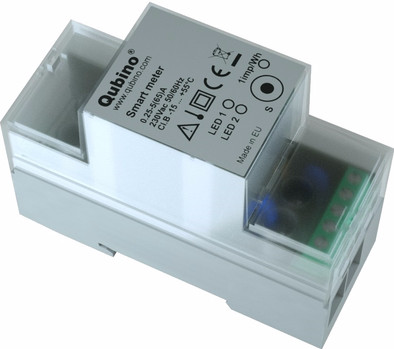
Place the Qubino Smart Meter on the Din rail in the meter cupboard and connect it to a group. Via this smart meter you get a clear overview of your electricity consumption from the connected group. The electricity consumption of the group is added up, so you do not see what the consumption is for each individual electrical device. When you have the Qubino IKA232-20 and BCOM432-40-WM1 modules in house, it is also possible to control these via the smart meter. Please note that you need a Z-Wave controlled base station to receive an overview of the energy consumption in the app on your smartphone or tablet.
5 stars
0
4 stars
0
3 stars
0
2 stars
0
1 star
0
Product number | 783687 | |
|---|---|---|
Manufacturer code | ZMNHTD1 | |
Brand | Qubino | |
Warranty | 2 years | |
Processing of your defect | Carry-in warranty |
Placement (energy meters) | Fuse box |
|---|---|
Measurement of (energy meter) | Energy consumption |
Connection with receiver | Wireless |
Support for home automation platform | N/A |
Connectivity (home automation) | WiFi |
Controls via app | |
Signal range | 30 m |
Controlled via Apple app | |
Controlled via Windows app | |
Controlled via Android app | |
Including bridge or base station | |
Communicates only with the same product type | |
Communicates only with brand-specific protocols | |
Protocol | 433.92 MHz, WiFi, Z-Wave |
Linkable to a protocol | |
Protected signal | |
Adjustable via wireless connectivity | |
Frequencies | 433 |
Mutually linkable | |
Linkable to home automation | |
Number of frequency channels | 1 |
Number of sensors included | 1 |
Bridge required for WiFi connection | |
Number of linkable sensors | 1 |
Including remote |