Never available again
View alternatives in the sidebar
View alternatives in the sidebar
According to our mouse expert
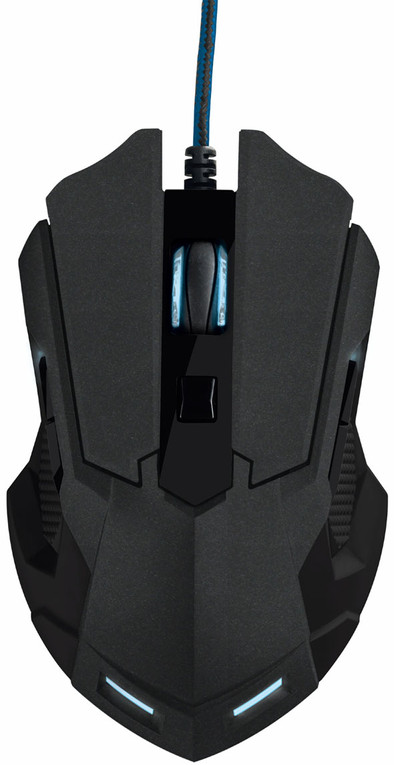
This is a familiar scenario. When you've just gotten used to the customized mouse settings of your favorite PC game, the next game is released in which you will undoubtedly want to invest a lot of your time. Are you going to use the same mouse settings? No, of course not; the games can be very different. Fortunately, the internal memory of the Trust GXT 158 has room for a maximum of five game profiles. Switching between saved profiles shouldn't be a problem.
Connection type | Wired | |
|---|---|---|
Mouse model | Full-size | |
Left or right-handed | Left-handed, Right-handed | |
Ergonomic design | ||
Suitable for gaming | ||
Silent mouse | ||
Depth | 123 mm | |
Adjustable DPI |
5 stars
60
4 stars
32
3 stars
4
2 stars
3
1 star
0
I've had this gaming mouse for about 4 months now. I had an old mouse, and since I have this mouse, I can play games more easily! A good recommendation
Werno
17 January 2016
Automatically translated from Dutch
accurate, easy to operate, good in the hand, nice design
Vandevivere Bruno
12 October 2016
Automatically translated from Dutch
You first have to download the software yourself from the Trust website, but that is only a small effort. Everything about this mouse can be adjusted via this program: the function of the buttons, sensitivity, light schedule, refresh rate, pointer speed, etc. Even the function of the left and right mouse buttons is adjustable. You can assign hotkeys to these buttons as well as multimedia keys (play/stop/next), browser keys (previous/next), windows keys, program launch and also macros. These macros are a sequence of shortcuts that you can include in the program itself, possibly with intervals. But you can't manually set this interval, which would be useful for some games. You can't adjust much about the color either: either a fixed color or it runs through all seven colors. Full RGB would be nicer.
You can also set it to automatically jump to a profile when you start a program, but this does not always work reliably.
The macros are also useful at work. During a holiday job I had to go through a whole row of articles in their program and perform an action per article. Quickly created a macro so that this tedious job could be handled quickly. It is very useful that the mouse stores these macros in its internal memory, because that computer did not allow installing external software.
Another hint: long pressing the DPI button jumps to the next profile.
Florian Bonte
27 October 2017
Automatically translated from Dutch
Product number | 591511 | |
|---|---|---|
Manufacturer code | 20324 | |
Brand | Trust | |
Warranty | 2 years | |
Processing of your defect | Carry-in warranty |
Mouse model | Full-size | |
|---|---|---|
Input | Laser | |
Number of buttons | 8 | |
Ergonomic design | ||
Left or right-handed | Left-handed, Right-handed | |
Adjustable DPI | ||
Mouse controls | Buttons, Scroll wheel | |
Suitable for gaming | ||
Recommended for game genre | [FPS] | |
Mouse grip technique | Claw, Palm | |
Mouse weights | ||
Programmable buttons | ||
Number of programmable buttons | 8 | |
Lighting peripherals | ||
Color lighting | Blue, Red, White | |
Number of colors lighting | 5 | |
Zone lighting | Scroll wheel, Side(s) | |
Zones separately lit | ||
Silent mouse | ||
Horizontal scrolling | ||
Mouse surface | Any surface | |
Product family | GXT |
Connection type | Wired | |
|---|---|---|
Type of USB port | Standard USB-A | |
Braided cable | ||
Cable length | 1,7 m |
Plug and Play | ||
|---|---|---|
Compatible with operating system | Windows |
Power supply type | USB port PC/laptop | |
|---|---|---|
Battery level indicator |
Color | Black | |
|---|---|---|
Width | 76 mm | |
Height | 36 mm | |
Depth | 123 mm | |
Material | Plastic | |
Finish | Matte and glossy |