NETGEAR GS324
Never available again
View alternatives in the sidebar
View alternatives in the sidebar
According to our network switch expert
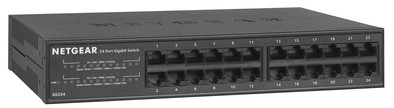
Connect up to 23 extra wired devices to your home network with the NETGEAR GS324 switch. Since you don't have to configure the switch, it's ready to use in 5 minutes. Connect your security camera, PC, smart TV, and NAS directly to the switch. This SOHO 300 series switch recognizes which network ports aren't in use and switches them off automatically. This, in turn, saves energy.
Number of Ethernet ports | 24 | |
|---|---|---|
Managed switch | ||
Ethernet speed | Gigabit Ethernet (1000Mbps) | |
PoE support | ||
Switching capacity | 16 Gbit/s | |
Quality of Service (QoS) | ||
Mounting possible |
5 stars
4
4 stars
1
3 stars
0
2 stars
0
1 star
0
Introduction Since our current switch made a bit too much noise (Cisco SR2024C) I went looking for a cheap alternative instead of replacing the fairly pricey fan. The Cisco did its job well, but it made quite an annoying fan rattle and with a continuous consumption of 38.4 Watt it still drew quite a bit of juice from the wall. A new fan is expensive and does not guarantee that the sound will disappear and remain. That could just be bad design.
So I went to look for a new switch. I had a few wishes/requirements for a new device.
It should not be too expensive (around €120 and preferably just below) It does not have to be 19” as long as it is not a 0.5U unit. Preferably completely fanless Built-in power supply with C14 socket so I can plug it into the PDU in the patch cabinet
Thanks to a Coolblue advertisement on an external site, I came across this Netgear. Great price for 24 ports gigabit and somewhat ok brand. Other switches were full size 19” switches from Zyxel, but I didn't like that. certainly not for the prices they were going for. (sub €90 is the almost too-good-to-be-true category for me anyway). Looking at what coolblue could deliver, it became the netgear. With a price of just over €100 very reasonable for the feature set. This SOHO switch is intended for SMEs and individuals with a slightly more advanced network setup. I also fall under that with 20 connections.
In the box The Netgear arrives neatly packaged. In the box we find a power cord, the switch itself (plastic bag with netgear seal) and a box with another power cord (UK) and some other accessories such as screws for wall mounting, rubber feet for desk use, cage nuts and a set of 19” rack ears. All in all, a very complete version where you have all possible mounting options in the box.
In addition, there are also 7 booklets included: manuals in 6 different languages and a warranty leaflet. Because they are 6 separate booklets, you can already throw away 5 and you do not have to store them because you could happen to need 6 pages of your 200-page book. So a plus.
Installation Installation of the switch is of course very easy. You neatly prepare the desired mounting method, insert the patch cables and provide the device with juice. In my case it was a 19” rack mounting and so the rack ears were allowed on it. This goes neatly with 4 screws per side.
I am still arranging CAT6.5m patch cables in the color white. This so that I can patch in all other ports. I have now kept a color coding for important fixed elements in the network such as NAS, AccessPoints and modem-router connection. The rest is just plain white.
The handy thing about this switch is that the lights are centralized with the number. I've kept the same positions as on the patch, so I can quickly see which units have errors related to cabling. Orange lights indicate a 100mbit connection and green is a gigabit connection. In addition, the numbers themselves also give light. This is for activity within the network. This is also useful for troubleshooting network problems. If your connection is slow, but you see little network activity, something is wrong with a modem, router or access point.
Activity and speed LEDs are neatly grouped to the left. The two orange lights are for the AppleTV (which has a 100mbit port) and another connected device (same same).
Performance I can say very little about this right now. I've been using the switch for half a day now and so far it does its job as expected. I don't have any high demanding devices that continuously require 2 gigabits via LACP, so that's not too bad. The NAS (also Netgear) is the only one in the network that has 2 NICs and that is not so bad. In any case, the switch is completely silent, so that's nice.
Conclusion This SOHO switch is a great device for a more sophisticated setup. The housing is completely made of metal, which also helps with passive cooling. With a maximum of 11.1W, the consumption is very positive compared to the 38.4W continuous that we had before. The gate layout is logical, but unfortunately standard plastic gates. This is unfortunate if you use grounded cabling, because that no longer works. For the price, though, I get it. This switch is one of the cheapest gigabit switches with metal housing and passive cooling available in Compact size. A great device that will last a while.
Nathan van Dalen
24 April 2017
Automatically translated from Dutch
does what it's supposed to do
Louis Bloemers
19 July 2018
Automatically translated from Dutch
Easy to connect, fits easily Fuse box.
André
21 March 2019
Automatically translated from Dutch
Product number | 744767 | |
|---|---|---|
Manufacturer code | GS324-100EUS | |
Brand | Netgear | |
Warranty | 25 years | |
Processing of your defect | Carry-in warranty |
Managed switch | ||
|---|---|---|
Number of Ethernet ports | 24 | |
Ethernet speed | Gigabit Ethernet (1000Mbps) | |
Switching capacity | 16 Gbit/s | |
SFP/GBIC ports | 0 | |
Quality of Service (QoS) | ||
LACP Link aggregation | ||
IGMP Snooping | ||
VLAN | ||
Jumbo frame support | ||
Port mirroring | ||
Professional use |
PoE support | ||
|---|---|---|
Type of PoE | No PoE |
Fan present | ||
|---|---|---|
Mounting possible | ||
Suitable for 19-inch rack mount | ||
Weight | 1,31 kg | |
Color | Black | |
Height | 4,4 cm | |
Width | 25,2 cm | |
Depth | 18 cm | |
Material | Metal |