Trust Smart Home ZYCT-202
Never available again
View alternatives in the sidebar
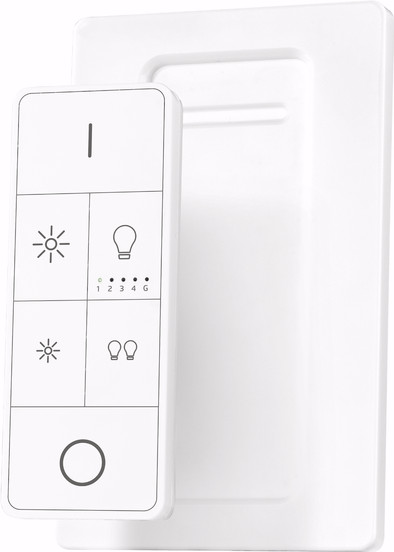
The Trust Smart Home ZYCT-202 is a wall mounted remote control for your Smart Smart Home smart lights. Handy if you do not want to operate the lights via the app on your smartphone. In addition to just turning the lights on and off, you also dim the Trust smart lights to a desired color temperature. Since the package is equipped with a wall mount bracket, you give the remote control a nice spot on the wall.
5 stars
4
4 stars
2
3 stars
3
2 stars
0
1 star
0
I have a philips hue system and want to be able to operate it via the app as well as via the remote control, these should complement each other, not get in the way. After help from Coolblue, transferred to KAKU because I couldn't figure it out with this manual:
https://manuals.coolblue.nl/e2/trust-smart-home-zyct-202.pdf
At step 2.B it says: channel 1,2,3,4,5 blink once, this did not happen with me. So instead you walk up to your hue lamp, hold your ZYCT against the hue lamp and press the I button. Hold this until the lamp starts flashing, then it goes from weak to bright (takes about 10 to 12 seconds in total). If you want to link more lamps under the same "led group", keep that group selected and do the above again. Now this remote works perfectly with the hue app! (note: switching off the lamp(s) is 2x short 0, switching on is only 1xI).
Edo Zwartbol
29 May 2018
Automatically translated from Dutch
This remote only works if you have separate Phillips Hue, Ikea or click on click off Zigbee lamps, or any product codes that start with a "Z". I was advised that the remote control would work in combination with the Trust ICS-2000 module, linking with module is possible, you will also see it in the CLICK ON CLICK OFF app under devices, .. but you cannot switch lamps with it or dimming via the module, then it is worthless. Switching and dimming is possible with the AYCT-202, it looks exactly the same, is just as expensive, .. but it works with all built-in RF switches and dimmers from CLICK ON, CLICK OFF.
Caspar
9 January 2019
Automatically translated from Dutch
(working step-by-step plan at the bottom of the review)
After getting started with the Philips Hue starter package, we missed an extra remote to operate separate groups. This was the most convenient and inexpensive solution. This is because we did not want to do everything via Google Home voice control or pick up the phone every time, open the app and operate the lamps from there.
It took some effort to get it working, but now that it does work, I'm very satisfied!
The step-by-step plan:
Take remote out of the box (duh) Remove the battery tab
Open the Philips Hue app, click on settings --> Accessory configuration --> Add accessory --> Hue dimmer switch --> Option 1 ---- Do nothing else
Stand as close to the Hue Bridge as possible (within 2 meters)
Press and hold the button with the 2 lamps on the remote. LEDs 1, 3, 5 flash. Quickly press the LED flashes in the Hue app. Continue to hold the button until all 5 LEDs light up. You can now release the button.
Now we are going to connect the lamps and here is the punch line.
If you've only just screwed in your lamp and turned on the power, it's pretty easy. Hold the remote up to/against the correct lamp, choose a channel and hold the "I" button (On button) until the lamp flashes 3 times and then after a short pause it quickly flashes 2x again. Release.
If you've been using your Hue lights for a while, do the following: Turn off the physical switch so that the lamp has no power at all. Wait at least 5 seconds and turn it back on. The lamp should now burn at full power by default. Now you can go through the same pairing steps.
If you want multiple lamps on one 'group', you repeat the process without switching groups (there is a maximum of lamps per group)
Tibo Geurten
29 December 2018
Automatically translated from Dutch
Product number | 789993 | |
|---|---|---|
Manufacturer code | 71171 | |
Brand | Trust | |
Warranty | 2 years | |
Processing of your defect | Carry-in warranty |
Material | Plastic | |
|---|---|---|
Finish | Matte | |
Plastic type | ABS | |
Protocol | Zigbee | |
Smart home platform | Homey |