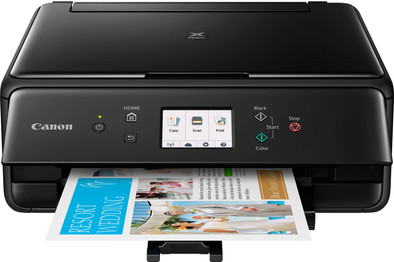
Canon PIXMA TS6150
Never available again
View alternatives in the sidebar
View alternatives in the sidebar
Print technology | Inkjet | |
|---|---|---|
Printer type | All-in-one | |
Automatic duplex printing | ||
Automatic document feeder (ADF) | ||
Color printer | ||
Maximum print size | A4 | |
Photo paper drawer | ||
Built-in WiFi |
According to our printer expert
The Canon PIXMA TS6150 is an All-in-one inkjet printer for home use. Use WiFi or Bluetooth to connect the printer to your smartphone, tablet, and laptop or print remotely from the cloud. Print images with a high color gamut thanks to the 5 separate ink cartridges, including 1 for special photo black ink. Your images will also be razor-sharp because of the 4,800 by 1,200DPI print resolution. The printer also supports borderless printing and square paper up to 13 by 13cm, allowing you to print your Instagram images, for example. Photo paper can be placed in the special tray on the back of the device, allowing you to keep it separate from standard text paper. The large 7.5cm color touchscreen is useful for quickly adjusting the settings for copies and scans. Want to save on paper? Turn on the automatic duplex printing feature.
5 stars
84
4 stars
71
3 stars
3
2 stars
0
1 star
1
Do you wish a nice, compact printer with many cloud solutions. Eg, scan documents, on your online cloud storage (Dropbox, Google Drive, Evernote, Box....) Save, save, print and access. Then this is a top machine. Very cheap to start up. Canon sells standard cartridges, XL cartridges and XXL cartridges for this device. One this for a low purchase price. No more imitation inks for me ☺️
Romain Zadora
8 May 2018
Automatically translated from Dutch
The installation went OK, but the software only showed the ink status once, and then it stopped working. There were also some problems. I also found the over-modernized interface clumsy. I immediately decided to uninstall everything just to reinstall the driver. You also have all the functionality, so you don't miss anything.
For a complete but no-nonsense experience, I recommend downloading only the driver.
Before you print, you must first fold up the front (that is, the entire front including the screen and buttons), otherwise the printer will not work. Then you have to lower it back down to cover the paper and internals. It doesn't look like it when folded up either. It is therefore a labour-intensive printer, because you also have to unfold the paper catcher completely, which is located behind the panel. Then fold everything in again to close the panel again. Ridiculous design I must say.
The material feels dirt cheap. I was a bit shocked. Very different from the (equally expensive) Hewlet Packard. But HP has lost my goodwill, which is why I'm switching to Canon.
Printer has a standby option but it does not wake up when you want to print. I had already read that, but it was still a bit weird. Since I don't use it anymore after just installing the driver, the printer automatically turns off after a few minutes. I think it's a good alternative because, as mentioned, the standby doesn't work anyway.
On the positive side, it prints double-sided, but that is considerably slower. The actual printing is fast but the paper is then spit out 95%, and then there is a long pause. Then the paper is completely swallowed again and the back is printed.
No USB cable is included, so I reused the USB cable from the HP printer.
The front panel - which you have to lift before printing - is high-gloss. Since you often have to touch it to raise it, many visible fingerprints quickly arise. In addition, I think the high gloss looks kitschy.
I have purchased additional print cartridges to qualify for the €40 discount. Which basically means that the first set of cartridges are free. It was deposited pretty quickly I must say. Registered the printer the same day and applied for the discount.
A set of 50% full cartridges is already supplied with the printer.
The disadvantage is that there are no 3rd party cartridges for sale for this model yet. I don't know if it's coming.
It is more compact in depth and width, but not in height if you put the paper in the top feeder. I have it on the front because at the top you have to have plenty of space if you want to put the paper in there. The print quality is quite good, but not quite as good as a competing HP. I must say that it is more economical with the ink, unless you use the cleaning function; then it guzzles more than other printers I've had.
In short, the design is clumsy because they wanted to keep it relatively compact with two feeders. The supplied operating software has defects, is clumsy and is mainly there to be modern and beautiful I think.
I keep this printer because, again, HP has sold it to me. But overall it feels and looks like a budget fighter that wanted to be compact at the cost of less printing convenience. If you want to last longer with ink, this is a good choice.
Valmont
2 July 2018
Automatically translated from Dutch
works fine
Trappeniers Eddy
2 September 2018
Automatically translated from Dutch
Receive more coverage in case of damage than with your standard warranty. Coolblue takes care of everything: from taking out the insurance to repairs. Is a repair not possible? You receive the purchase price as CoolblueCredit.
XCover is allowed to arrange and process insurances on behalf of the insurer. The insurances are governed by Belgium law. If you have a complaint, you can contact the or our customer service.
First, add your printer to your shopping cart. On the next page, choose the Protection Plan below. You always have a 30-day return window and pay no deductible in case of damage.
The insurance can be canceled every year, even if you have paid in advance. If you cancel earlier, you will receive a refund for the overpaid amount.
Product number | 794856 | |
|---|---|---|
Manufacturer code | 2229C006 | |
Brand | Canon | |
Warranty | 2 years | |
Processing of your defect | Carry-in warranty |
Printer size | Small | |
|---|---|---|
Width | 37,2 cm | |
Depth | 31,5 cm | |
Height | 13,9 cm | |
Color | Black | |
Weight | 6,2 kg |
Printer type | All-in-one | |
|---|---|---|
Photo printer | ||
Portable (mobile use) |
Cartridge line | Canon PGI-580 / CLI-581 | |
|---|---|---|
Print technology | Inkjet | |
Number of cartridges/toner cartridges | 5 | |
Color printer | ||
Print speed black (ISO) | 15 ppm | |
Print speed color (ISO) | 10 ppm | |
First black page ready after | 30 seconds | |
Maximum print resolution height | 1200 dpi | |
Maximum print resolution width | 4800 dpi | |
Maximum print size | A4 | |
Automatic duplex printing | ||
Borderless printing | ||
Maximum print size duplex printing | A4 |
Scan functionality | ||
|---|---|---|
Maximum optical scan resolution width | 2400 dpi | |
Maximum optical scan resolution height | 1200 dpi | |
Scanner type | Flatbed scanner | |
Maximum scan size | A4 (21x29.7cm) | |
Automatic document feeder (ADF) | ||
Scan sizes | A4 | |
Scan speed (PPM) | 4,2 ppm | |
Color depth output | 16 bpp | |
Scan to | PC (network) | |
OCR |
Copying functionality |
|---|
Fax functionality |
|---|
Built-in screen | ||
|---|---|---|
Color screen | ||
Touchscreen |
Compatible with operating system | Android, Windows, Windows Phone, iOS, macOS | |
|---|---|---|
Connection type | Wired, Wireless | |
Apple AirPrint | ||
Email print | ||
WPS (Wireless Protected Setup) | ||
Female standard USB-A port version | 2.0 | |
NFC | ||
Built-in WiFi | ||
Bluetooth | ||
WiFi direct | ||
USB port |
Manual input tray | ||
|---|---|---|
Photo paper drawer | ||
Output capacity output drawer | 60 | |
Maximum print size standard paper tray | A4 | |
Input capacity standard paper tray | 100 | |
Number of standard paper trays | 1 |
Memory card reader |
|---|