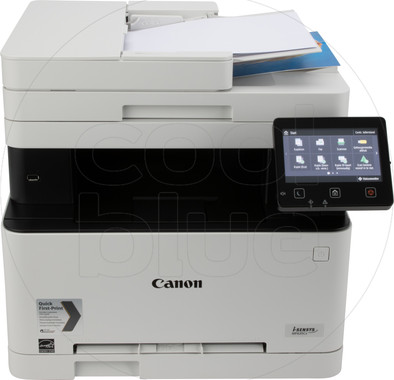
Canon I-SENSYS MF635CX
Never available again
View alternatives in the sidebar
View alternatives in the sidebar
According to our printer expert
With the I-SENSYS MF635CX all-in-one laser printer, you can print up to 18 pages per minute. You can also use this I-SENSYS to fax. That's why this printer is suitable for use in a small office. You can scan automatically and print duplex with this all-in-one. Thanks to the integrated automatic document feeder (ADF), you can put a whole stack of paper in the scanner at the same time. That way, you'll save time and you won't have to wait next to the device until it's done.
Print technology | Laser | |
|---|---|---|
Printer type | All-in-one | |
Automatic duplex printing | ||
Automatic document feeder (ADF) | ||
Automatic duplex scanning | ||
Color printer | ||
Maximum print size | A4 | |
Photo paper drawer |
5 stars
20
4 stars
18
3 stars
1
2 stars
0
1 star
0
First of all kudos to Coolblue, ordered and delivered the next day. A special mention for the package itself: the printer was cleverly packed, so that it was unpacked in no time, without the typical wringing associated with styrofoam protection. That can also be said. We take for granted the many pieces of adhesive tape to protect the moving parts. After all, it is a workhorse that you hope to use for several years. Installation went smoothly. Of course, in these online times, it is best to go straight to the Canon site to get the latest drivers, manuals, etc. CDs go into the archive ("in case we ever resell them. It does not spark joy :-)"). Install drivers, connect the printer (I also use a USB cable, in addition to a wireless connection), print the first test pages and you're done. The toners were also pre-installed, which saved some installation time. The printer was intended to replace my old inkjet Canon, mainly to make it easier to use, as we regularly take multipage copies, or scans over several double-sided pages. The printer does an excellent job of this and runs fast enough (much faster than the previous inkjet anyway). I also definitely wanted airprint support, that went very smoothly. Of course I wanted to test the photo quality, and it's not that bad, a bit oversaturated, but that could also be due to the fact that you have to take a "standard" from iOS. The next day there was a small downside: suddenly the printer wouldn't print at all (coming from an iMac). I then did a firmware upgrade and it worked again. Hopefully this solves the problem, because you obviously don't want to be able to print at crucial moments. In terms of settings and configuration, you can also go very far, which is probably more necessary if you were to use it in the office. You can do the settings remotely, via a remote UI from your browser, or also on the touchscreen. However, this touchscreen is still of the resistive type, and it remains a bit difficult to operate this screen, especially since much navigation is done by using a back arrow at the top left, which is then difficult to use with the finger. Protip: use (back of) a ballpoint pen. All in all, an excellent, relatively cheap laser printer/scanner. Concerning the fax, I can be brief: we don't use it, no telephone line (and a bit outdated for home use, given the many other online communication options)
James Depoorter
8 March 2019
Automatically translated from Dutch
A printer that does what it's supposed to do: print, scan, copy. Doesn't run a full cleaning program at every startup at the expense of a lot of ink (even if you don't have to print anything). Text just comes out of the printer razor sharp, images look great too. It's not a photo printer, but no one said that either. Though photos still come out fine (on plain paper).
Joris van de Wijgert
26 October 2018
Automatically translated from Dutch
Printer with many options for a relatively low price. Highly recommended!
Sylvia
5 December 2018
Automatically translated from Dutch
Product number | 805805 | |
|---|---|---|
Manufacturer code | 1475C034 | |
Brand | Canon | |
Warranty | 2 years | |
Processing of your defect | Carry-in warranty |
Printer size | Large | |
|---|---|---|
Width | 45,1 cm | |
Depth | 46 cm | |
Height | 40 cm | |
Color | Black | |
Weight | 22 kg |
Printer type | All-in-one | |
|---|---|---|
Photo printer | ||
Portable (mobile use) | ||
Usage location | Office |
Toner cartridge line | Canon 045 | |
|---|---|---|
Print technology | Laser | |
Number of cartridges/toner cartridges | 4 | |
Color printer | ||
Print speed black (ISO) | 18 ppm | |
Print speed color (ISO) | 18 ppm | |
First black page ready after | 11 seconds | |
Usage costs per page | 0,141 euro | |
Maximum print resolution height | 1200 dpi | |
Maximum print resolution width | 1200 dpi | |
Maximum print size | A4 | |
Automatic duplex printing | ||
Borderless printing | ||
Maximum print size duplex printing | A4 |
Scan functionality | ||
|---|---|---|
Automatic duplex scanning | ||
Maximum optical scan resolution width | 600 dpi | |
Maximum optical scan resolution height | 600 dpi | |
Scanner type | File scanner, Flatbed scanner | |
Maximum scan size | A4 (21x29.7cm) | |
Automatic document feeder (ADF) | ||
Maximum paper size ADF | A4 | |
Scan sizes | A4 | |
Scan speed (PPM) | 14 ppm | |
Color depth output | 24 bpp | |
Scan to | Email address, FTP, PC (network), USB | |
ADF capacity | 50 | |
OCR |
Copying functionality |
|---|
Fax functionality | ||
|---|---|---|
Color fax |
Built-in screen | ||
|---|---|---|
Color screen | ||
Touchscreen |
Compatible with operating system | Android, Windows, iOS, macOS | |
|---|---|---|
Connection type | Wired, Wireless | |
Apple AirPrint | ||
Email print | ||
WPS (Wireless Protected Setup) | ||
Female standard USB-A port version | 2.0 | |
Number of Ethernet ports | 1 | |
NFC | ||
Built-in WiFi | ||
Bluetooth | ||
WiFi direct | ||
USB port |
Manual input tray | ||
|---|---|---|
Photo paper drawer | ||
Output capacity output drawer | 150 | |
Maximum print size standard paper tray | A4 | |
Input capacity standard paper tray | 150 | |
Number of standard paper trays | 1 |
Memory card reader |
|---|