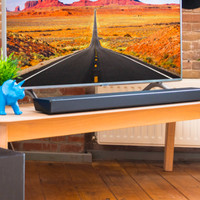
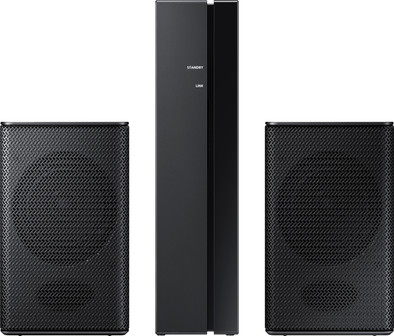
Samsung SWA 8500S/XN Speaker Set
Never available again
View alternatives in the sidebar
View alternatives in the sidebar
According to our soundbar expert
You can create a 4.1 surround sound in your living room with the Samsung SWA 8500/XN Speaker Set. The set consists of a receiver module and 2 rear speakers. Connect the speakers to the receiver using a speaker cable. You can connect the receiver wirelessly to your soundbar. This way you won't be bothered by cables in your living room. With an output capacity of 80 watts, this set is especially suitable for the smaller to medium-sized room. Note! The speaker set can only be connected to the following Samsung sound bars: Samsung HW-N400, HW-T430, HW-T450, HW-T530, HW-T550, HW-T650, HW-S60T, HW- S61T, and HW-Q60T.
Built-in WiFi | ||
|---|---|---|
Bluetooth | ||
Width | 8,7 cm | |
Height | 14,7 cm | |
Sound reproduction | Surround | |
Quality category | Basic |
5 stars
55
4 stars
39
3 stars
13
2 stars
4
1 star
0
Sound quality
Connection options
Design
Options
A true addition to your M-series soundbar.
I myself have recently had a 3.1 M-550 soundbar from Samsung. But since a few days also the Swa-8500S.
The Swa-8500S is suitable for the following models: Samsung Sound+ HW-M360, HW-M450, HW-M4500, HW-M550.
The box has inside two loudspeakers, a “Bluetooth” box, power plug and loudspeaker cable which is about 4 meters long and manual.
Connecting the speakers to the box is simple. The speaker cord that is needed for this has a separately colored plug on one side that corresponds to the color on the back of the box. “Can't go wrong, and don't need to screw anything.
The other side of the wire is of course pinned to the back of the speakers, which also have a matching color. Make sure that you don't put the wires for the speakers too far in the back, it won't make contact because the insulation of the speaker cord then rests on the contact points.
Connecting further wirelessly to my soundbar was quite easy and is described in the manual. You don't have to do more than that.
As soon as I turn the soundbar on or off, the Swa-8500s also turns on or off. “Red LED when off, Blue LED when on on the unit”
My TV service is Ziggo and if you press the “i button” via the ziggo remote control and then convert the sound of a channel to Dolby Digital, it sounds like something I should have done much earlier. “You will have to experience it yourself”
Please note the following when purchasing, if you e.g. have an M450 sound bar.
This is namely 2.1 and not 3.1 as the M550 is. This means that with the M450 you will not have real surround “understandable 5.1”. But then the rear speakers will work the same as the front. The M450 has no center channel and so the voices go through the left and right speakers on the sound bar and the rear speakers will copy that. The M450 is 2.1 and can only play Dolby Digital 2.0 The M550 is 3.1, which you can expand to 5.1 Dolby Digital with the Swa-8500s.
Dennis
18 June 2018
Automatically translated from Dutch
combined with my soundbar the samsung n650 great sound and the bass is also fantastic give a 10/10 for the combination I don't think it should be inferior to a Bose soundbar
eddy timmers
5 February 2019
Automatically translated from Dutch
I have the Samsung HW-650N soundbar, which according to Coolblue would not be compatible with this rear speaker set, but according to the user manual of the soundbar it is. It works perfectly! I quickly got it paired with the soundbar, if you turn up the volume of the rear speakers, the sound is good. It gives an extra depth when watching movies. I am satisfied with it!
Thierry Isler
18 January 2019
Automatically translated from Dutch
Product number | 809617 | |
|---|---|---|
Manufacturer code | SWA-8500S/XN | |
Brand | Samsung | |
Warranty | 2 years | |
Processing of your defect | Via Coolblue |
Height | 14,7 cm | |
|---|---|---|
Width | 8,7 cm | |
Depth | 8,7 cm | |
Weight | 1,9 kg | |
Color | Black | |
Quality category | Basic |
Separate subwoofer |
|---|
Sound quality according to customers | Good | |
|---|---|---|
Number of audio channels | 2 | |
Number of subwoofer channels | 0 | |
Sound reproduction | Surround | |
Surround sound | Virtual surround sound | |
Surround sound systems | DTS | |
Hi-Res audio | ||
Radio |
HDMI connector | ||
|---|---|---|
Digital optical connector | ||
Network connector | ||
USB port |
Bluetooth | ||
|---|---|---|
Built-in WiFi | ||
Plays from network | ||
Multi-room audio | ||
NFC |
Compatible with smartphone / apps | ||
|---|---|---|
Controls via app | ||
Controlled via Android app | ||
Controlled via Apple app | ||
Controlled via Windows app |
Best tested |
|---|