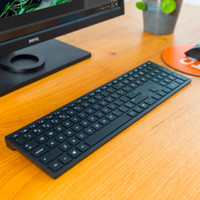
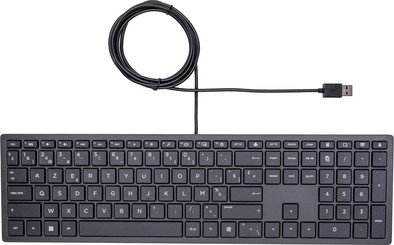
HP Pavilion Wired Keyboard 300 AZERTY
Similar keyboards
- Wired
- Multimedia shortcuts
- No backlit keys
28,99
Delivered tomorrow
- Wired
- Full size (100%)
- Not ergonomic
55,-
Delivered tomorrow
28,99
Delivered tomorrow
55,-
Delivered tomorrow
Current product
34,99
28,99
55,-
49,99
No
No
Yes
No
Keyboard, Numpad
Keyboard, Numpad
Keyboard, Numpad
Keyboard, Numpad, Standard
No
No
No
Yes
No
No
Yes
No
According to our keyboard expert
With the HP Pavilion Wired Keyboard 300 AZERTY, you can get even more out of typing. You have all kinds of shortcuts at your fingertips, for example. You can start the calculator, control the volume of your music, or go to the print options with the push of a button. Thanks to its simplistic design, the keyboard fits any workplace. The flat keys are designed in such a way that they don't produce much noise when you type. This is useful if you don't want to bother your colleagues with your typing, or if you find the noise annoying yourself. This keyboard has a numeric keypad, so working with numbers is child's play for you. You can easily navigate through your tabs and applications with the mouse.
Note: the keyboard layout on the product images differ from the actual layout. This keyboard has an ISO layout.
Connection type | Wired | |
|---|---|---|
Backlit keyboard | ||
Keyboard composition | Keyboard, Numpad | |
Bluetooth | ||
Geographic keyboard layout | BE layout | |
Ergonomic design | ||
Suitable for gaming | ||
Mechanical keyboard |
5 stars
22
4 stars
29
3 stars
6
2 stars
4
1 star
0
Installation ease
Ergonomics
The keys are not equally visible. In a dim light most are hardly visible.
Joseph Selling
21 November 2019
Automatically translated from Dutch
Function keys cannot be activated without pressing the Fn key. Not useful as a programmer.
Lyphout Tine
11 March 2021
Automatically translated from Dutch
The keyboard looks sleek and is compact. One of the reasons I chose this one is the easy access to the media buttons. In times of home work and video conferencing, this is an added value. I don't use the function keys much myself. However, this will not be useful for those who often use these buttons. However, the keyboard also has significant drawbacks. Build quality doesn't seem that great (although this remains to be seen). It doesn't feel that solid. I had hoped for a similar feel to my laptop, but this is certainly not the case. The keys also make a lot of noise when typing, which is not pleasant. A very important disadvantage is the enter key. Instead of a traditional L-shape, with mainly a long vertical section, it is a horizontal beam shape here. This takes some getting used to compared to other keyboards. I have often pressed the wrong button. I can get away with it, but I'm not very enthusiastic about it.
Wim
12 January 2021
Automatically translated from Dutch
Product number | 823284 | |
|---|---|---|
Manufacturer code | 4CE96AA#AC0 | |
Brand | HP | |
Warranty | 2 years | |
Processing of your defect | Via Coolblue |
Keyboard layout | AZERTY | |
|---|---|---|
Geographic keyboard layout | BE layout | |
Physical keyboard layout | ANSI | |
Typing comfort | Mid-range | |
Backlit keyboard | ||
Spill-resistant | ||
Programmable keys | ||
Multimedia shortcuts | ||
Flat keys | ||
Suitable for gaming | ||
Mechanical keyboard |
Connection type | Wired | |
|---|---|---|
Type of USB port | Standard USB-A | |
Cable length | 1 m | |
Bluetooth |
Power supply type | USB port PC/laptop |
|---|
Keyboard composition | Keyboard, Numpad | |
|---|---|---|
Ergonomic design | ||
Height | 2,23 cm | |
Width | 41,01 cm | |
Depth | 11,42 cm | |
Wrist rest | ||
Color | Black | |
Weight | 0,41 kg |