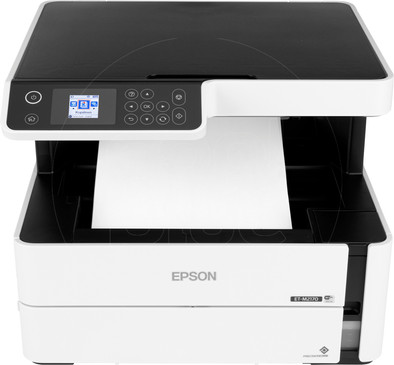
Epson EcoTank ET-M2170
Never available again
View alternatives in the sidebar
View alternatives in the sidebar
According to our printer expert
Print, scan, and copy black-and-white documents at high speeds with the Epson EcoTank ET-M2170. With a print speed (ISO) of 20 pages per minute, you never have to wait long for your print: your first print is ready after 6 seconds. You scan 5 pages per minute. The ET-M2170 doesn't use cartridges, but uses an ink reservoir instead that you can refill with ink from a bottle. This is much cheaper than cartridges: a single print only costs 0.4 cents. You can print via your PC, laptop, smartphone, or tablet via WiFi, WiFi direct, or Ethernet. You can adjust settings on the integrated color screen. Store up to 250 blank pages in the input tray and up to 100 pages in the output tray.
Print technology | Inkjet | |
|---|---|---|
Printer type | All-in-one | |
Automatic duplex printing | ||
Automatic document feeder (ADF) | ||
Color printer | ||
Maximum print size | A4 | |
Photo paper drawer | ||
Built-in WiFi |
5 stars
3
4 stars
8
3 stars
0
2 stars
0
1 star
0
This printer has a handy system to refill ink, this of course offers the possibility to get rid of the current system of inkjet printers. It is of course important that this trend continues so that perhaps a universal system can be created with which all printers could work. The advantage of these printers is that it is an economical and fast printer. Not only economical in terms of ink, but also power consumption.
In my opinion, the printer looks sleek, and is ideal for my (home) office. The printer is also easy to connect to WiFi, so you can easily print via your phone.
Finally, the screen is on the small side, although I didn't need it much, the screen and the control panel are not very user-friendly. When setting the WiFi password, for example, you have to do that with arrow keys, I think a slightly larger touchscreen would be easier.
DannyKlappers
19 January 2020
Automatically translated from Dutch
Ideal printer for business and private use, the great thing about this printer is that you can easily refill it with ink. Of course this has a lot of potential to replace the current system of inkjet printers, but I have my doubts about that. It may only be ink from Epson, I just hope that this makes a universal system possible with which any printer of any brand could work. The main question is therefore how this idea will develop.
As for the printer itself, it is also an excellent device, prints quickly and has all the important features you would expect from a printer. Ease of use is okay, but I don't really like such a small color screen. In this price range, I think a slightly larger touchscreen would be fine. For example, something as simple as entering the WiFi password is a bit inconvenient because it has to be entered with the arrow keys.
Geraldo
7 January 2020
Automatically translated from Dutch
I have a home office and I have been asked to test this printer for a while.
Installing the printer is super simple. Within a few minutes it will be connected to your WiFi network and will be found by all your devices. However, if you want to use some more of the scanning functions, you have to connect the printer via USB. When you order the scan from your computer, it can be done via the network.
Normally I use a laser printer, what really strikes me is the slowness of printing. if you have to print a lot of pages, this just takes a long time. I must indicate that the quality of an ink printer is many times better than I thought of an inkjet printer.
The printer is very quiet during printing and scanning.
What really disappoints me is the collection tray of the prints. the most convenient is to remove it from the back of the printer. through the front is almost impossible. partly because it is an inkjet printer and if you pick up your printed papers too quickly, you will quickly get stains. to take the paper you have to fold it a bit, so that your print no longer looks very neat.
HS Ottens
9 January 2020
Automatically translated from Dutch
If you purchase this printer between 1 April 2023 and 31 March 2026, you receive a 3-year warranty. This way, you have the default 1 year and 2 extra years of warranty. You can register your promotional product for the Epson promotion until 30 days after purchase. Go to the promotional Terms and Conditions for more information.

Product number | 837541 | |
|---|---|---|
Manufacturer code | C11CH43401 | |
Brand | Epson | |
Warranty | 2 years | |
Processing of your defect | Via Coolblue |
Printer size | Medium | |
|---|---|---|
Width | 37,5 cm | |
Depth | 34,7 cm | |
Height | 30,2 cm | |
Color | White | |
Weight | 6,4 kg |
Printer type | All-in-one | |
|---|---|---|
Photo printer | ||
Portable (mobile use) | ||
Usage location | Office |
Cartridge line | Epson 111 | |
|---|---|---|
Print technology | Inkjet | |
Number of cartridges/toner cartridges | 1 | |
Color printer | ||
Print speed black (ISO) | 20 ppm | |
First black page ready after | 6 seconds | |
Usage costs per page | 0,003 euro | |
Maximum print resolution height | 2400 dpi | |
Maximum print resolution width | 1200 dpi | |
Maximum print size | A4 | |
Automatic duplex printing | ||
Borderless printing | ||
Maximum print size duplex printing | A4 |
Scan functionality | ||
|---|---|---|
Maximum optical scan resolution width | 2400 dpi | |
Maximum optical scan resolution height | 1200 dpi | |
Scanner type | Flatbed scanner | |
Maximum scan size | A4 (21x29.7cm) | |
Automatic document feeder (ADF) | ||
Scan sizes | A4 | |
Scan speed (PPM) | 5 ppm | |
Color depth output | 200 bpp | |
Scan to | Dropbox, Email address, Evernote, FTP, Google Docs, Microsoft SharePoint Connector, PC (network), USB | |
OCR |
Copying functionality |
|---|
Fax functionality |
|---|
Built-in screen | ||
|---|---|---|
Color screen | ||
Touchscreen |
Compatible with operating system | Android, ChromeOS, Linux, Windows, Windows Phone, iOS, macOS | |
|---|---|---|
Connection type | Wired, Wireless | |
Apple AirPrint | ||
Email print | ||
WPS (Wireless Protected Setup) | ||
Female standard USB-A port version | 2.0 | |
Number of Ethernet ports | 1 | |
NFC | ||
Built-in WiFi | ||
Bluetooth | ||
WiFi direct | ||
USB port |
Manual input tray | ||
|---|---|---|
Photo paper drawer | ||
Output capacity output drawer | 100 | |
Maximum print size standard paper tray | A4 | |
Input capacity standard paper tray | 250 | |
Number of standard paper trays | 1 |
Memory card reader |
|---|