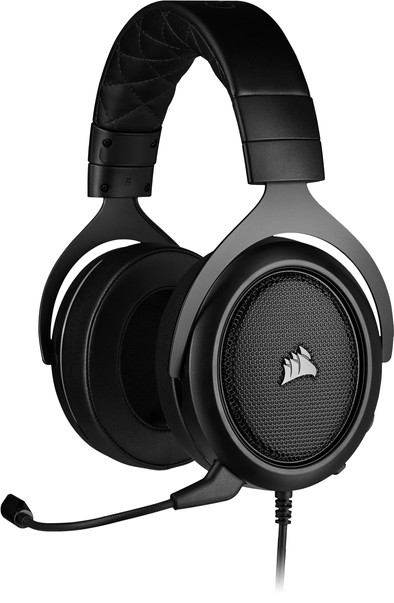
Corsair HS50 Pro Stereo Gaming Headset Carbon/Black
Never available again
View alternatives in the sidebar
View alternatives in the sidebar
According to our gaming headset expert
With the Corsair HS50 Pro Stereo Gaming Headset, you'll enjoy stereo sound with any gaming platform. Via a 3.5mm connector, you can connect the headset to all gaming platforms that support this. Use the microphone to communicate with your friends via Discord while gaming. It's a flexible microphone that bends into every direction. You can put the microphone close to your mouth so you'll hear your opponents loud and clear. If you don't want your opponents to hear you, simply turn off the microphone with the mute button. Use the use the volume wheel to turn up the in-game volume.
Connection type | Wired | |
|---|---|---|
Sound reproduction | Stereo | |
Microphone noise suppression |
5 stars
5
4 stars
6
3 stars
1
2 stars
0
1 star
0
If you can't choose, this one is highly recommended! I've been playing with it for a few days now and you can hear the people walking around you in the game. What is an advantage for shooting games online
Semmy Es
29 April 2020
Automatically translated from Dutch
Looks great but also has some things that are disappointing
Joelle De Winter
23 August 2020
Automatically translated from Dutch
Price-quality unbelievable in its kind. Sound quality to beat for gaming and work.
Jarno De Geeter
2 January 2021
Automatically translated from Dutch
Product number | 841200 | |
|---|---|---|
Manufacturer code | CA-9011215-EU | |
Brand | Corsair | |
Warranty | 2 years | |
Processing of your defect | Via Coolblue |
Compatible with Windows version | Windows 10, Windows 7, Windows 8 | |
|---|---|---|
Compatible with OS X version | Mac OS X 10.10 Yosemite, Mac OS X 10.11 El Capitan, Mac OS X 10.12 Sierra, Mac OS X 10.13 High Sierra, Mac OS X 10.14 Mojave, Mac OS X 10.7 Lion, Mac OS X 10.8 Mountain Lion, Mac OS X 10.9 Mavericks |
Sound reproduction | Stereo | |
|---|---|---|
Audio channels | 7.1 | |
Volume control speaker(s) | ||
Volume controls location | Ear cup |
Microphone noise suppression | ||
|---|---|---|
Microphone mute function | ||
How to mute | Via the button on the ear cup | |
Microphone volume control |
Connection type | Wired | |
|---|---|---|
USB port | ||
Headphone jack | ||
Braided cable | ||
Cable length | 1,8 m |
Lighting peripherals |
|---|
Adjustable sound settings | ||
|---|---|---|
Equalizer | ||
Including receiver/transmitter |
Build quality | Basic | |
|---|---|---|
Material | Plastic | |
Ear cups design | Closed design | |
Ear cushion material | Imitation leather | |
Filling ear cushions | Memory foam | |
Foldable | ||
Color | Black |