Trust GXT 970 Morfix Customizable Gaming Mouse
Never available again
View alternatives in the sidebar
View alternatives in the sidebar
According to our mouse expert
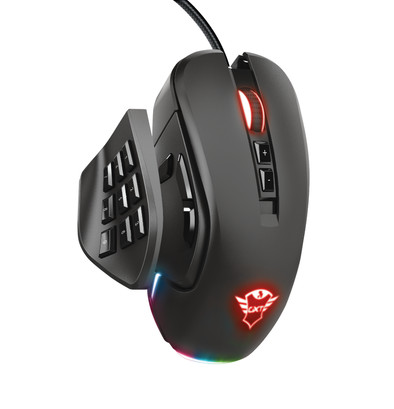
Change the side panels of the Trust GXT 970 Morfix Gaming Mouse and play every game type, whether its FPS, MOBA, or MMO. Use the panel with 3 thumb buttons to play shooters. This is handy if you're replacing your sniper with a fully automatic in Call of Duty and also want to keep the push-to-talk button on hand. Switching to League of Legends? With the 9 button panel, you'll have just enough buttons in an easily reachable configuration. You can also set up the RGB lighting on your mouse, so it matches the rest of your setup. That way, your gaming rig is a unified whole.
Connection type | Wired | |
Mouse model | Standard | |
Left or right-handed | Right-handed | |
Ergonomic design | ||
Suitable for gaming | ||
Bluetooth | ||
Silent mouse | ||
Depth | 12,6 cm |
5 stars
22
4 stars
11
3 stars
1
2 stars
0
1 star
1
Connection options
Ergonomics
Accuracy
Size
Design
There is no other mouse on the market with such a choice of interchangeable pieces included in the package at this price, and for me it fits perfectly in the hand and plays great too
Neal Vos
13 December 2020
Automatically translated from Dutch
I think this is a very nice mouse. Both in daily use and during gaming. It kind of flies over my desk while using it. The sidebars are also very nice. Unfortunately, the bright colors do get a bit boring at the end of the day when I want to go gaming and it's dark.
degamersz
29 November 2021
Automatically translated from Dutch
I've been able to test the Trust GXT 970 for a few days now and I'm surprised. It lies very comfortably in the hand, the possibility to adjust the sides has made this mouse even more versatile and can be adjusted according to your own wishes. I have mainly used the mouse for gaming. By using the extra software you can set the mouse completely to your own wishes. I've used the programmable keys to assign most of the hotkeys for a PC game. This was my first time working with programmable keys and it took some getting used to at first, but once you get used to it. then it gets easier
Jeroens Nieuwenhuizen
30 September 2021
Automatically translated from Dutch
Product number | 868686 | |
Manufacturer code | 23764 | |
Brand | Trust | |
Warranty | 2 years | |
Processing of your defect | Via Coolblue |
Mouse model | Standard | |
Input | Optical | |
Number of buttons | 14 | |
Ergonomic design | ||
Left or right-handed | Right-handed | |
Adjustable DPI | ||
Mouse controls | Buttons, Scroll wheel | |
Suitable for gaming | ||
Recommended for game genre | First Person Shooter, MOBA, RPG | |
Mouse grip technique | Claw, Fingertips, Palm | |
Mouse weights | ||
Programmable buttons | ||
Number of programmable buttons | 14 | |
Lighting peripherals | ||
Number of colors lighting | 16.8 million | |
Zone lighting | Front, Scroll wheel, Side(s) | |
Zones separately lit | ||
Silent mouse | ||
Horizontal scrolling | ||
Mouse surface | Matte surface |
Connection type | Wired | |
Type of USB port | Standard USB-A | |
Bluetooth | ||
Braided cable | ||
Cable length | 1 m |
Plug and Play | ||
Compatible with operating system | Windows |
Power supply type | USB port PC/laptop |
Color | Black | |
Width | 7,2 cm | |
Height | 4,2 cm | |
Depth | 12,6 cm | |
Material | Plastic | |
Finish | Matte |