Rocketbook Flip Executive
Never available again
View alternatives in the sidebar
View alternatives in the sidebar
According to our drawing tablet expert
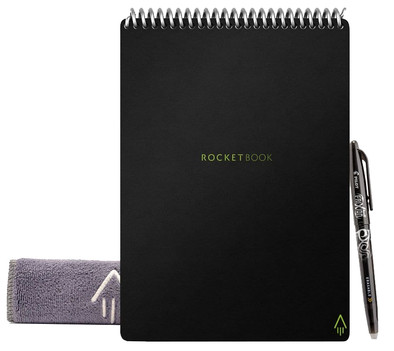
Digitize your drawings, notes, and designs with the Rocketbook Flip Executive. Thanks to the structure of the Executive, you don't lose the paper sense. You'll be able to take notes in the usual way with the included pen. To store your work as a digital PDF file, just scan the page via the Rocketbook app on your phone or tablet. Use the icons at the bottom of the page to indicate where you'd like to save the page to. Send your notes to your mailbox for example, or your Google Drive, photo gallery, or Dropbox. You can erase the ink from the page with the included microfiber cloth, so you can use the page for writing more text. That's why the Rocketbook Flip Executive will never run out of space for you to write on.
Dimensions: 22.6x15.24x1.27cm
Note: To digitize your notes, you'll need to install the Rocketbook app on your smartphone or tablet.
Compatible with operating system | Android, Windows, iOS, macOS | |
|---|---|---|
Multi-touch | ||
Connection type | Wireless | |
Width | 15,24 cm | |
Depth | 1,27 cm |
5 stars
4
4 stars
2
3 stars
0
2 stars
0
1 star
1
I first bought the A5 rocketbook, but I found it a bit less convenient in terms of size. Bought the bigger one now. Although it is A4 format according to the description, it is considerably smaller than an average lecture block. Writing and erasing works well, but you have to wait a while for the ink to dry otherwise you will get smudges. The system with the app works well and fast. Because you no longer see lines after scanning, you can also use it as drawing paper. Although the pens don't lend themselves very well to that. Highlighters from Pilot (frixion) don't work very well on paper, they do on plain paper. Would have preferred a few more pages (or slightly larger pages), but I'm fine with this.
Floor
9 December 2021
Automatically translated from Dutch
genius idea; an erasable notepad with an associated app to store your notes digitally. You just take your notes with the included Pilot Frixion ball pen (note: only use this type of pen!), then you take optimized photos of your notes with the app that (if you have set that up) automatically on your OneDrive or other cloud storage can be stored. Then moisten the supplied cloth and wipe the pages clean. Super handy and simple and in my opinion even works better than the (more expensive) digital notebooks. The review calls for 'screen quality', my rating is for the paper. The Rocketbook seems robust enough for daily use, but after two weeks it is not yet possible to say with 100% certainty whether the paper is still usable after a year, for example. The only drawbacks I've been able to discover after two weeks of use is that sometimes the ink still bleeds when flipped and you're stuck with the relatively expensive Pilot Frixion ball pens. In two weeks I've already written half the black pen, so I'm going to check out refill kits. Official accessories are relatively pricey anyway, but refills for the pens can be found for a reasonable price.
Kees Van Mansom
26 September 2022
Automatically translated from Dutch
With permanent marker you can make all kinds of templates, while the pen is erasable with a damp cloth.
Mitch
13 March 2023
Automatically translated from Dutch
Product number | 889215 | |
|---|---|---|
Manufacturer code | FLP-E-K-A | |
Brand | Rocketbook | |
Warranty | 2 years | |
Processing of your defect | Via Coolblue |
Drawing tablet has integrated screen | ||
|---|---|---|
Multi-touch | ||
Number of buttons | 0 | |
Programmable buttons | ||
Tilt sensitive | ||
Compatible with operating system | Android, Windows, iOS, macOS |
Connection type | Wireless |
|---|
Weight | 136 g | |
|---|---|---|
Width | 15,24 cm | |
Depth | 1,27 cm | |
Height | 22,6 cm |
Power source |
|---|