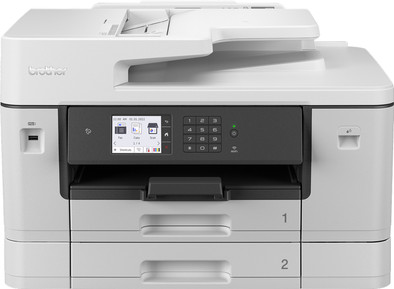
Brother MFCJ6940DW
Never available again
View alternatives in the sidebar
View alternatives in the sidebar
Print technology | Inkjet | |
|---|---|---|
Printer type | All-in-one | |
Type of ink | Cartridges | |
Automatic duplex printing | ||
Automatic document feeder (ADF) | ||
Automatic duplex scanning | ||
Color printer | ||
Maximum print size | A3 |
According to our printer expert
It's a 4-in-1 printer, so you can scan, copy and fax in addition to printing.
You can also scan and print your documents on A3 paper in addition to the standard A4 size.
Thanks to the automatic document feeder (ADF), the printer scans and copies a stack of paper in one go.
The printer is large and doesn't fit on your desk, so you have to place it on a separate table.
With the Brother MFCJ6940DW, you have a user-friendly 4-in-1 inkjet printer for a small or medium-sized office. You can print, copy, scan, and fax in A3 size. The printer has a print speed of 28 pages per minute in both black and white and color. So you don't have to wait long for your documents. You can fill the 2 paper trays with 500 sheets of paper in total. You can scan and copy up to 50 sheets in one go with the automatic document feeder. The printer automatically scans and copies on both sides as well, which saves paper. You can use the printer both wired and wirelessly. And you can easily control the printer on the 6.8-inch LCD screen or via the Brother Mobile Connect app.
5 stars
8
4 stars
12
3 stars
2
2 stars
1
1 star
0
Final conclusion: a fantastic printer! What do I like?
What could be improved in my opinion?
NvR
2 April 2024
Automatically translated from Dutch
Does what I bought the device for.
patrick
25 December 2023
Automatically translated from Dutch
We have a moderate print usage (job in education) and were looking for a good printer that could be used for both school and photos. Important points: A3 printing, double-sided scanning and speed. After hesitating between the Laser variant of Brother and this model, because of costs (1x set of laser toners replaced was more expensive than the printer) we decided to purchase this device. The quality of laser for text would probably have been better but we can't complain. Very fast device The setup for printing went automatically (on Mac & Windows) as well as scan to dropbox. After some help from openai I was also able to easily link the settings for the mail server with my Gmail smtp server.
Steven
9 September 2024
Automatically translated from Dutch
Product number | 907838 | |
|---|---|---|
Manufacturer code | MFCJ6940DWRE1 | |
Brand | Brother | |
Warranty | 2 years | |
Processing of your defect | Via Coolblue |
Printer size | Large | |
|---|---|---|
Width | 57,6 cm | |
Depth | 47,7 cm | |
Height | 37,5 cm | |
Color | Gray | |
Weight | 23,4 kg |
Printer type | All-in-one | |
|---|---|---|
Photo printer | ||
Print quality photos | Stand | |
Portable (mobile use) | ||
Recommended for use printers | Business printing |
Cartridge line | LC-422 | |
|---|---|---|
Usage costs for 1 page | 3 eurocents | |
Print technology | Inkjet | |
Type of ink | Cartridges | |
Number of cartridges/toner cartridges | 4 | |
Color printer | ||
Print speed black (ISO) | 28 ppm | |
Print speed color (ISO) | 28 ppm | |
First black page ready after | 4,4 seconds | |
Speed class | Very good | |
Maximum print resolution height | 1200 dpi | |
Maximum print resolution width | 4800 dpi | |
Maximum print size | A3 | |
Automatic duplex printing | ||
Borderless printing | ||
Maximum print size duplex printing | A3 |
Scan functionality | ||
|---|---|---|
Automatic duplex scanning | ||
Maximum optical scan resolution width | 2400 dpi | |
Maximum optical scan resolution height | 1200 dpi | |
Scanner type | Barcode scanner, Book scanner, Business card scanner, File scanner, Flatbed scanner, Graphic scanner, Mobile scanner, Photo scanner | |
Maximum scan size | A3 (29.7x42cm) | |
Automatic document feeder (ADF) | ||
Maximum paper size ADF | A4 | |
Scan sizes | A3, A4, A5, A6, A7 | |
Scan speed (PPM) | 25 ppm | |
Color depth output | 24 bpp | |
Scan to | Cloud, Dropbox, Email, Email address, Email server, Evernote, FTP, Folder, Google Docs, Image, MicroSD card, Network, PC (local), PC (network), PDF, PDF/A, SD card, USB | |
ADF capacity | 50 | |
OCR |
Copying functionality | ||
|---|---|---|
Copy speed black (ISO) | 25 ppm | |
Copy speed color (ISO) | 24 ppm | |
Maximum copy resolution height | 600 dpi | |
Maximum copy resolution width | 600 dpi |
Fax functionality | ||
|---|---|---|
Color fax |
Built-in screen | ||
|---|---|---|
Color screen | ||
Touchscreen |
Suitable for HP Instant Ink |
|---|
Compatible with operating system | Android, ChromeOS, Linux, Windows, iOS, macOS | |
|---|---|---|
Connection type | Wired, Wireless | |
Apple AirPrint | ||
Email print | ||
WPS (Wireless Protected Setup) | ||
Female standard USB-A port version | 2.0 | |
Ethernet port | ||
NFC | ||
Built-in WiFi | ||
WiFi frequency printers | 2.4GHz, 5GHz | |
Bluetooth | ||
WiFi direct | ||
USB port |
Manual input tray | ||
|---|---|---|
Photo paper drawer | ||
Output capacity output drawer | 100 | |
Maximum print size standard paper tray | A3 | |
Input capacity standard paper tray | 500 | |
Number of standard paper trays | 2 |
Memory card reader |
|---|
Receive more coverage in case of damage than with your standard warranty. Coolblue takes care of everything: from taking out the insurance to repairs. Is a repair not possible? You receive the purchase price as CoolblueCredit.
XCover is allowed to arrange and process insurances on behalf of the insurer. The insurances are governed by Belgium law. If you have a complaint, you can contact the or our customer service.
First, add your printer to your shopping cart. On the next page, choose the Protection Plan below. You always have a 30-day return window and pay no deductible in case of damage.
The insurance can be canceled every year, even if you have paid in advance. If you cancel earlier, you will receive a refund for the overpaid amount.