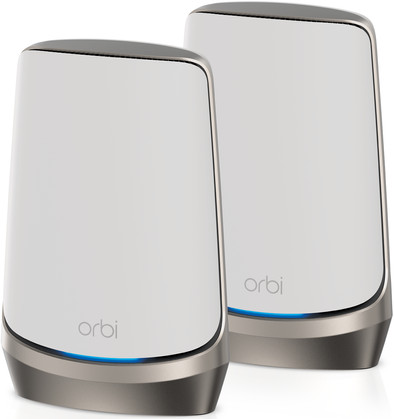
NETGEAR Orbi RBKE962
Never available again
View alternatives in the sidebar
View alternatives in the sidebar
Fastest WiFi standard | Wireless AXE (WiFi 6E) | |
|---|---|---|
Ethernet speed | 10Gb Ethernet (10,000Mbps) | |
Frequency bands | Tri-band | |
WiFi speed | AX11000 | |
Number of Ethernet ports | 5 | |
Type router | Mesh WiFi system | |
Number of stations | 2 | |
Living situation | Large apartment, Small apartment |
According to our router expert
Thanks to the 6GHz band, you can go online even faster an extra stably close to the router.
There's no delay between the stations thanks to the extra backhaul frequency.
Orbi RBK962 routers work with the fastest data plans thanks to the 10GB WAN port.
Not all devices work with the 6GHz frequency.
The 6GHz frequency of WiFi 6E routers have a smaller range than that of WiFi 7 routers.
5 stars
4
4 stars
5
3 stars
2
2 stars
0
1 star
0
Range
Installation ease
Stability
Speed
Design
After a lot of Googling and two attempts I had the orbi netgear working over 1 router and 5 satellites . It's a pity that setting in the AP (access point) mode is not in the abbreviated manual, while this is usually the only option behind your router modem from your provider. You want the modem of your provider to distribute the IP addresses . In a stable network it is desirable that 1 device or server does this. I think that the AP mode is the most used mode. How to put the orbi router in AP mode 1 . Connect a computer to the orbi router and launch a web browser. 2. Go to the following configuration page : http:// orbilogin.com 3. You will be prompted to enter a username and password. Username : admin Password: password
If the default credentials don't work, you probably changed the administrator password yourself. 4. Select Advanced > Advanced Setup > Router/AP Mode. 5. Select AP mode 6. Click Apply.
Hope this review helps someone.
Matthijs
6 June 2022
Automatically translated from Dutch
What a relief this NETGEAR Orbi Quad-band WiFi 6E mesh system. Super stable and fast WiFi in and around the house, even with WiFi 5 and 6. Logically you also need a fast internet connection.
Lars Bongers
8 May 2022
Automatically translated from Dutch
The installation was a drama. Spent two days with the last FOUR hours on the phone with the NetGear technician to get it up and running. After a first software update after switching on, I got another software update on day 2 that was not installed properly and not on the satellites.
Emile wolff
26 January 2023
Automatically translated from Dutch
Product number | 931855 | |
|---|---|---|
Manufacturer code | RBKE962-100EUS | |
Brand | Netgear | |
Warranty | 2 years | |
Processing of your defect | Via Coolblue |
Type router | Mesh WiFi system | |
|---|---|---|
WiFi speed class | High-end | |
Usage situation | Gaming and downloading, Work from home | |
Living situation | Large apartment, Small apartment | |
Number of stations | 2 | |
Can be expanded with extra stations | ||
Built-in modem |
Fastest WiFi standard | Wireless AXE (WiFi 6E) | |
|---|---|---|
Frequency bands | Tri-band | |
WiFi speed | AX11000 | |
2.4GHz band speed | 1200 Mbit/s | |
5GHz band speed | 4800 Mbit/s | |
Speed of second 5GHz band | 2400 Mbit/s | |
Speed of 6Ghz band | 4800 Mbit/s | |
Number of WiFi antennas | 12 | |
Jumbo frame support |
Ethernet speed | 10Gb Ethernet (10,000Mbps) | |
|---|---|---|
Network connector | ||
Number of Ethernet ports | 5 | |
SFP/GBIC ports | 0 | |
PoE support | ||
USB port |
SIM card slot |
|---|
Quality of Service (QoS) | ||
|---|---|---|
MU-MIMMO | ||
Seamless roaming | ||
Beamforming | ||
Port forwarding | ||
LACP Link aggregation |
Parental controls | ||
|---|---|---|
WLAN security | WEP, WPA, WPA-PSK, WPA2, WPA2-PSK | |
Firewall | ||
Firewall type | DoS, NAT Firewall, SPI Firewall | |
Guest network | ||
VPN support | ||
VPN server | ||
VPN client | ||
VPN passthrough |
Mounting possible | ||
|---|---|---|
Width | 19,1 cm | |
Height | 25,4 cm | |
Depth | 8,4 cm | |
Weight | 1,36 kg | |
Color | White | |
Material | Plastic |
Power supply type | Power grid |
|---|
Receive more coverage in case of damage than with your standard warranty. Coolblue takes care of everything: from taking out the insurance to repairs. Is a repair not possible? You receive the purchase price as CoolblueCredit.
XCover is allowed to arrange and process insurances on behalf of the insurer. The insurances are governed by Belgium law. If you have a complaint, you can contact the or our customer service.
First, add your router to your shopping cart. On the next page, choose the Protection Plan below. You always have a 30-day return window and pay no deductible in case of damage.
The insurance can be canceled every year, even if you have paid in advance. If you cancel earlier, you will receive a refund for the overpaid amount.