AnkerMake M5C
Never available again
View alternatives in the sidebar
AnkerMake M5C:
No extra filament
Included by default
View alternatives in the sidebar
AnkerMake M5C:
No extra filament
Included by default
According to our 3D printer expert
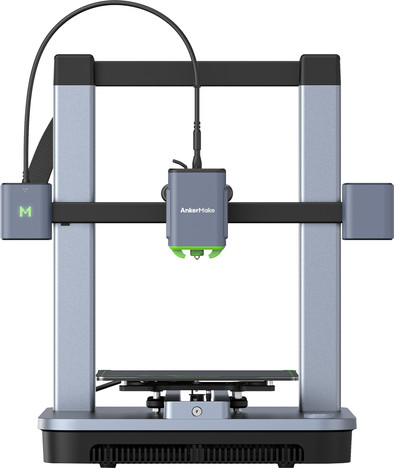
Print up to 500mm/s with the AnkerMake M5C, which is up to 5 times faster than comparable 3D printers. Thanks to the maximum printing temperature of 300°C, you can process PLS, ABS, TPU, and PETG as well as PA and wood filament. The AnkerMake M5C has pre-built parts that you can easily put together. The 3D printer also automatically adjusts the print bed with 7x7 automatic bed leveling. That makes the printer suitable for beginners. The M5 has a build volume of 220x220x250mm, so you can make medium-sized designs. You can control the 3D printer with the AnkerMake app and button on the 3D printer. In the app, you can decide which functions you control with the button.
Note: this 3D printer doesn't contain filament. Want to get started right away? Purchase a roll of filament.
Supporting types of filament | ABS, Flexible, PLA | |
|---|---|---|
Number of printheads (extruders) | 1 | |
Layer height (resolution) | 50 - 400 mm | |
Heated print bed |
5 stars
2
4 stars
2
3 stars
0
2 stars
0
1 star
0
With the AnkerMake M5C I have a super-fast and user-friendly 3D printer that I can easily assemble. I miss an AI camera with which I can monitor my 3D printer from a distance.
Easy to assemble The box of the AnkerMake M5C contains the 3D printer, a tool box, installation manual and extra 0.2 millimeter nozzle. I assemble the printer with ease. The 3D printer comes in 2 pre-assembled modules, which I only screw together. The 3D printer is assembled within 20 minutes and I have loaded the filament.
Nice to use The 3D printer does not have an LCD screen, so I control it from my laptop and smartphone. There is a button on the 3D printer where I set shortcuts. I find it more convenient to use the app and control the printer via a WiFi connection. The AnkerMake M5C automatically adjusts the print bed, which takes about 10 minutes. Because I don't do this manually, I save time and prevent errors in the adjustment of the print bed.
Suitable for beginners AnkerMake has its own slicer in the app, so you don't need any other slicers. The slicer has an 'easy' and 'expert' mode, making it easy to use even as a beginner. The app automatically turns your design into an AI image, but the AnkerMake M5C does not have an AI camera. I cannot monitor my print remotely via my phone or computer. This is possible with the AnkerMake M5. I do receive a notification via the app if, for example, the filament has run out, something goes wrong during printing or when the 3D printer is ready.
Fast printing in fast mode The mobile app contains a number of prints that have already been sliced. For these designs, just click on 'Print'. With the 3DBenchy design I test the accuracy of the 3D printer in fast mode. The print is ready within 20 minutes. Even with the high speed I get a good design with neat layers. I don't have much trouble with stringing, the thin wires that sometimes get stuck on your print. After making several prints, I was sold on fast fashion. This is especially useful for designs with less detail. For designs with more details I use the normal speed, which is also quite high at 250 millimeters per second.
Accurate and many options The extruder supports printing up to 300 degrees Celsius, allowing me to process many different types of filament, including wood filament and PA. This gives me many options. With the 0.2 millimeter nozzle I make prints with a layer thickness of 0.1 millimeters in Precision Mode. This allows me to print my designs with the most detail.
Kayleigh. 3D printer specialist.
23 October 2023
Automatically translated from Dutch
Satisfied with the product, does what it is supposed to do.
Yves
2 January 2024
Automatically translated from Dutch
A huge compliment to the staff and service at Coolblue (Leeuwarden branch). A few weeks after purchase, my daughter's 3D printer no longer wanted to print. Took the printer to the store (where they still knew we had picked up the printer), explained the problem. We were told that, despite the printer being sent back to the manufacturer for investigation/repair, we would receive a completely new printer at home free of charge.
Lootsma
28 September 2024
Automatically translated from Dutch
Product number | 935868 | |
|---|---|---|
Manufacturer code | V81103C5 | |
Brand | Anker | |
Warranty | 2 years | |
Processing of your defect | Via Coolblue |
Depth | 37,4 cm |
|---|---|
Material | Metal |
Height | 48 cm |
Width | 46,6 cm |
Type of assembly (3D printers) | Do it yourself | |
|---|---|---|
Number of printheads (extruders) | 1 | |
Maximum construction width | 220 mm | |
Maximum print height | 250 mm | |
Maximum print length | 220 mm | |
Maximum print volume | 12,1 l | |
Positioning accuracy X axis | 0,02 mm | |
Positioning accuracy Y axis | 0,02 mm | |
Positioning accuracy Z axis | 0,02 mm | |
Layer height (resolution) | 50 - 400 mm | |
Optional mouthpiece available | ||
Heated print bed | ||
Supporting types of filament | ABS, Flexible, PLA | |
Memory card reader | ||
Printing without PC/laptop | ||
Built-in screen | ||
Pre-assembled | ||
USB port | ||
Bluetooth | ||
NFC | ||
Built-in WiFi |