Written by Stan
Edited on
29 December 2023
·
15:58
Adjust Bose QuietComfort 35 II noise canceling
With the Bose QuietComfort 35 II, it's possible to adjust the noise canceling. This allows you to determine how much ambient noise is muted. In this article, we explain how to do this.

Adjusting noise canceling in 5 steps
In this article, we explain how to adjust the noise canceling of the Bose QuietComfort 35 II in 5 steps.
Step 1: Link headphones
Step 2: Download the app
Step 3: Open the app
Step 4: Open the noise canceling menu
Step 5: Adjust noise canceling

Step 1: connect your Bose QuietComfort 35 to your device
Connect the Bose QuietComfort 35 via Bluetooth to the device with which you are going to play music. Make sure that both devices are at least 60% charged so that nothing can go wrong during the installation of the app.
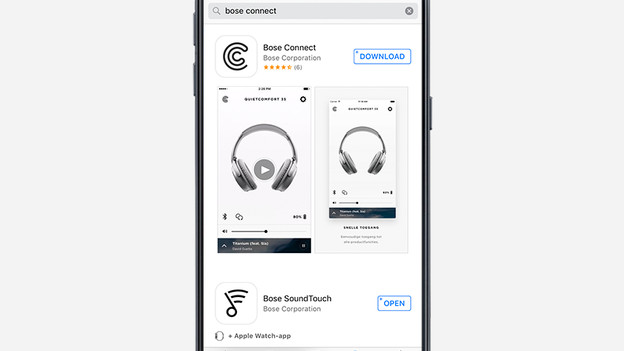
Step 2: download the app
In the main menu of your smartphone or tablet, look for the Google Play store or App store. In the app store, look for the Bose Connect app.
Tip: Click the App Store image if you have an iPhone and click the Google Play Store image when your device is running Android.
Have you already downloaded the app? Then make sure that you update in the Bose Connect app. When the app is opened, a notification is automatically displayed whether a new update is available. Perform this update by pressing it. The new functions only work above update version 4.2 or higher.
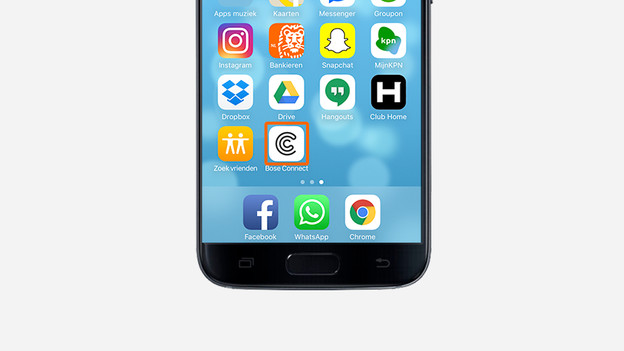
Step 3: open the app
If your smartphone or tablet is connected to your headphones, open the Bose Connect app. The app automatically recognizes your device. Is your headphones not visible in the app? Then follow the next steps: \ n \ n * 1. Switch your headphones off and then on again. \ N * 2. Make sure your smartphone or tablet is within 9 meters of your headphones. \ N * 3. Close the Bose Connect app on other devices.
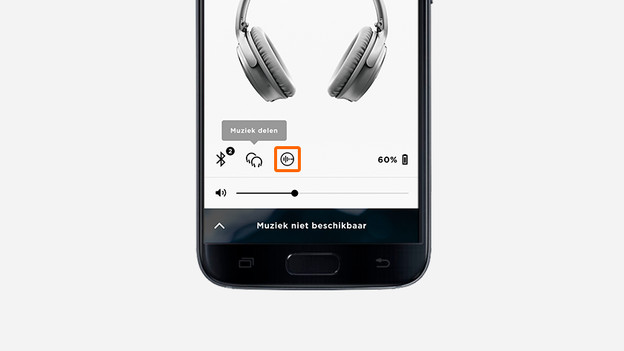
Step 4: open the noise canceling menu
Press on your device on the circled icon with dashes, which can be seen at the bottom left of the app. The noise canceling setting screen will now open.
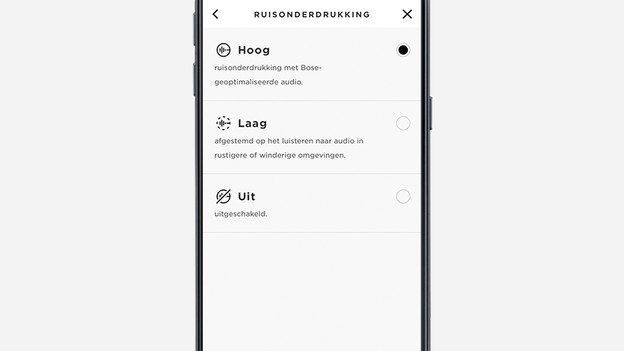
Step 5: adjust the noise canceling to your liking
The noise canceling consists of 3 different modes: high, low and off. By default, the setting is high. Select the desired noise canceling mode. If the noise canceling is switched off, the Bluetooth connection remains on. This was not possible before the update.