Written by Steven
Edited on
29 June 2023
·
14:15
How do you see which RAM fits in your Apple Mac?
The time has come: you're going to replace the RAM of your Apple MacBook or iMac. If you know what to look for, there's still another important part: figuring out which type of RAM fits in your Mac. Here we'll explain how to look this up in Mac OS.

View which type of Mac you have
If you want to find out what type of RAM your laptop supports, open About this Mac. This is fairly easy:
- Click the Apple logo at the top left of the screen.
- Click About this Mac.
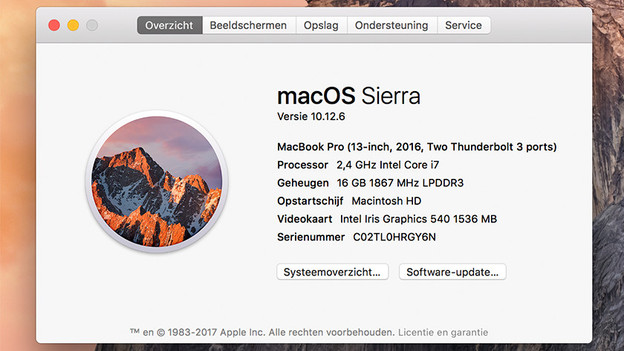
In the Overview tab, you can see which MacBook or iMac model you have. This is indicated by the year, often with 'Early', 'Mid', or 'Late' before it.
Note: With MacBooks from late 2012 and later, it's not possible to expand the RAM. It's soldered onto the motherboard.
View the RAM of your Mac
In the same tab, Overview, behind Memory you'll see what you should consider when purchasing RAM:
- The first number, followed by 'GB', stands for the present RAM.
- The number after the number of GB (1867MHz on the image) indicates the speed of the RAM.
- Then comes the DDR type, which in some cases has the letters 'LP' in front of it.

The maximum RAM in your Mac
Every MacBook or iMac supports a maximum RAM, usually distributed across 2 memory slots. However, this maximum memory isn't always in your Mac by default. For example, a Mac with a default 8GB of RAM can also have space for, for example, 16GB. To find out how much RAM your MacBook or iMac supports, look up the serial number on the internet. You can find this in the About this Mac window.
If you want to use the full RAM, then replace the entire memory for a new RAM module with a higher capacity. Another option is to install an extra RAM module of the same type if an extra slot is present.