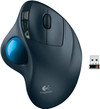
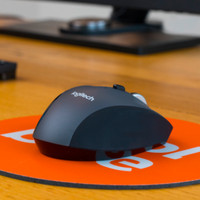
Logitech Wireless Trackball M570

Never available again
View alternatives in the sidebar
View alternatives in the sidebar
Connection type | Wireless | |
|---|---|---|
Bluetooth | ||
Mouse model | Standard | |
Ergonomic design | ||
Left or right-handed | Right-handed | |
Suitable for gaming | ||
Silent mouse | ||
Depth | 14,5 cm |
According to our mouse expert
The right-handed among us are lucky to have the Logitech Wireless Trackball M570. This trackball enables you to work in optimal comfort for hours at a time. Its ergonomic shape and stable base contribute to a healthy work posture and support the user's right hand. A trackball can be particularly useful when you have limited desk space or work on a moving surface. In the case of this Trackball, you move the cursor by turning the blue ball, so the device itself stays in the same spot. The USB receiver is so small that it barely sticks out from the USB port. In other words, you won't have to worry about damaging or losing it.
5 stars
138
4 stars
44
3 stars
3
2 stars
0
1 star
0
I am selling this trackball professionally. And the customers who trust me always have the same reaction: "expensive for "a mouse"". And for the first three days, they curse me for always trying to slide the M570 across the desk surface.
But afterwards they wish tar and feathers to the inventor of the classic computer mouse...and they don't want anything else.
This trackball is the alternative to a mouse for EVERYONE who A) sometimes use the laptop in the sofa or bed B) has little space on his desk C) want absolute precision from a mouse (in eg games) D) configurable keys on his trackball.
A plus is the Unifying receiver so that multiple Logitech input devices can be connected
Only downside I think is that wireless is not always a must. I would like to see this product again with wire, so I have 7 of these at home on my devices, but they are no longer for sale.
Jeroen Devroede
1 July 2013
Automatically translated from Dutch
Once you get used to it, this trackball is very easy to use. No more mouse for me. Shame about the quality of the buttons. This is for both the wired and wireless version. After a while these work poorly. You notice this especially when you want to select something. Hopefully they do something about this because this isn't just with me.
Erwin
25 October 2015
Automatically translated from Dutch
The perfect combination of mouse and trackball, very ergonomic design, no more painful wrist/arm. You can work with it very precisely, both on the Internet and in other programs, even graphics programs. Tested for several hours daily and encountered no problems. In the beginning it takes some getting used to to operate the trackball and scroller in combination, but once you get used to it, fantastic! the two back and forward buttons are also super handy when browsing the internet, making this just a little bit smoother. A purchase with not the slightest bit of regret! super!
Neels
1 March 2011
Automatically translated from Dutch
Product number | 119039 | |
|---|---|---|
Manufacturer code | 910-001882 | |
Brand | Logitech | |
Warranty | 3 years | |
Processing of your defect | Via Coolblue |
Mouse model | Standard | |
|---|---|---|
Input | Trackball | |
Number of buttons | 4 | |
Ergonomic design | ||
Left or right-handed | Right-handed | |
Adjustable DPI | ||
Mouse controls | Buttons, Trackball | |
Suitable for gaming | ||
Programmable buttons | ||
Number of programmable buttons | 2 | |
Lighting peripherals | ||
Silent mouse | ||
Mouse surface | Any surface |
Connection type | Wireless | |
|---|---|---|
Nano receiver | ||
Frequency bands | 2.4GHz | |
Bluetooth |
Plug and Play | ||
|---|---|---|
Compatible with operating system | Windows |
Power supply type | Rechargeable battery | |
|---|---|---|
Rechargeable battery | ||
Battery level indicator |
Color | Black | |
|---|---|---|
Mouse size | Large | |
Width | 4,5 cm | |
Height | 9,5 cm | |
Depth | 14,5 cm | |
Material | Plastic | |
Finish | Matte and glossy |
How large is a mouse exactly? It's often difficult to see on a photo. That's why we thought of the thumb rule below.
Choose a mouse that takes up more than half of the surface of the dimensions of your hand. You can find the dimensions of the mouse under the specifications.
Your hands are often 2 times longer from your wrist to the tip of your middle finger than that it's wide from your little finger to the knuckle of your thumb. The closer the length and width a mouse come to 60% of the length and width of your hands, the more likely it is that the mouse feels comfortable in your hand.

Receive more coverage in case of damage than with your standard warranty. Coolblue takes care of everything: from taking out the insurance to repairs. Is a repair not possible? You receive the purchase price as CoolblueCredit.
XCover is allowed to arrange and process insurances on behalf of the insurer. The insurances are governed by Belgium law. If you have a complaint, you can contact the or our customer service.
First, add your mouse to your shopping cart. On the next page, choose the Protection Plan below. You always have a 30-day return window and pay no deductible in case of damage.
The insurance can be canceled every year, even if you have paid in advance. If you cancel earlier, you will receive a refund for the overpaid amount.