Canon DR-M140
Never available again
View alternatives in the sidebar
View alternatives in the sidebar
According to our scanner expert
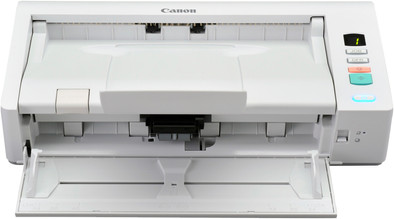
With the Canon DR-M140 document scanner, you can scan up to 6,000 pages per day. This means it's suitable for large (government) offices. The compact scanner is about the size of a shoe box, so it'll easily fit on your desk or on the window sill. In addition to the normal scan mode, which sees the paper take a U-turn and emerge from the scanner at the same side, you can also use the straight paper path for thick paper or cards, which will see them emerge from the back of the scanner. With the 50-page automatic document feeder, you can scan stacks of contracts, minutes, or invoices without having to insert all sheets separately. You can insert documents of different weights and sizes and the scanner will easily digitize them separately.
Scanner type | File scanner | |
|---|---|---|
Scan sizes | A4 | |
Automatic document feeder (ADF) | ||
Automatic duplex scanning |
5 stars
9
4 stars
1
3 stars
0
2 stars
0
1 star
0
I was looking for a double-sided, compact scanner with which I could digitize my paper administration. My main criterion was a smooth automatic document feed. I first tried the Canon P-215. However, it regularly picked up double leaves and I sent it back. The replacement Canon P-215 did better, but not well enough. I then tried a Fujitsu ScanSnap S1300i, but it kept getting stuck. If a leaf had anything like a fold or wrinkle, it would block.
I decided to go a little more expensive and try the HP ScanJet Prof 3000. Normally I have good experiences with HP, but unfortunately not this time. Like the ScanSnap, it frequently blocked. The replacement model had the same problem. I started to get despondent: Would it be possible at all to find a scanner that can do what I want: automatically feed sheets without any problems.
On the advice of customer service, I then tried the Kodak ScanMate i1120. Voila, she did it. I was relieved that it was indeed possible to find a scanner that does what it promises. At the same time, I was frustrated with Kodak's software. I couldn't quite figure out how the program worked, while with the Canon software, capture on touch, it is clear in 1 second how it works. I couldn't figure out how if the paper was jammed I could continue with the stack so I don't have to start from scratch. It had become clear to me in the meantime that Canon's software is superior in terms of ease of use: easy to understand and easy to erase failed pages and move on.
I then decided to try the Canon DR-M140. At first, the picture of the DR-M140 did not appeal to me. It seemed inconvenient to feed the blades from below and I thought the device looked a bit old-fashioned. However, I am very satisfied and happy with it. The document input is smooth 98% of the time, even better than with the Kodak. Feeding in flat paper from below is very convenient for me. And if once a leaf goes through it crookedly, I can easily remove that leaf with software, put it back in the scanner and continue. I'm excited. The Canon DR-M140 was more expensive than what I initially wanted to spend, but I think the extra cost is well worth it. A large part of my administration has now been scanned.
I have great appreciation for Coolblue's service. Without a murmur, each scanner was exchanged or replaced with a different make and model. And all within 1 or a few days. So I was able to find a scanner that completely meets my needs. Wow!
H. Stappers
31 December 2012
Automatically translated from Dutch
After a user experience with the Brother ADS2600W and the Fujitsu ScanSnap i500, the Canon DR-M140 beats the aforementioned competitors by far. Even if you factor in the price difference, the Canon DR-M140 still has relatively more quality. Although no WiFi, a WiFi connection could only be made with the Brother ADS2600W, the Fujitsu ScanSnap i500 let us down because it only makes a WiFi connection with mobile applications such as a smartphone and tablet. The automatic paper rotation or reading on horizontal lines is fantastic. No document is read incorrectly. The aforementioned Brother and Fujitsu let her fall sharply. Also entering all kinds of documents, thin, thick, wrinkled or whatever is no problem. Here the Brother ADS2600W was the lesser.
In short: if you want to invest a little more, this is an absolute must. Besides, the investment comes back in the longer lifespan.
Henk
5 January 2014
Automatically translated from Dutch
A decent scanner. Every scanned document is automatically scanned straight. (even if you enter everything mixed up, upside down,...). Bank statements and outside formats are automatically scanned correctly.
The only drawback is that the software does not allow you to split large scanned bundles at once at will (for example, create a new document after every even page).
Even wafer-thin papers are scanned perfectly and quickly
Perfect for the home office!
Ilse
3 February 2015
Automatically translated from Dutch
Product number | 162870 | |
|---|---|---|
Manufacturer code | 5482B003 | |
Brand | Canon | |
Warranty | 2 years | |
Processing of your defect | Via Coolblue |
Maximum optical scan resolution height | 600 dpi | |
|---|---|---|
Maximum optical scan resolution width | 600 dpi | |
Scan speed (PPM) | 40 ppm | |
Automatic duplex scanning | ||
Maximum paper weight ADF | 80 g/m2 | |
Maximum paper size ADF | A4 | |
ADF capacity | 50 | |
Color scanner | ||
Color depth output | 24 bpp | |
Automatic document feeder (ADF) | ||
Maximum scan size | A4 (21x29.7cm) | |
Gray tones output | 8 bpp | |
Scan to | Image, OCR, PC (local) | |
Scan without PC/laptop | ||
Scanner type | File scanner |
OCR | ||
|---|---|---|
Scan drivers | ISIS, TWAIN | |
Double input detection | ||
Portable (mobile use) | ||
Skew correction | ||
Skip blank page | ||
Digital photo optimization |
Network connector | ||
|---|---|---|
Wired connector type | Port (in device) | |
Port type | Power connector, USB | |
Total number of ports | 2 | |
Type of USB port | Standard USB-B (2.0 form) | |
Number of USB ports | 1 | |
Gender standard USB-B (2.0 form) port | Female | |
Female standard USB-B (2.0 form) port version | 2.0 | |
Number of female standard USB-B (2.0 form) ports | 1 |
Built-in WiFi | ||
|---|---|---|
Bluetooth |
Built-in screen | ||
|---|---|---|
USB port | ||
Width | 31,3 cm | |
Depth | 18,1 cm | |
Height | 9,3 cm | |
Number of USB ports | 1 | |
Compatible with operating system | Windows | |
Color | White | |
Weight | 2,6 kg | |
USB version | USB 2.0 |