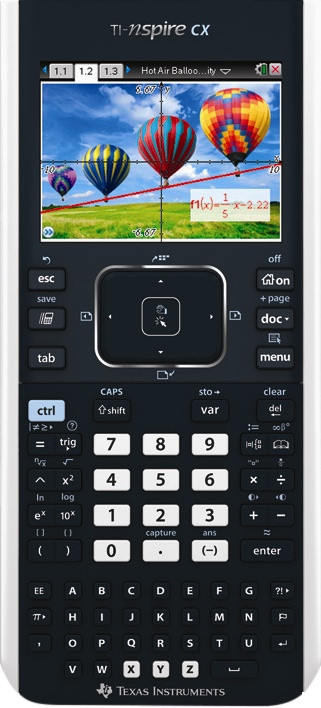
Texas Instruments TI-Nspire CX
Never available again
View alternatives in the sidebar
View alternatives in the sidebar
Type of calculator | Graphic | |
|---|---|---|
Allowed during exam | ||
Solar cell | ||
Graphic display | ||
Number of screen lines | 5 |
According to our calculator expert
The Texas Instruments Nspire CX is designed to guide students and teachers in doing and understanding research in physics and mathematics. The calculator has a higher version of the operating system than the minimum required OS 4.4.0.532 and therefore fully meets the requirements for the central exam. Thanks to the advanced functions and graphically very detailed screen, complicated operations can be displayed visually, making them easier to understand. This graphing calculator is therefore a very useful aid in mathematics and physics lessons. For example, you solve complex issues from algebra, geometry, trigonometry and calculus quickly and with great ease. The use of the Texas Instruments Nspire is, despite its impressive capabilities, simple by the simple menu and the use of folders to store files. All in all, this Texas Instruments model is a very complete and user-friendly graphing calculator for science.
5 stars
25
4 stars
18
3 stars
0
2 stars
0
1 star
1
I used to work with a TI 84 plus. When I had to buy a new one, I quickly noticed that the price difference with a TI Nspire CX was not very big and therefore chose this calculator. Because the TI 84 plus is still used by many, I will regularly point out the differences and similarities between the two calculators.
The TI Nspire CX always works in documents. This way you always create a document with different tabs: a spreadsheet, a graph, tables, notes, … This has the advantage that switching between different parts can go very quickly. You can also always save your various documents so that you can retrieve your graph and calculations a month later without any problems. You also have a notepad. You can always open this next to your (main) document. You can then quickly calculate something or draw a graph.
The spreadsheet
The spreadsheet is where you do all your calculations. The TI Nspire CX has more keyboard shortcuts than the TI 84 plus. For example, matrices can be made much faster, fractions easier to write, but the absolute value sign, summation sign, derivative sign, Â… are also much more accessible. Self-written programs are unfortunately very cumbersome. Fortunately, there is a built-in function to find the zeros of polynomial functions, where the TI 84 plus required an additional program. The fact that the calculator is completely in Dutch means that you quickly understand where all the functions are. The spreadsheet of the TI Nspire CX is, in my opinion, better than that of the TI 84 plus in every way.
Graphs
The biggest advantage of the graphs is that they are in color. Very useful if you want to get 2 or more graphs on your screen at the same time. With the TI 84 plus that would sometimes become unclear with all those thick, thin and dotted lines. Also drawing the graph itself happens a lot faster than with the TI 84 plus. The biggest disadvantage of the graphs is that the function table is always crammed next to the graph and is not accessible with 1 push of a button. Alternatively, I usually go to my spreadsheet, select the function there and enter a value. This is often much faster thanks to the keyboard shortcuts and working with the tabs.
Notes
With the TI 84 plus, taking notes was only possible with an extra program. This is built in by default in TI Nspire CX. Taking notes is also faster thanks to the separate keyboard at the bottom of the calculator. What is very unfortunate is that these keys are simply in alphabetical order and not in azerty or qwerty.
Technical
The TI Nspire CX has a rechargeable battery. The battery lasts about a month. That's relatively short compared to the TI 84 plus where I only had to replace the batteries every 2 years. You can charge the calculator via the computer, but this takes a very long time (+5 hours). You can also choose to order a separate cable so that you can charge the calculator via a wall socket. The advantage of the rechargeable battery is that you can always predict when your battery will be empty. So you will never be surprised! The color screen of the TI Nspire CX has a high resolution and this works very pleasantly.
What to look for when purchasing?
Compared to the TI 84 plus, the TI Nspire CX has almost no extra functions. Only the ease of use is much higher. If you are allowed to work with a TI 84 plus in your school, you are probably also allowed to work with a TI Nspire CX. Also be careful not to buy a TI Nspire CX CAS by mistake. This calculator includes the same functions, but can also work with unknowns (eg derivative of polynomial function, matrix with unknowns). This is usually not allowed on exams! As soon as you have purchased the calculator, I definitely recommend reading this manual: http://www.t3vlaanderen.be/fileadmin/media/cahiers/Basisreken_van_de_TI-84_met_de_TI-Nspire__cahier34_.pdf
Conclusion
The TI Nspire CX is well worth its small extra cost. In addition, you can get away with all the functions very quickly. The advantages of this calculator outweigh the disadvantages.
Matthias Franck
1 January 2014
Automatically translated from Dutch
An hp fanatic since 1976 and yet the trial version of the nspire cx made me fall in love with the ti-nspire. Professionally I have to do quite a lot of calculations on alternating current circuits, both graphically and numerically. I've never had it for a graphing calculator either, it was always a search for the right key. The ease of use of the new Ti is a revelation. As a newbie you can easily get along with this machine in a relatively short time. You can enter equations as if you were typing them on the PC, very quickly and naturally. To draw a function, first and second derivatives are executed in three clicks. The rolldown menus make this possible. The screen excellent quality, even with a lot of light. For me this is a must. Ti convinced me after 36 years.
30 December 2012
Automatically translated from Dutch
It's a great device! There is a kind of small convertible version in it, you can also just draw figures with it. I find that really useful. You can use tabs and always switch. A scratch calculator is of course also super handy. The colors that make the image of the screen better. Also very handy is that the letters are separate, so if you want to put notes in it, it all goes much faster. The mouse that you can operate with infrared is also nice to operate. Really good device!
Maxime Mertens
2 May 2013
Automatically translated from Dutch
Product number | 167363 | |
|---|---|---|
Manufacturer code | 5808800 | |
Brand | Texas Instruments | |
Warranty | 3 years | |
Processing of your defect | Carry-in warranty |
Height | 1,6 cm | |
|---|---|---|
Depth | 19,69 cm | |
Width | 8,59 cm | |
Weight | 0,21 kg | |
Color | Black | |
Material | Plastic |
Power source | ||
|---|---|---|
Batteries included | ||
Type of battery | Specific battery | |
Power supply type | Rechargeable battery | |
USB port |
Type of calculator | Graphic | |
|---|---|---|
Color screen | ||
Backlit screen | ||
Allowed during exam | ||
Allowed during CFA exam | ||
Graphic display | ||
Number of screen lines | 5 | |
Receipt printer | ||
VAT converter | ||
Currency converter | ||
PC connection | ||
Solar cell | ||
Automatic shut-off | ||
Including exam mode |