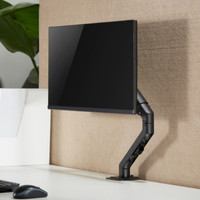
Neomounts by Newstar FPMA-D935D Monitor Arm Silver
Never available again
View alternatives in the sidebar
View alternatives in the sidebar
Product number | 333273 | |
|---|---|---|
Manufacturer code | FPMA-D935D | |
Brand | Neomounts | |
Warranty | 5 years | |
Processing of your defect | Via Coolblue |
Color | Silver | |
|---|---|---|
Weight | 6 kg | |
Material | Aluminum |
Mounting surface | Desk | |
|---|---|---|
Cable management | ||
Mount flexibility | Swivels and tilts | |
Rotates | ||
Adjustable in depth | ||
Maximum weight | 12 kg | |
Adjustable height in centimeters | 0 - 50 cm | |
Minimum screen size | 10 inches | |
Maximum screen size | 27 inches | |
Adjustable in height | ||
VESA mount | 100x100mm, 75x75mm | |
Distance to the wall | 12 - 50 cm | |
Tilts | 180 ° | |
Swivel | 360 ° | |
Number of clamping arms | 2 | |
Ergonomic design | ||
--- NL | No | |
--- BE | No |
Maximum screen size | 27 inches | |
|---|---|---|
Maximum weight | 12 kg | |
Mounting surface | Desk | |
VESA mount | 100x100mm, 75x75mm | |
Cable management | ||
Gas spring |
According to our monitor arm expert
Suitable for almost any desk, thanks to the thumb screw.
Adjust the mount to your ideal posture.
No mess thanks to the cable management system.
This monitor doesn't have a screen-side tilt point.
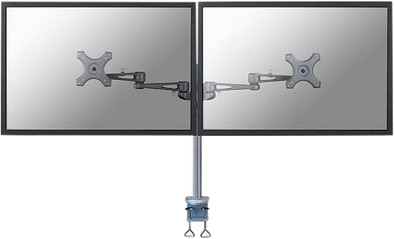
The Neomounts by NewStar FPMA-D935D Monitor Arm Silver is suitable for 2 monitors and is very easy to attach to your desk. Thanks to the 2 thumb screws, the mount will remain firmly in place. The monitor mount can be easily adjusted in height and depth. In addition, it allows you to pivot the monitor and tilt it horizontally and vertically. This helps you take on the best working posture. This mount can be moved away from the wall, rotated up to 360 degrees, tilted to the front and the back by 180 degrees, and pivoted 300 degrees left and right. The NewStar Monitor mount FMPA-D935D is suitable for screen sizes between 10 and 27 inches (25 - 66cm).
5 stars
14
4 stars
10
3 stars
0
2 stars
0
1 star
0
I've been using the brace for a month now and so far I don't regret my purchase.
Used screens:
The LG screens that I have purchased are known for their weak foot. At the slightest bump or vibration on the desktop, every screen vibrates to the point of boredom. Putting the screens together has solved a lot, but in the end decided to purchase a monitor bracket for 2.
After considering whether I would place the screens via the wall or on the desk, it eventually became a desk bracket. Although I am enormously charmed by the space savings of a wall bracket, the convenience and interchangeability of a simple desk bracket has been the decisive argument. I hope to switch to 27" screens in the future and then I won't have to reposition the brackets, just move them.
Package: It arrived 1 day after ordering and paying for the braces. The box was a lot bigger than expected, in terms of weight it was not that bad. When opening the box, the explanation for this size was immediately visible, because the "arms" are 1 whole, supplemented with the standing tube with foot.
Installation: The installation was very simple, place the foot on the desk and slide the arms (which come together at 1 point) over the tube. All necessary keys were included. The desk clamp consists of 2 separate parts which can be preset according to the desktop. The clamps fit well and are easy to tighten. However, I would be careful with glass tops as both the support and the clamps are bare iron without a rubber finish.
Cable management: As far as cable management is concerned, everything is reasonably provided, clamps are included where 2 cables can be easily held per arm in order to absorb the movements. The cables come together on the holder and run down to my PC.
What disappointed me somewhat is that there is cable management from the screens to the tube, but no further provision to the foot. I used a simple tie-wrap but this could certainly have been cleaner. In the future I may have a hollow tube made to measure so that the cables can run through this tube. A DVI cable will probably not fit, but an HDMI probably will.
Fine tune: As easy as the installation was, adjusting the screens was a little less. In order for the 2 identical screens to come into contact with each other, the arms of the monitors must be able to move as far back as possible. Unfortunately, this was not an option for me because my desk is against the wall, which made the screens come further forward than originally planned. The measured distance between the wall and the front of the screens is +- 18 cm, for screens with a screen diagonal of 23". With larger screens, the arms will have to stretch more so that they will hang closer to the wall.
The height of the screens is easier to adjust, although I do recommend doing this with 2 people.
By using a spirit level you can easily level the screens, although this will require some patience. After +- 3 weeks, 1 screen was slightly twisted compared to the other, a matter of tightening the bolts enough.
Timothy Fornoville
14 April 2014
Automatically translated from Nederlands
Very sturdy and beautiful design. Easy to install with the quick screws. I chose the fpma-d935 because it can practically be placed upside down. The arm can be completely slid off so that the tube can be attached to a shelf upside down, so that the screen hangs 'in the air' and you can use all the space underneath. The flexibility can be regulated by means of an Allen key.
Jurgen VdP
30 December 2014
Automatically translated from Nederlands
Solid and sturdy monitor bracket that really takes a few minutes to assemble. A bit heavy, so pay attention to how much weight your desk can support.
B.S.A. Balk
3 November 2019
Automatically translated from Nederlands