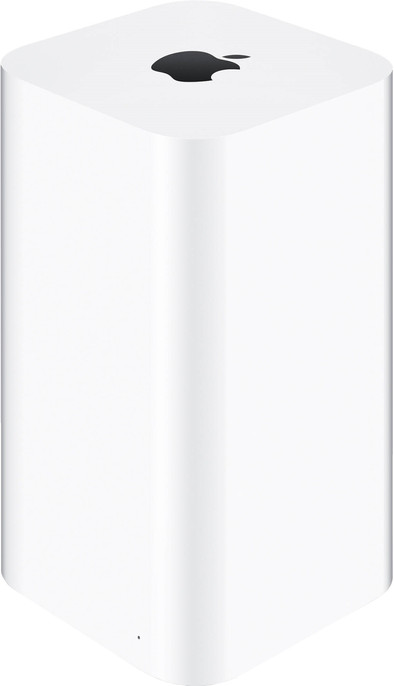
Apple AirPort Time Capsule 2TB
Never available again
View alternatives in the sidebar
View alternatives in the sidebar
According to our NAS expert
Automatically backup your holiday photos and other documents from your iPhone, iPad, or Mac with Apple AirPort Time Capsule. This workhorse is a NAS and dual-band router in one. Set up a wireless WiFi network (AC) in no time, and stream your favorite photos or music quickly and easily. Thanks to the 6 cleverly-placed internal WiFi antennas, you'll have an excellent WiFi range in your whole house. Time Capsule will backup all the files on your Apple device on a set moment. That way, you're sure you haven't lost anything when you drop your iPhone one too many times.
This is an original Apple accessory.
All of your WiFi devices can work with AirPort Time Capsule. it's compatible with all devices that use specifications 802.11a, 802.11b, 802.11g, 802.11n, and 802.11ac.
Number of hard drive slots | 1 | |
Suitable for hard drive size | 2.5 inches | |
Internal RAM | 512 MB | |
Processor cores | Dual-Core (2) | |
Built-in hard drive | ||
Total storage capacity | 2 TB |
5 stars
105
4 stars
31
3 stars
3
2 stars
0
1 star
0
Purchased after endless annoyance with the Ziggo router. Constantly dropping connection, very annoying during your banking. Even after several channel changes, the Ziggo WiFi Helpdesk also did not have a suitable answer.
Then bought this AirPort Extreme Timecapsule... what a relief! Plug it in, plug in the power cable, wait for it to come online, set up your WiFi on your PC and run it. Finished!
Mark
12 August 2017
Automatically translated from Dutch
After trying different routers switched to the TC. I have to say that Apple lives up to its name again. Device is super easy to install and the AC wifi signal is perfect. I have not been able to achieve the speeds that I get now with 1 other router. You should not assume that the TC is a replacement for a NAS because it certainly isn't, but it is a top device for simple file sharing in a network and especially of course making backups with Time Machine. All in all, this router is great for people who already have Apple equipment at home. It is also handy that you can set the TC via an iPhone or iPad via the airport app. For people looking for a real NAS, better look at a Synology or a QNAP.
Peter
5 January 2014
Automatically translated from Dutch
Installation is simple, if you know how. With iOS devices, first select the router via Settings > WiFi. You can then further configure the router via the handy AirPort app. The guest network is also useful. After installation, no more worries, just works well, as you can expect from Apple.
R. Edens
30 October 2015
Automatically translated from Dutch
Product number | 340051 | |
Manufacturer code | ME177Z/A | |
Brand | Apple | |
Warranty | 2 years | |
Processing of your defect | Carry-in warranty |
Built-in hard drive | ||
Replaceable hard drive | ||
Number of hard drive slots | 1 | |
Suitable for hard drive size | 2.5 inches | |
Total storage capacity | 2 TB | |
RAID | RAID 0 | |
Internal RAM | 512 MB | |
Total number of RAM slots | 0 |
LACP Link aggregation | ||
Thunderbolt connector | ||
Bluetooth | ||
Number of Ethernet ports | 4 |
NAS functions | Backup server, Print server, VPN server | |
NAS application center | ||
Plex support | ||
Number of IP camera licenses included | None | |
DLNA | ||
UPnP AV support | ||
FTP server | ||
On/off switch | ||
Kensington lock | ||
Apple Time Machine support | ||
Chromecast support | ||
Suitable for IFTTT | ||
Recommended for use | Store photos and videos |
Processor brand | Apple | |
Processor family | Cortex A9 | |
Processor code name | Cortex | |
Processor cores | Dual-Core (2) | |
Clock speed | 1 GHz |
Depth | 9,8 cm | |
Width | 9,8 cm | |
Height | 16,8 cm | |
Type NAS | Upright | |
Color | White | |
Weight | 1,48 kg |