Never available again
View alternatives in the sidebar
View alternatives in the sidebar
Usage location | Indoors | |
|---|---|---|
Storage options | SD card | |
IP camera type | HD camera, Indoor camera, Night camera, PTZ camera, WiFi camera |
According to our IP camera expert
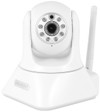
With the Eminent EM6225 ip camera, you keep an eye on things from a distance. Place the camera in your house and watch and listen live. You control the camera easily with the free app: move your finger across the screen to turn the camera vertically and horizontally. Thanks to infrared lighting, the camera can also film in the dark. If the camera detects motion, it automatically sends an email with a photo. This way you are immediately aware of an (un) desired visitor.
5 stars
55
4 stars
75
3 stars
15
2 stars
3
1 star
4
To start with, the camera looks solid and has good features. Connecting via cable to a router was all it took for it to work properly. When downloading the PC software I immediately ran into a problem. The site says PC software but there was no software package for my PC. There was only a Windows software package to download and in general it doesn't work on a Linux PC. I got the software package working in WINE without any problems. (WINE allows you to run Windows software on *nix like systems.) The App for the phone (Android) works reasonably well. Only had to fill in the data from the bottom of the camera (scan QR code) The App on the phone will not work if there is no internet access, even if the camera and the phone are on the same local network. The software package for the PC immediately saw that a camera was connected to the network and could connect to it directly with the default password. Via the software you can set everything such as passwords, admin, user, guest. For advanced settings you can also log in via a web page that is available. Here you can also set the bitrate of the video streams.
After some playing with it I thought how safe is this system. Listen and shiver. If you log in via the software as a guest you can see the passwords of the admin, user and guest. This means you have no security if you only want someone to watch. Then I thought of how does the PC app log into that system. I have analyzed the packets via wireshark and found that the username and password are thrown over the internet in plain text. Example if you are at a free internet point and you check if everything is going well at home, people like me can do the same afterwards. To check if everything is okay at your home. Since I was at it I thought I'd turn off UPnP and all that stuff. The IP Camera is behind a NAT router and no outside access is possible, normally. What happens if I open the app on my phone via mobile internet? The App immediately sees that the camera is active and can connect to it without difficulty. Apparently P2P is actively used, so you can always connect to your camera, even behind a semi-closed NAT router. But because the passwords go over the internet in bare text, I don't think that's a success. This way, your security camera can turn into a spy camera in no time. I searched the settings to disable P2P so that I could use the camera as an internal network camera over VPN. Unfortunately, there is no function to disable P2P.
This is my conclusion. This camera is not suitable for my security purpose. There are bound to be people who take these security risks for granted because the product just works. This camera works fine and the image quality is excellent. Very easy to install and operate via the supplied software.
Jasper
23 July 2015
Automatically translated from Dutch
Product (mainly software) hangs together with snags despite simple basic installation and decent image. Built-in speaker cannot be used via app under latest version of iOS. First thought of hardware error but new product (after return) has the same defect. The app is not stable and crashes regularly. Can send emails for some reason via Telenet mail server or iCloud (I only got it to work with my employer's mail server). Three different versions of software (PC, mobile app, browser) but completely different interface and parameters to be configured differ (!) on each platform. Manual doesn't explain enough. Wifi connection is not always stable despite good network.
Frank
22 August 2015
Automatically translated from Dutch
You can do a lot with it if you study it well, definitely recommend it! Some computer knowledge is required.
Walter Beks
8 April 2016
Automatically translated from Dutch
Product number | 584465 | |
|---|---|---|
Manufacturer code | EM6225 | |
Brand | Eminent | |
Warranty | 5 years | |
Processing of your defect | Carry-in warranty |
Video resolution width | 1280 pixels | |
|---|---|---|
Video resolution height | 720 pixels | |
Horizontal viewing angle | 70 ° | |
Vertical viewing angle | 120 ° | |
Pan | ||
Pan type | Analog | |
Degrees of panning | 355 ° | |
Tilt | ||
Tilt type | Analog | |
Tilts | 120 ° | |
Zoom (IPcam) | ||
Digital zoom | 3 | |
Fisheye | ||
Frames per second | 30 fps |
Number of cameras | 1 | |
|---|---|---|
IP camera type | HD camera, Indoor camera, Night camera, PTZ camera, WiFi camera | |
Usage location | Indoors | |
Motion detection sensor | ||
Infrared lighting | ||
Infrared light range | 8 m | |
Infrared motion sensor | ||
Dynamic DNS client | ||
Built-in microphone |
Storage options | SD card | |
|---|---|---|
SD card slot | ||
Type of SD card | microSD | |
Built-in WiFi | ||
PoE support | ||
UPnP AV support | ||
ONVIF certified | ||
PSIA certified |
Height | 11,5 cm | |
|---|---|---|
Width | 9,1 cm | |
Depth | 11,5 cm | |
Color | White | |
Mounting possible |
Receive more coverage in case of damage than with your standard warranty. Coolblue takes care of everything: from taking out the insurance to repairs. Is a repair not possible? You receive the purchase price as CoolblueCredit.
XCover is allowed to arrange and process insurances on behalf of the insurer. The insurances are governed by Belgium law. If you have a complaint, you can contact the or our customer service.
First, add your IP camera to your shopping cart. On the next page, choose one of the Protection Plans below. You always have a 30-day return window and pay no deductible in case of damage or theft.
The insurance can be canceled every year, even if you have paid in advance. If you cancel earlier, you will receive a refund for the overpaid amount.