TP-Link Touch P5
Never available again
View alternatives in the sidebar
View alternatives in the sidebar
According to our router expert
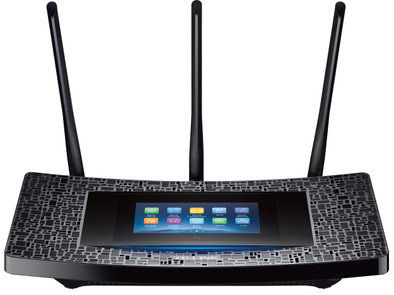
Create a stable (WiFi) network for all your network devices at home. Whether you're looking to play online games or stream 4K movies, the Touch P5 can manage it. Effortlessly set up the router using the user-friendly touchscreen. For example, the screen allows you to manage all connected device, create a guest network, change the password, etc.
Ethernet speed | Gigabit Ethernet (1000Mbps) | |
|---|---|---|
Frequency bands | Simultaneous dual-band | |
WiFi speed | AC1900 | |
Number of Ethernet ports | 4 |
5 stars
22
4 stars
12
3 stars
1
2 stars
0
1 star
0
Since my old router died, I fell back on a router from Ziggo. But often had problems. Especially with the WiFi range, especially in the bedroom, not to mention the attic. The connection was also very unstable. Streaming a movie or series regularly ran rough. So after some research I decided that I wanted a new and better router and I looked into different models. Then I read about this new router with touchscreen from tp-link.
A week at home now. And I must say, the router is very nice!
Installation
The installation was very simple. Connect all cables, in my case there were two. The power cable and the cable from the ziggo modem. Then you can continue on the touchscreen of the router. Create a password for the menu and then you can choose your own network name and password. The screen works great. It is not as nice as a brand new smartphone but a lot nicer than I expected. And the system responds super fast. I hung up the router myself and it looks really cool with the touchscreen on.
Touch screen
You can set everything on the screen. I'm fairly familiar with routers, but even if you're not, you can set everything up very simply. But it is not necessary in itself because the router immediately worked flawlessly. For the more technical people there are many extra options, but I haven't looked at them all and used them yet.
Performance
The range has really improved dramatically. I live in a fairly standard terraced house. Previously, in the back bedroom on the first floor, I only had 1 or sometimes 2 bars of WiFi on my iPhone. Now there really full range. Also in the attic I have two lines left. I did some speed tests and certainly in the bedroom I still have 60-70 Mb of my 100 Mb connection. Enough for netflix. :) I have now connected my apple tv there (with wifi) and that works really great. The connection has not dropped for a moment this week (is used almost every evening). Everything also works flawlessly on the laptop and telephones in the house.
Conclusion
I would definitely recommend this Touch P5. I'm very content. The speed, range and stability of my WiFi has improved dramatically. And I must say that the touchscreen makes the installation really easy and also looks very cool.
Jeffrey
22 September 2015
Automatically translated from Dutch
First of all sorry for the English review, my Dutch is not so great.
I bought this router in hope of getting better download speeds as my ISP provides 200Mbps but with their box I could not get a speed of faster than 35Mbps via wifi.
Now, after buying the TP Link router and playing a bit with the Wifi settings, channel etc, I can now obtain speeds of up to 95Mbps on my laptop. Still not great, but this is due to my chip set on my laptop, which will be replaced shortly from a WiFi N 150Mbps chip to an AC chip.
My tablet on the other hand that does have WiFi ac reception can actually get speeds of up to 195Mbps, so job well done in the end.
Until I worked out where the speed fault with the Wifi N on my laptop was, I had sent several emails to customer support at TP Link, they are great. They respond within hours and provide you with all the technical information you require. I would recommend this router just for the support, if not for anything else.
Now, of course this router has just come out and maybe in the future some problems will show up, as is the case with most new electronic devices, but so far so good.
The design is very, could easily blend in with the furniture.
Sotirios Vertsetis
30 September 2015
Automatically translated from Dutch
Am happy with this addition, still have to puzzle that the other functions are but that will work too
Raymond Hofste
10 October 2015
Automatically translated from Dutch
Product number | 612420 | |
|---|---|---|
Manufacturer code | TOUCH P5 | |
Brand | TP-Link | |
Warranty | 3 years | |
Processing of your defect | Carry-in warranty |
Can be expanded with extra stations |
|---|
Frequency bands | Simultaneous dual-band | |
|---|---|---|
WiFi speed | AC1900 | |
2.4GHz band speed | 600 Mbit/s | |
5GHz band speed | 1300 Mbit/s | |
Number of WiFi antennas | 3 | |
Jumbo frame support |
Ethernet speed | Gigabit Ethernet (1000Mbps) | |
|---|---|---|
Network connector | ||
Number of Ethernet ports | 4 | |
PoE support | ||
USB port | ||
Number of USB ports | 2 |
Automatically switches to 3G/4G | ||
|---|---|---|
SIM card slot |
Quality of Service (QoS) | ||
|---|---|---|
MU-MIMMO | ||
Seamless roaming | ||
Beamforming | ||
Port forwarding | ||
LACP Link aggregation |
Parental controls | ||
|---|---|---|
WLAN security | WEP, WPA, WPA-PSK, WPA2, WPA2-PSK | |
Firewall | ||
Firewall type | NAT Firewall | |
Guest network | ||
VPN server | ||
VPN client | ||
VPN passthrough |
Mounting possible | ||
|---|---|---|
Width | 28,4 cm | |
Height | 5,2 cm | |
Depth | 15,7 cm | |
Weight | 1404 g | |
Color | Black | |
Material | Plastic |
Power supply type | Power grid |
|---|---|
Battery level indicator |