Very satisfied with the alarm, but before I go over to the review, I first want to start with a small warning that there may be a software error in the system that can be easily remedied by means of an update.
I came across this by accident and then contacted the service department of smanos and they indicated that this can occur with a certain production series.
What is the error in the system and how can you fix it!
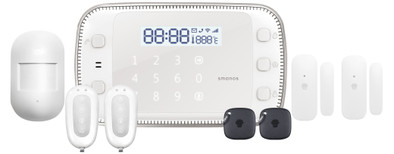
You have 3 buttons on the control panel to switch on the alarm.
1- the top button that turns on all the sensors in your home
2- the middle button that turns on the alarm in home mode. "this means that, for example, you switch on all smoke detectors, door/window contacts when you get home, eg when you go to sleep but want to leave the motion detectors switched off
3- the bottom button to turn off the alarm "you can do this after entering your set pin code"
The moment the top button is activated and your house is fully secured and the alarm would go off, you could only switch it off with your PIN code or remote control...
BUT!!! If you press the middle button "home mode", the alarm including the siren will go off and the display will flash.
THIS IS NOT ALLOWED! The siren should continue to sound until you use the PIN or remote control to turn off the alarm.
The solution/ Software update
-First of all, you need to set the APN settings. For this you need to send the number 17 in an SMS to the SIM card in the system. You will then receive the message below.
APN:
Username:
Password:
Copy this and enter the correct APN data (these can be found on the provider's website):
for instance:
APN:live.vodafone.com
Username:
Password:
If the APN settings are set correctly, send the following word in a text message: x5ftpupdate
The screen shows 4 dashes on the LCD screen. This indicates that the system is updating. Once the time appears, the update should be successful.
If this does not work "in my case the above did not work" then you have to send the display to Smanos to have them perform the update, I had the display back within a few days.
Now the review.
It is a beautiful display that you can place in your house in 2 ways, you can hang it up or put it on your sideboard by means of an included foot.
What comes out of the box is plug and play, but if you want to add other accessories, you can easily do this according to the supplied manual of the accessories.
You can set your alarm in 2 ways, namely via the text message "this works best" or via an app that can be downloaded in the android playstore or in the apple app store,
Through this app you can add phone numbers that should be texted / called when an alarm goes off.
Personal is the easiest to do everything via SMS and the English manual is clearly described than the Dutch. Once set up, you don't have to worry about it anymore and you no longer have to send text messages.
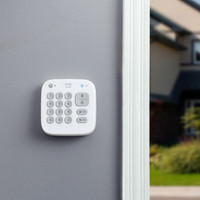
You can activate/deactivate the alarm system via the control panel, remote control, RFID, telephone app, but also via SMS, which is easy if you do not have wifi/internet, eg on holiday.
The alarm is loud, I also have an extra alarm on the middle floor that is equipped with a flashing light and night light.
You can set the alarm in different ways.
whether the alarm should go off immediately when a window/door contact is activated or whether you want a delay of the desired number of seconds to switch off the alarm via the control panel.
We only use it via the remote control that we activate/deactivate from outside so that the alarm goes off immediately at the moment of entry.
The telephone numbers that are set in the system are called immediately and also provided with SMS. This is a plus though.
You can name all detectors in your house, so that you can read in the SMS which sensor has been activated.
In short, after the update "if it is needed" it is a super system and a good purchase.
have fun with purchase.