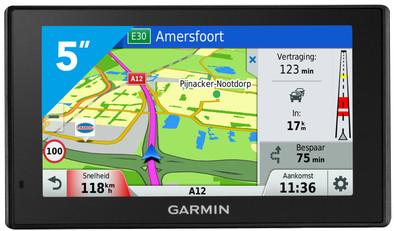
Garmin DriveAssist 50 LMT-D Europe
Never available again
View alternatives in the sidebar
View alternatives in the sidebar
According to our car navigation expert
Unfortunately, accidents do happen. That's why the Garmin DriveAssist 50 LMT-D Europe helps you drive extra safely. Make hands-free calls with your family or business relations via Bluetooth and receive notifications from your phone directly on your navigation system. Did you unexpectedly deviate from the lane? The device immediately alerts you if you do, so you can correct if necessary. Garmin DriveAssist also alerts you if you drive too close to the car in front of you or approach a sharp bend or school zone. If you drive for long stretches on the way to your vacation destination, the navigation system helps remind you to also take a break every now and then.
Map coverage | Europe | |
|---|---|---|
Navigation for vehicle type | Car | |
Useful places | ||
Screen size | 5 inches | |
Traffic updates via | Digital radio (DAB+) | |
Hands-free calls | ||
Voice control | ||
Period of free map updates | Lifespan of device |
5 stars
7
4 stars
4
3 stars
0
2 stars
0
1 star
0
I'm going to start with the negatives first, the screen is glossy!! What id***t came up with this? My previous nuvi 760 had a matte screen but now they put a glossy screen in it that reflects very much when the sun is out. In cloudy weather you do not suffer from it. The screen is nice and sharp and everything you want, but it comes at the expense of readability so this could be better.
The cable of the car charger could have been longer, now it just worked out for me. My 12v socket is behind the center storage compartment and with that I need a longer cable.
I liked the suspension system on the windshield better with the nuvi 760. Now that's just a mini USB connection and if I want to store the navigation, you have to pull out that cable. And what's even worse, disconnecting the device is quite abrupt, while on the nuvi it was much easier to disconnect from the suction cup holder. As a result, I now just leave the navigation on the windshield day and night, it's no different.
Then on to the pros. I really like the voice control. You say "voice control" and then you say eg "Find address" you speak the address with house number and municipality and the device starts navigating without touching the navigation. Much safer than entering it manually. As long as you speak clearly, the device already recognizes what you say, very well. All you have to do is mute the sound of the car radio, otherwise the device will not recognize your voice.
The built-in dashcam is also fine. Quality is much better than my previous dashcam. It records as soon as the device starts and since my 12v connection also goes out with the ignition, I don't have to touch the device at all to start and stop recording. When the card is full, it starts overwriting the oldest data (in 1 minute segments with time stamp). If something happens you can also press "save" and it will record 1'30" sec before and after the event and that is not exceeded. There is also a message if you drive over the white stripes, but I have disabled that because it is not reliable. The collision warning is the same.
There is an app (android and ios) through which you can connect your mobile phone to the device. So you can call hands-free and you can see the incoming text messages on the device. Because I already call hands-free via my car radio (is also better because the sound comes from the speakers), I can't do that via the navigation. So I don't get a car radio and navigation connected to my mobile phone via bluetooth.
And then finally the navigation, that goes just fine. Haven't tested it extensively yet, but haven't had any problems so far. Now you get a Flemish female voice that speaks clearly. If you drive wrong, she no longer says "Recalculate" but just nothing more while it does recalculate of course. Speed cameras are included in the maps that you can update every so often. The speed limits are not always accurate. Especially on the smaller roads it sometimes gets it wrong. I do regret that. The speed of calculation depends on the length of the travel route, but I still think it could have been faster. Booting is pretty fast. When I unlock the car and get in, the navigation is already ready to use and the signal is also there immediately. I have not yet been able to test traffic information via DAB, but it is nice that it is there. With the lower models you don't have this and you get 'normal' traffic information.
So all in all I am a happy owner. The combination with a dashcam made me choose this version. The excellent voice control is a nice extra. Just a shame about the glossy screen....
Alex C.
8 June 2016
Automatically translated from Dutch
Initially I wanted to buy the 'Garmin Dash Cam 35', but because Garmin also has a navigation device with built-in Dash Cam in its collection, I opted for the 'Garmin DriveAssist 50'.
I don't need to explain all the possibilities here, you can read that in detail elsewhere.
The 'DriveAssist 50' is a light and handy device that takes you from A to B and also films what is happening in front of the car. You get extensive lifetime support to keep installed maps up to date. Installing a new version of the map took less than 2 hours.
The internal memory space for the storage of maps and other files that are important for navigation is more than sufficient with 16GB. With me, only half of the storage space is in use, but if necessary, this can be expanded with an extra microSD card.
The camera images, if recorded in the highest resolution, are saved in segments of 1 minute and a file size of 73.7MB. So on the supplied 4GB card there is room to store more than 50 minutes of video images, after which the oldest files are overwritten. I immediately replaced the 4GB card for a 32GB card so that I can now store more than 430 minutes or 7 hours of video before the oldest files are overwritten.
In order for the voice control to work properly, it is wise to switch off the radio for a while and not to let the ventilation in the car run at the highest level. The voice control will then work fine.
Here are a few things I noticed about the 'DriveAssist 50';
It is striking that Garmin has recently cut back more and more on the materials used. OK, OK, I understand. Every Euro is one, especially when you are talking about large numbers, Garmin can save a lot of money by limiting production costs.
A user manual is not included. The Dutch user manual of the 'Garmin DriveAssist 50' is easy to find, with the help of 'Garmin Express'.
To connect the device in the car, the power cable must be plugged directly into the device instead of, as with the 'Garmin nüvi 2797', in a holder that remains in the car and connects to the navigation device with spring-loaded contacts when it is placed in the holder.
Have now driven around with the navigation device a few times and wonder why the engineers have opted for a mirrored screen. Being able to easily and quickly 'read' the information on an anti-glare screen while driving is a lot safer than staring at your screen for seconds because it is barely visible due to reflection.
With some previous Garmin models you still received a case to store the device, now you have to do without it. If Garmin's 'DriveAssist 50' would be the cheapest model in the range, I can understand it, but it is one of the more expensive models.
The quality of the video images could be better, but they only serve as evidence in the event of a possible traffic accident, for that purpose the quality is more than sufficient.
Would I recommend the device to others? When it comes to the specifications, I can unreservedly recommend the device to anyone. Due to the reduced traffic safety, the reflective screen reduces the total number of points to be awarded by two. The lack of a decent pouch and the way in which the electrical connection in the car is established takes one more point off.
My rating then remains at a 7.
B. Wubbeling
19 July 2016
Automatically translated from Dutch
Fine with more options than TomTom but traffic information could be better.
Mike
6 August 2016
Automatically translated from Dutch
Product number | 705333 | |
|---|---|---|
Manufacturer code | 010-01541-10 | |
Brand | Garmin | |
Warranty | 2 years | |
Processing of your defect | Carry-in warranty |
Width | 14 cm | |
|---|---|---|
Height | 8,4 cm | |
Depth | 2 cm | |
Weight | 191 g | |
Color | Black | |
Integrated dash cam | ||
Maximum battery life | 30 min |
Screen size | 5 inches | |
|---|---|---|
Resolution height | 272 pixels | |
Resolution width | 480 pixels | |
Screen reflection | Anti-glare |
Map coverage | Europe | |
|---|---|---|
Pre-installed maps | ||
Maps expandable | ||
Period of free map updates | Lifespan of device | |
Map updates via WiFi (car navigation) |
Navigation for vehicle type | Car | |
|---|---|---|
Points of Interest POI (Car Navigation) | ||
Traffic updates function | ||
Traffic updates via | Digital radio (DAB+) | |
Speed camera alert | ||
Spoken directions | ||
Lane assist | ||
Coordinate navigation | ||
Uploading routes possible | ||
Quick GPSfix | ||
GLONASS |
Bluetooth |
|---|
Hands-free calls | ||
|---|---|---|
Voice control | ||
Shows smartphone messages |
Memory card reader | ||
|---|---|---|
Memory card | MicroSD |