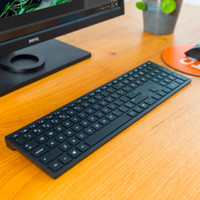
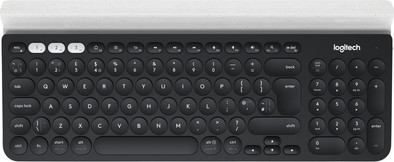
Logitech Multi Device Keyboard K780 AZERTY
Never available again
View alternatives in the sidebar
View alternatives in the sidebar
Connection type | Wireless | |
|---|---|---|
Backlit keyboard | ||
Keyboard composition | Keyboard, Numpad | |
Bluetooth | ||
Ergonomic design | ||
Mechanical keyboard | ||
Physical keyboard layout | ISO | |
Geographic keyboard layout | FR layout |
According to our keyboard expert
The Logitech Multi Device Keyboard K780 is a wireless keyboard for your computer, tablet, and phone. Connect up to 3 devices simultaneously, using Bluetooth or the USB Bluetooth dongle. Press the button to switch effortlessly between the connected devices. Type a report on your computer one moment, quickly answer a WhatsApp message on your smartphone the next. Thanks to the integrated holder, you get a good view of your phone or tablet while typing.
5 stars
24
4 stars
9
3 stars
2
2 stars
0
1 star
0
Installation ease
Ergonomics
User friendliness
Pairing with my laptop and Nexus 6 GSM went very smoothly via the supplied dongle and bluetooth. It cannot connect to my Android 4 tablet. It appears from the Logitech support page that you must have an Android 5 or higher device!
The keys have limited depth when pressed and the touch feels hard.
There is also no real HOME and END key, only using the SHIFT in combination with num 7 and num 1. The F3 (search) key is also not immediately available because that is the "pair" key.
Because of those limitations, keyboard is not really suitable for me as a developer.
Too bad, I'm better off just Logitec. Looks nice but just misses the ball!
Michiel Vermandel
1 March 2017
Automatically translated from Dutch
Switch quickly from Mac to iPhone and iPad (white key 1 for eg Mac, key 2 for iPhone and key 3 for iPad). No cable hassle, just via Bluetooth. A slot is provided at the top of the keyboard to place your mobile devices. Then switch to your Windows PC: no problem. Just plug in the USB unifying and tap.
Rudy De Feyter
3 October 2016
Automatically translated from Dutch
Previously I used the K750 (Windows) and K760 (OSX, android, IOS) keyboard, both solar. My K760 keyboard started to come loose and so I was ready for a new keyboard and preferably one that could replace both. After comparing everything for a while, I arrive at this keyboard. Read a few tests and this seemed to be the keyboard I was looking for.
In the meantime about the delivery. Ordered on Sunday evening and on Monday I got the message that it would arrive Tuesday. Bpost and a busy period that never goes well together, I thought right away and it was right. The package arrived in the neighboring municipality and was then sent back to Antwerp X to arrive a day later. The first time something takes longer than 24 hours.
When opening the packaging, you saw at first sight that this is a decently finished keyboard. Remove the plastic between the batteries at the bottom and then set the ON button to the correct position. The first white key, top left, was blinking. Just go to the bluetooth settings of the Imac and have it scanned. You will then see the keyboard appear in between. Just click on it with the mouse and then you will see a number of 6 digits. You enter this on your keyboard followed by enter. Hooray it's paired! Same procedure for IOS as for android. This works exactly the same as with the K760 keyboard, with which you could also operate 3 devices.
This also works without any problems via the logitech Unifying protocol. I already had that block in my Windows PC. The keyboard was recognized via the logitech software and the computer and keyboard connected without any problems.
In the meantime, a week in use and the others have not been out of the closet. To go from Imac to Windows PC is simply a matter of pressing the correct white key that is linked to the device.
The layout of the keyboard is provided for both Windows and OSX. My K760 keyboard didn't have a numeric keypad, which this one does.
Joel Vandermeeren
9 January 2017
Automatically translated from Dutch
Receive more coverage in case of damage than with your standard warranty. Coolblue takes care of everything: from taking out the insurance to repairs. Is a repair not possible? You receive the purchase price as CoolblueCredit.
XCover is allowed to arrange and process insurances on behalf of the insurer. The insurances are governed by Belgium law. If you have a complaint, you can contact the or our customer service.
First, add your keyboard to your shopping cart. On the next page, choose the Protection Plan below. You always have a 30-day return window and pay no deductible in case of damage.
The insurance can be canceled every year, even if you have paid in advance. If you cancel earlier, you will receive a refund for the overpaid amount.
Product number | 724063 | |
|---|---|---|
Manufacturer code | 920-008037 | |
Brand | Logitech | |
Warranty | 2 years | |
Processing of your defect | Via Coolblue |
Keyboard layout | AZERTY | |
|---|---|---|
Geographic keyboard layout | FR layout | |
Physical keyboard layout | ISO | |
Typing comfort | Mid-range | |
Backlit keyboard | ||
Spill-resistant | ||
Programmable keys | ||
Multimedia shortcuts | ||
Flat keys | ||
Suitable for gaming | ||
Mechanical keyboard |
Connection type | Wireless | |
|---|---|---|
Nano receiver | ||
Bluetooth | ||
Bluetooth version | 4.0 |
Power supply type | Rechargeable battery | |
|---|---|---|
Rechargeable battery |
Keyboard composition | Keyboard, Numpad | |
|---|---|---|
Ergonomic design | ||
Height | 2,2 cm | |
Width | 38 cm | |
Depth | 15,8 cm | |
Wrist rest | ||
Color | Black, White | |
Weight | 0,875 kg |