Receive more coverage in case of damage than with your standard warranty. Coolblue takes care of everything: from taking out the insurance to repairs. Is a repair not possible? You receive the purchase price as CoolblueCredit.
What am I insured for?
Fall and impact damage
Water damage
Manufacturing defects outside the warranty
What am I not insured for?
Damage you deliberately cause
Damage that doesn't affect the product functioning (such as scratches)
Damage due to gross negligence
XCover insurace
XCover is allowed to arrange and process insurances on behalf of the insurer. The insurances are governed by Belgium law. If you have a complaint, you can contact the or our customer service.
First, add your video card to your shopping cart. On the next page, choose the Protection Plan below. You always have a 30-day return window and pay no deductible in case of damage.
XCover Protection without theft cover
3-year advance payment
19,99 one-time payment (6,66 per year)
2-year advance payment
10,99 one-time payment (5,50 per year)
The insurance can be canceled every year, even if you have paid in advance. If you cancel earlier, you will receive a refund for the overpaid amount.
Specifications
The list with properties are filtered when you type
This video card is cooler and quieter during use, due to the Twin Frozr cooling method.
The video card supports NVIDIA SLI, allowing you to work with 2 identical cards for more frames per second.
Overclock the video card with the MSI Afterburner software for even better performance.
The video card requires a power supply of at least 500 watts to work properly.
Description
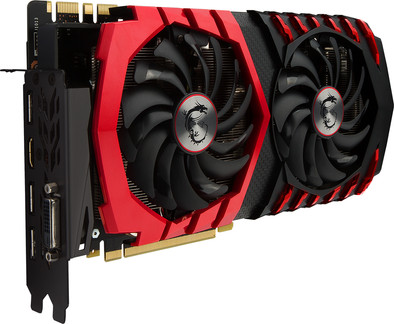
The MSI Geforce GTX 1070 Gaming X 8G is a video card for hardcore gamers. Connect 4 monitors to this card and have all the space you need for your games and other applications. You can play games like Battlefield 1 and Gears of War at the highest settings with this card, without any frame rate drops. You can set the LED lighting on this video card to your favorite color, making it match your computer case. Planning to do some work or watch a movie after your gaming session? If the card isn't under full load, the fans will switch off. This prevents any annoying buzzing sounds from disturbing you.
In 2014 I ordered a fully assembled computer that, at the time, had a high-end video card. What this means is that the card was very good to run just about all games. As technology evolves at a rapid pace, I thought it was time to buy a new ticket. I introduce you to the monster, the beast: the GTX 1070!
Sound production
The first thing that struck me about this card was the sound. Boy, there was no sound at all. This card is so quiet you can barely hear it. I play with my case open so the sound from all components comes through very loudly, but to my surprise that was not the case with this card. One would think that, for such a large card with such gigantic fans, the sound would be deafening. So for the youngsters who secretly want to play on the computer while the parents are "sleeping": good news!
large memory
8GB of memory is of course a plus. For the people who don't know what this net does, let me inform you why this is so fantastic: the memory takes care of storing pre-processed image parts. As a result, less compromise has to be made between speed and detail reproduction. At high resolutions, there are more pixels. This means that there are more textures that need to be stored in memory. This card is therefore very suitable for people who have a high-resolution screen. Anti-aliasing is mainly used in gaming. This also takes up a relatively large amount of memory. Gosh, if only I had that much memory!
High benchmarks
Now we come to the part that many of you are looking for. How does this card actually perform? Well, she's not good, but divine. You can easily play games that require relatively little from your card at 500 fps, average games between 200 and 250, and high games can fluctuate between 60 and 110. Let me clarify with examples: you all know low games. Average: Dota 2, League of Legends, Rocket League,... High: Far Cry games, The Witcher, Ark: Survival,...
Cooling
Baking a steak or egg on this menu is not really an option. It's the size it has to hold the dish to be cooked, but the refrigeration this monster has got in the way of cooking plans for your date tonight. The 2 giant fans located at the bottom of the map do their job as they should. They keep the card cool so that it can continue to do its job without any loss of performance.
Software
The video card comes standard with a disk containing all the software:
Drivers & utilities: the most recent drivers can be installed in this way. Drivers are pieces of software that control how components should work together. I'll quickly run through the utilities:
1.1) MSI Gaming App: On the gaming app you can control the different profiles: OC mode, Gaming mode & silent mode. OC mode is to set the card to overclock mode, gaming mode is the mode for when you are going to play and the silent mode is for quiet use like normal internet browsing. In silent mode, the fans will run more quietly or even simply switch off.
1.2) Eye Rest: This app is going to present you 3 pre-made profiles (yes, there I am again with food) that are best for your eyes, based on the action you are doing. Please note, this must be set manually and does not happen automatically. In the Eye Rest App we have: Eye Rest, Gaming & movie. These speak for themselves. As an additional option, you can create a profile yourself that you can configure yourself!
1.3) Led config: With this option you can color and animate the dragon and "MSI" on the graphics card itself. Blessed, isn't it?
1.4) Virtual Reality: With the VR option you can get the best out of your card for Virtual Reality with 1 click.
1.5) System information on screen: This option gives you an overview of the computer's performance. The following things are displayed: FPS, clock speed, usage and temperatures of video card, processor & VRAM.
1.6) MSI Dragon Eye: In all honesty, I find this app as useless as you can make it unless you play games AFK. This option allows you to watch streams or videos while you are playing. You will then get a small frame on your screen where you can follow the stream or video.
1.7) Twin Frozr: This option will shut down the fans when not in heavy use. (enabled by default)
Afterburner: MSI Afterburner will ensure that you can improve the performance of the video card. (Read: overclocking) DO NOT do this if you don't know what you're doing.
Xsplit Gamecaster: allows you to stream on eg Twitch.tv, but also to record your gameplay.
Google: Gives you the option to install Google Drive, but this is the option that hardly anyone uses anyway.
Tips & Notes:
Check if your motherboard has 2 slots. If not, you will need to purchase another motherboard before purchasing this card.
Do calculations. This map is huge. People who doubt whether it will fit in their case: you can see the dimensions of the card under specifications. Measure the space in your case and then conclude whether or not the card will fit.
Do you play on a 60Hz screen? Shame. With such a card you almost have to go higher because otherwise you lose all those delicious frames. With this card I bought myself a BenQ XL2411Z. This screen is 144Hz. If you play on this with this card you are just really in it. Simply delicious!
I hope I was able to help you make your choice. More gaming fun!
Review by:
Niels DC
Date:
29 September 2016
Translation:
Automatically translated from Dutch
Review is 8,8 out of 10.
8,8/10 ()
Top card
Silent up to 60 degrees
great card it's like you've always been nearly blind and then all of a sudden buy glasses, this card is a beast! highly recommended
Review by:
vincent van de zande
Date:
25 August 2016
Translation:
Automatically translated from Dutch
Review is 8,8 out of 10.
8,8/10 ()
Major upgrade for PC, TOP.
1050p runs any game effortlessly
DirectX 12_1
8GB RAM
Just a little too wide for a mainstream PC case
The other variant (AMD) card is a lot cheaper, but with the Nvidia chip in it, it is really worth much more. Hence bought this one. and must say no regrets. The drivers of the card are excellently cared for. in short, more support, etc. MSI also has handy tools. so you can overclock the card with 1 click (OC mode) and even set it to Silence mode. absolutely great. all the games i play look super smooth and run smoothly. :) now a new monitor and I am completely satisfied.