Wacom Bamboo Folio Large
Never available again
View alternatives in the sidebar
View alternatives in the sidebar
Compatible with operating system | Android, Windows, iOS, macOS | |
|---|---|---|
Multi-touch | ||
Connection type | Wired | |
Width | 267 mm | |
Depth | 19 mm |
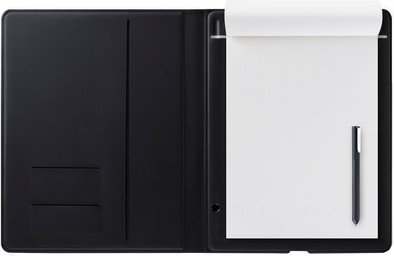
With the Wacom Bamboo Folio Large, you can take notes and draw with pen and paper, and then convert this to digital files. Save your notes in various file formats, including JPG and PDF. You can synchronize, edit, and save them on a smartphone or tablet that you connect with via Bluetooth. You can also export files to the cloud to store them. The ergonomic pen gives you a good grip to draw clean lines. Using the pressure sensitivity of the pen, you can determine the thickness of the lines and letters that you draw. When you don't use the pen, turn the top half of the pen so that the tip is protected against damage. The Bamboo Folio Large is similar to an A4.
5 stars
5
4 stars
4
3 stars
0
2 stars
1
1 star
0
I can now write notes and/or explanations while continuing to look at a class or group of people while these notes and/or explanations are visible to the others. With the live option, this even happens immediately.
EriC vd Ven
14 February 2017
Automatically translated from Dutch
The idea of getting started with pen and paper is nice. I already had an A5 version of this series. This one is doing particularly well. The A4 version is large and I experience it as stiff. The biggest issue, however, is the unreliable synchronization (which the producer does not answer either)
Prins Björn
7 February 2018
Automatically translated from Dutch
I think it's a great thing. I had hoped that I could also use it with any pen. Unfortunately, this is not possible because it concerns the combination between the Folio and the ink of the pen. It is not a smartpen and has no battery. Charging is quite fast and it lasts a long time. I charge it with an external battery and this works without any problems (via micro-USB). When taking notes or drawing an idea, it can sometimes take a minute or 2 for the app to sync. Sometimes it seems that nothing happens or that you do not get the page digitally. But just when you start to worry, he downloads the page(s) and it is in the app. When creating a work order, for example, you can fill it in as usual. You can then export the downloaded page as .PNG. This means that it will be an image with only the text and a transparent background. You can put this in a photo editing app like Autodesk Sketchbook. This works with layers just like Photoshop. Then you scan 1 receipt and you can overlay them on your phone and save, edit or export them further. It sounds like a lot of work, but it isn't. It is a pity that all this is not possible in the Wacom app itself. But this way it also works fine and fast. I also thought that you would have to pay extra in the app itself to be able to use it. That is not entirely true. For example, you can buy other drawing tools. You do not have any additional tools for written text. I think it's ideal. It takes some getting used to. Both the app and the Folio itself. Nevertheless, I am very satisfied and I think it is a genius idea that has been worked out well. Hopefully, some additional features will be added to the app over time.
Timo
28 January 2018
Automatically translated from Dutch
Receive more coverage in case of damage than with your standard warranty. Coolblue takes care of everything: from taking out the insurance to repairs. Is a repair not possible? You receive the purchase price as CoolblueCredit.
XCover is allowed to arrange and process insurances on behalf of the insurer. The insurances are governed by Belgium law. If you have a complaint, you can contact the or our customer service.
First, add your drawing tablet to your shopping cart. On the next page, choose one of the Protection Plans below. You always have a 30-day return window and pay no deductible in case of damage or theft.
The insurance can be canceled every year, even if you have paid in advance. If you cancel earlier, you will receive a refund for the overpaid amount.
Product number | 735984 | |
|---|---|---|
Manufacturer code | CDS-810G | |
Brand | Wacom | |
Warranty | 2 years | |
Processing of your defect | Carry-in warranty |
Drawing tablet has integrated screen | ||
|---|---|---|
Lines per inch (LPI) | 0 lpi | |
Height of active drawing area | 297 mm | |
Width of active drawing area | 210 mm | |
Multi-touch | ||
Number of buttons | 0 | |
Programmable buttons | ||
Tilt sensitive | ||
Compatible with operating system | Android, Windows, iOS, macOS |
Connection type | Wired |
|---|
Weight | 810 g | |
|---|---|---|
Width | 267 mm | |
Depth | 19 mm | |
Height | 338 mm |
Power source | ||
|---|---|---|
Power supply type | Via a different product | |
Cable length | 1 m |