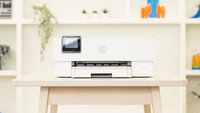
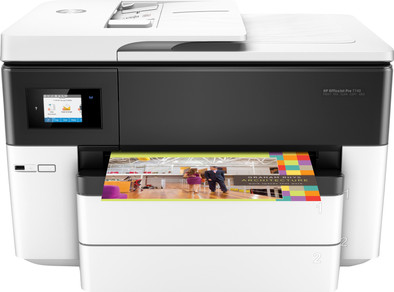
HP OfficeJet Pro 7740 All-in-One (G5J38A)
Never available again
View alternatives in the sidebar
Insure your printer
Receive more coverage in case of damage than with your standard warranty. Coolblue takes care of everything: from taking out the insurance to repairs. Is a repair not possible? You receive the purchase price as CoolblueCredit.
What am I insured for?
- Fall and impact damage
- Water damage
- Manufacturing defects outside the warranty
What am I not insured for?
- Damage you deliberately cause
- Damage that doesn't affect the product functioning (such as scratches)
- Damage due to gross negligence
XCover insurace
XCover is allowed to arrange and process insurances on behalf of the insurer. The insurances are governed by Belgium law. If you have a complaint, you can contact the or our customer service.
How do I insure my printer?
First, add your printer to your shopping cart. On the next page, choose the Protection Plan below. You always have a 30-day return window and pay no deductible in case of damage.
XCover Protection without theft cover
- 5-year advance payment64,- one-time payment (12,80 per year)
- 3-year advance payment31,99 one-time payment (10,66 per year)
The insurance can be canceled every year, even if you have paid in advance. If you cancel earlier, you will receive a refund for the overpaid amount.
HP 3-year warranty after registration
If you purchase the HP OfficeJet Pro 7740 All-in-One (G5J38A), you'll receive a 3-year warranty from HP after registration. With this, you can extend the commercial warranty to 3 years. Is something wrong with the printer? HP will solve it for you. Go to the promotional Terms and Conditions (PDF) for more information.
Specifications
Product
Product number | 745337 | |
|---|---|---|
Manufacturer code | G5J38A#A80 | |
Brand | HP | |
Warranty | 2 years | |
Processing of your defect | Via Coolblue |
Physical properties
Printer size | Large | |
|---|---|---|
Width | 58,4 cm | |
Depth | 46,7 cm | |
Height | 38,3 cm | |
Color | White | |
Weight | 19,5 kg |
Printer type
Printer type | All-in-one | |
|---|---|---|
Photo printer | ||
Portable (mobile use) | ||
Recommended for use printers | Business printing |
Print properties
Cartridge line | HP 953 | |
|---|---|---|
Print technology | Inkjet | |
Type of ink | Cartridges | |
Number of cartridges/toner cartridges | 4 | |
Color printer | ||
Print speed black (ISO) | 22 ppm | |
Print speed color (ISO) | 18 ppm | |
First black page ready after | 9 seconds | |
Speed class | Very good | |
Maximum print resolution height | 1200 dpi | |
Maximum print resolution width | 4800 dpi | |
Maximum print size | A3 | |
Automatic duplex printing | ||
Borderless printing | ||
Maximum print size duplex printing | A3 |
Scan properties
Scan functionality | ||
|---|---|---|
Automatic duplex scanning | ||
Maximum optical scan resolution width | 1200 dpi | |
Maximum optical scan resolution height | 1200 dpi | |
Scanner type | File scanner, Flatbed scanner | |
Maximum scan size | A3 (29.7x42cm) | |
Automatic document feeder (ADF) | ||
Maximum paper size ADF | A3 | |
Scan sizes | A3, A4 | |
Scan speed (PPM) | 8 ppm | |
Color depth output | 24 bpp | |
Scan to | Email address, USB | |
ADF capacity | 35 | |
OCR |
Copy properties
Copying functionality | ||
|---|---|---|
Copy speed black (ISO) | 33 Hz | |
Copy speed color (ISO) | 31 Hz | |
Maximum copy resolution height | 600 dpi | |
Maximum copy resolution width | 600 dpi |
Fax properties
Fax functionality | ||
|---|---|---|
Color fax |
Screen
Built-in screen | ||
|---|---|---|
Color screen | ||
Touchscreen |
Connectors
Compatible with operating system | Android, Windows, iOS, macOS | |
|---|---|---|
Connection type | Wired, Wireless | |
Apple AirPrint | ||
Email print | ||
WPS (Wireless Protected Setup) | ||
Female standard USB-A port version | 2.0 | |
Ethernet port | ||
Number of Ethernet ports | 1 | |
NFC | ||
Built-in WiFi | ||
WiFi direct | ||
Bluetooth | ||
USB port |
Paper tray
Manual input tray | ||
|---|---|---|
Photo paper drawer | ||
Output capacity output drawer | 100 | |
Maximum print size standard paper tray | A3 | |
Input capacity standard paper tray | 250 | |
Number of standard paper trays | 2 |
External memory card reader
Memory card reader |
|---|
Durability
Quality mark sustainable company | CDP A List, EcoVadis Platinum, Responsible Business Alliance, Science Based Targets initiative (SBTi) | |
|---|---|---|
Quality mark sustainable product | EPEAT Silver, Energy Star | |
Green production features | Environmentally-friendly package |