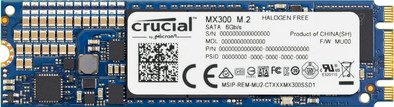
Crucial MX300 525GB M.2
Never available again
View alternatives in the sidebar
View alternatives in the sidebar
Make the most of your ultrabook or laptop with the Crucial MX300 M.2 525GB SSD. Put the M.2 from the MX300-serie in a M.2 port and your programs will launch within 15 seconds. This compact SSD is only 1.35mm thick and fits in the thinnest devices.
This SSD is 80 millimeters long. Want to use this M.2 internal SSD? Make sure to check whether your motherboard supports this length first. If this isn't the case, the SSD won't fit and you won't be able to install it.
Total storage capacity | 525 GB | |
|---|---|---|
Maximum read speed | 530 MB/s | |
Maximum write speed | 510 MB/s |
5 stars
7
4 stars
1
3 stars
0
2 stars
0
1 star
0
Replace existing 120GB for this 525GB Crucial. Unfortunately my laptop only supports SATA and not PCIexpress M.2, so this was a good choice for me.
Been using it for almost a month now and everything works fine. Installing Windows and files was of course very fast. In CrystalDiskMark, it gets around 525MB/s read and write, like the specifications. So far I have not regretted going for this cheap Crucial instead of a more expensive Intel or Samsung.
This Crucial also contains AES which makes Windows Bitlocker encryption also very fast. I could not observe any delay without and with Bitlocker.
Installation is (with my laptop) a piece of cake. Loosen all screws at the bottom, loosen the tiny screw of the old M.2, new M.2 in, screw back, close the laptop and put the screws back. My BIOS is UEFI so it worked right away. Install via bootable USB stick with Windows installation ISO done.
No drawbacks found so far. Of course also very happy with Coolblue for free delivery the next day.
Patrick van Haaren
19 September 2017
Automatically translated from Dutch
I am an ICT student and I was short of SSD memory in my laptop. The standard SSD memory of 128GB ran out too quickly due to new programs. This made me look for an SSD with more memory, but at an affordable price. Installation was very fast with ISO windows 10 usb. After placing the new SSD in your PC, you must insert the ISO USB into your PC when booting and your PC will be installed again with your chosen operating system. In terms of storage, this SSD with 525GB is the cheapest Sata III M2.SSD for the storage it offers. I must say that when installing the SSD, the actual storage is less than expected. This SSD has 490GB of available space and when installing Windows 10 still 465GB of space with the operating system. It was expected that the actual capacity was lower. But 35GB less I think was taken for a ride by the manufacturer Crucial. This does not mean that the price/storage ratio is no longer correct, because then this will still remain the best buy.
Alex
17 January 2018
Automatically translated from Dutch
Does what it should, good value for money, installation depends on the laptop used
Peter Claes
22 December 2016
Automatically translated from Dutch
Product number | 749649 | |
|---|---|---|
Manufacturer code | CT525MX300SSD4 | |
Brand | Crucial | |
Warranty | 3 years | |
Processing of your defect | Carry-in warranty |
Total storage capacity | 525 GB | |
|---|---|---|
SSD-controller | Marvell | |
Memory type (SSD) | Triple Level Cell (TLC) |
M.2 SSD connector type | B+M |
|---|
Depth | 22 mm |
|---|---|
Height | 1,35 mm |
Width | 80 mm |
Color | Black |
Cache memory | 0 MB | |
|---|---|---|
Maximum read speed | 530 MB/s | |
Maximum write speed | 510 MB/s | |
Output operations per second (IOPS) | 92000 | |
Input operations per second (IOPS) | 83000 | |
Mean Time Between Failure (MTBF) | 1500000 hours |
Energy-efficient |
|---|