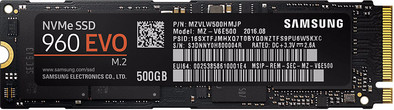
Samsung 960 EVO 500GB M.2
Never available again
View alternatives in the sidebar
View alternatives in the sidebar
According to our solid state drive (SSD) expert
The Samsung 960 Evo 500GB is an internal NVMe SSD that's suitable for demanding users. You can process data within seconds with rapid read speeds of 3200MB/s and write speeds of 1800MB/s, so it'll only take this drive 15 seconds to start up your laptop. You can use this SSD for years to come, thanks to its endurance of up to 400TB. The Dynamic Thermal Guard will keep your drive from overheating, so your data is protected. Via the Samsung Magician software, you can update the SSD's firmware and manage its performance.
This SSD is 80mm long. Do you want to use this M.2 internal SSD? First check whether your motherboard supports this length. If that's not the case, the SSD won't fit and you can't install it.
Total storage capacity | 500 GB | |
|---|---|---|
Type of SSD | M.2 NVMe (M key) | |
Maximum read speed | 3200 MB/s | |
Maximum write speed | 1800 MB/s |
5 stars
39
4 stars
9
3 stars
0
2 stars
1
1 star
0
Put this 960evo nvme ssd in this StarTech x4 PCI Express to M.2 PCIe SSD card because I don't have an M.2 slot on my motherboard. Installing was very easy.
You can download and use the unfortunately not included Samsung Migration Software to clone your old 850evo to your new much faster 960evo.
You only need to change the boot order in your bios with your new 960evo at number 1 and you can start with your super fast new ssd.
Now I am enjoying it without waiting to load anything.
Johan Min
9 January 2018
Automatically translated from Dutch
Very easy to install, if you have a bit of prior knowledge. The step from HDD to this SSD is a huge one. Windows now boots within seconds and loading programs or games is no problem at all. Investigating whether the hardware is compatible with your device can be equally difficult because not much is known about the M.2 slot, luckily there are also adapters for sale. Note the version of your PCIE lanes and whether your motherboard has an M.2 slot.
Levy Volkers
7 November 2017
Automatically translated from Dutch
The first SSD was not entirely in order, but this was solved without any problems and well by Coolblue after reporting this. A new SSD was delivered, at no additional cost, TOP.
P. Weeterings
23 May 2018
Automatically translated from Dutch
Product number | 752522 | |
|---|---|---|
Manufacturer code | MZ-V6E500BW | |
Brand | Samsung | |
Warranty | 3 years | |
Processing of your defect | Carry-in warranty |
Total storage capacity | 500 GB | |
|---|---|---|
Type of SSD | M.2 NVMe (M key) | |
SSD-controller | Samsung | |
Memory type (SSD) | Triple Level Cell (TLC) |
M.2 SSD connector type | M |
|---|
Depth | 80,15 mm |
|---|---|
Height | 2,38 mm |
Width | 22,15 mm |
Color | Black |
Cache memory | 512 MB | |
|---|---|---|
Maximum read speed | 3200 MB/s | |
Maximum write speed | 1800 MB/s | |
Output operations per second (IOPS) | 330000 | |
Input operations per second (IOPS) | 330000 | |
Mean Time Between Failure (MTBF) | 1500000 hours |
Energy-efficient | ||
|---|---|---|
Durability class | Basic |