Microsoft Surface - HDMI Adapter V2
Never available again
View alternatives in the sidebar
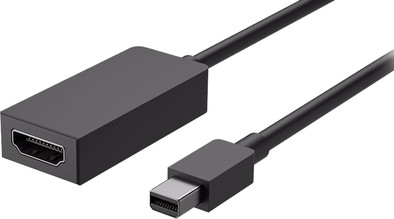
You can easily connect your Microsoft Surface device to an HDMI monitor, television, or projector using the Microsoft Surface - HDMI Adapter V2. Connect the adapter via Mini DisplayPort with your Surface and connect an external screen via the HDMI port of the adapter.
Cable length | 0,17 m | |
|---|---|---|
Color | Black | |
Compatible with product type | Desktop, Laptop, Monitor, Smartphone, Television | |
HDMI connector | ||
Lightning connector | ||
USB port | ||
Network connector | ||
DisplayPort connector |
5 stars
18
4 stars
7
3 stars
0
2 stars
1
1 star
0
Quality
Durability
Better than the plug I had before. That was after two years of games.
Eug Heman
3 June 2019
Automatically translated from Dutch
functions perfectly
Christine Landsheere
4 July 2017
Automatically translated from Dutch
Both at work and at home I use the Surface Docking, with two screens connected to it. Really great product!
Marco Huiskamp
4 July 2019
Automatically translated from Dutch
Product number | 782489 | |
|---|---|---|
Manufacturer code | EJT-00004 | |
Brand | Microsoft | |
Warranty | 2 years | |
Processing of your defect | Via Coolblue |
Compatible with product type | Desktop, Laptop, Monitor, Smartphone, Television | |
|---|---|---|
USB port | ||
Lightning connector | ||
HDMI connector | ||
Type of HDMI connector | Standaard HDMI Type A | |
Type of standard HDMI Type A connector | Port/female | |
Female HDMI Type A port version | 1.4 | |
DisplayPort connector | ||
Type of DisplayPort connector | mini DisplayPort | |
Type of mini DisplayPort connector | Connector/male | |
DVI connector | ||
VGA connector | ||
Headphone jack | ||
Network connector |
Color | Black | |
|---|---|---|
Cable length | 0,17 m |