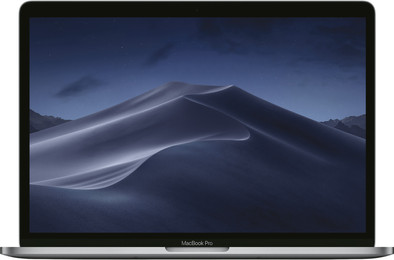
Apple MacBook Pro 13'' (2017) MPXQ2FN/A Space Gray AZERTY
Never available again
View alternatives in the sidebar
View alternatives in the sidebar
According to our laptop expert
From editing your vacation photos to making professional illustrations: you can create the nicest graphic designs on the crystal clear Retina Display of the Apple MacBook Pro 13" AZERTY. With a resolution of 2880x1800, you can see the tiniest details and thanks to the IPS panel, you can see the millions of colors perfectly from all viewing angles. The casing of the MacBook Pro aluminum is sturdy and the lightweight laptop weighs only 1.37 kilograms. With a thickness of only 1.49 centimeters, this workhorse is exceptionally thin and will easily fit in your bag. On to your next job!
Screen size | 13,3 inches | |
|---|---|---|
Processor | Intel Core i5 | |
Internal RAM | 8 GB | |
Total storage capacity | 128 GB | |
Video card | Intel Iris Plus Graphics 640 | |
Panel type | IPS panel | |
Touchscreen |
5 stars
27
4 stars
12
3 stars
0
2 stars
0
1 star
0
I bought this MacBook Pro 13" as an addition to my existing devices. In addition to a few Windows devices, I own a Mac Mini (2014) and a MacBook Pro 15" (2016). I've had a MacBook 12" Retina but passed it on to my daughter. The MacBook Retina's 12" screen was too small for my eyes. Since I have a disability, I can no longer sit on an office chair at my desk for long periods of time. I can do almost all my daily computer activities with this new 13" MB from my relax, couch or bed. The 15" MacBook Pro (which stays in my desk) is just a bit too big and heavy to use constantly on my lap. When I have to do programming, I use the 15" MacBook Pro. For everything else I now use this 13" MacBook Pro. I constantly use the standard macOS applications supplemented with Office 2016 and FileMaker. 80% of my time I am connected via Remote Desktop to my other macOS and Windows devices. This goes extremely smoothly thanks to the very good WiFi chipset. The battery life (I don't get more than 6 hours) might be better. Only 2 USB-C interfaces are very restrictive and require googling dongles and adapters but I can live with that. With this MacBookPro 13" I can go to battle anywhere, anytime
Pascal De Plancke
25 July 2017
Automatically translated from Dutch
After long hesitation between a Windows laptop or an Apple laptop, I made the choice for this MacBook. Some reason: -aluminium housing retina screen -the looks
My first MacBook Pro of this series was a flop...it was extremely slow and crashed.(There was an error in it) So thanks to the TOP service of coolblue, you can change DIRECTLY. I chose the 128 in combination with an external hard drive (without ssd) from lacie (Porsche 1tb) I have 15000 photos if these were on my Mac my memory is full. That's why it's extremely important to do the following when installing your Mac: Format Lacie and make Mac compatible (2min work and point its own) Then you have to move (click and slide) 'photos' (if you do it right you will see a copy bar appear) to your hard drive. Drag the logo photos that remain on your Mac to the trash. Go back to your lacie and open the photos. That's how your Mac knows to go there. Also good to know, you can never just pull out the external hard drive, you have to pass the command to your mag (press lacie in Finder and then you will see a symbol next to it) you have to click on it. This way you will see that your Mac has 'removed' it, this is not erased but ie ready for disconnection. If you skip this step, you could lose everything on it or what he was doing.
The USBc story is getting used to and a bit tricky because you have to buy a hub (coupler with other access ports so you can connect your peripherals)
Another thing I did, I'm allergic to scratches so I put a foil on both my Mac and my hard drive a transparent foil of 3€ for 2m! Foil that used to be used to laminate books. After a day or 2 the plastic settles and it is more beautiful. Rather a thin layer of foil and no scratches than no foil and scratches. It is a cheap good solution.
I hope that I have been able to help the ordinary person with the non-computer knobs. Thanks to coolblue!
Philip Makar
15 January 2019
Automatically translated from Dutch
Very practical laptop to take with you on all trips. Takes up little space while still being strong enough for graphic programs such as photoshop illustrator ...
Mathias Zwart
1 December 2018
Automatically translated from Dutch
Product number | 782952 | |
|---|---|---|
Manufacturer code | MPXQ2FN/A | |
Brand | Apple | |
Warranty | 2 years | |
Processing of your defect | Carry-in warranty |
Operating system | macOS | |
|---|---|---|
Screen size | 13,3 inches | |
Processor | Intel Core i5 | |
Internal RAM | 8 GB | |
Total storage capacity | 128 GB | |
Video card | Intel Iris Plus Graphics 640 | |
Touchscreen |
Panel type | IPS panel | |
|---|---|---|
Sharpness | Retina | |
Resolution width | 2560 pixels | |
Resolution height | 1600 pixels | |
Refresh rate | 60 Hz | |
Screen reflection | Glossy | |
Adaptive Sync |
Processor cores | Dual-Core (2) | |
|---|---|---|
Processor code name | Kaby Lake | |
Clock speed | 2,3 GHz | |
Turbo speed | 3,6 GHz | |
Cache memory | 4 MB |
Maximum internal memory | 16 GB | |
|---|---|---|
Memory composition | 1x 8GB | |
Memory slot 1 | 8 GB | |
Total number of RAM slots | 1 |
Storage type | SSD | |
|---|---|---|
SSD storage capacity | 128 GB | |
Hard drive type | M.2 |
Type of video card | Shared |
|---|
Operating system language | Dutch, English |
|---|
Laptop model | Laptop | |
|---|---|---|
Color | Gray | |
Material | Metal | |
Metal type | Aluminum | |
Height | 1,49 cm | |
Width | 30,41 cm | |
Depth | 21,24 cm | |
Weight | 1,37 kg |
Mobile data connection | No | |
|---|---|---|
WiFi standards | Wireless AC | |
Bluetooth | ||
Bluetooth version | 4.0 |
USB port | ||
|---|---|---|
Number of USB ports | 2 | |
Type of USB port | USB-C | |
Protocol Female USB-C port | DisplayPort Alternative Mode, Thunderbolt Alternative Mode, USB | |
USB version Female USB-C port | 3.1 | |
Number of USB 2.0 Female USB-C ports | 0 | |
Number of USB 3.0 Female USB-C ports | 2 | |
Number of USB 3.1 Female USB-C port | 2 | |
HDMI connector | ||
DisplayPort connector | ||
VGA connector | ||
Thunderbolt connector | ||
Headphone jack | ||
Memory card reader |
Keyboard layout | AZERTY | |
|---|---|---|
Physical keyboard layout | ISO | |
Numeric keypad | ||
Spill-resistant | ||
Backlit keyboard | ||
Mechanical keyboard | ||
Programmable keys |
Built-in microphone | ||
|---|---|---|
Number of speakers | 2 | |
Sound reproduction | Stereo | |
Integrated computer speakers brand | Standard speakers |
Built-in camera | ||
|---|---|---|
Image definition webcams | HD Ready (720p) |
Battery technology | Lithium polymer | |
|---|---|---|
Maximum battery life | 10 hours | |
Power connector input type (female) | Other brand/product specific |
Manufacturer's warranty | ||
|---|---|---|
Manufacturer's carry-in warranty | 2 years | |
Manufacturer's warranty on-site | 0 y | |
Pickup and return warranty from the manufacturer | 0 y |
TPM (Trusted platform module) | ||
|---|---|---|
Kensington lock | ||
Windows Hello | ||
Fingerprint identity sensor |
Extra installed software |
|---|