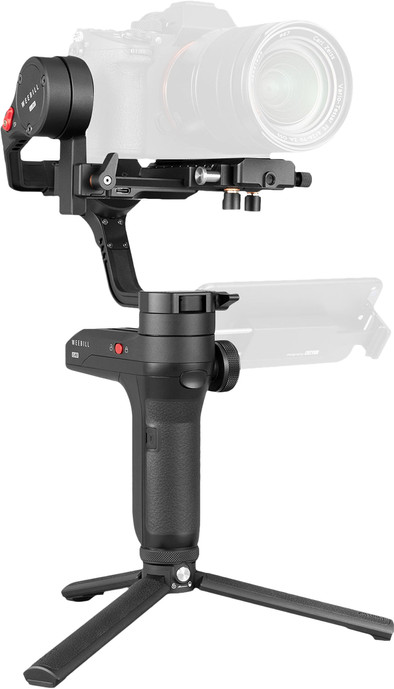
Zhiyun WEEBILL LAB Gimbal
Never available again
View alternatives in the sidebar
View alternatives in the sidebar
According to our gimbal expert
Note: the tripod may lean forward if you've mounted a large lens on your camera. Camera not included.
The Zhiyun WEEBILL LAB is a stabilizer and tripod in one that allows you to record smooth video images. You can use the wheel on the handle to focus while moving the stabilizer and select different modes to record images, such as pan follow, or full follow. You can place your smartphone in the phone mount so there's a direct connection to the stabilizer via the ZY Play app. Simply control the gimbal by moving your phone and easily adjust the camera settings with the ViaTouch Control System. You can connect a tripod to the handle that you can fold out. This allows you to use the tripod as a stabilizer. The maximum load capacity is 3kg. This means the tripod is suitable for SLR cameras with an attached lens.
Maximum load capacity | 3 kg | |
Weight | 970 g | |
Controlled via buttons on device | ||
Tilt range | 360 ° |
5 stars
4
4 stars
3
3 stars
1
2 stars
0
1 star
0
This is my third product that I have ordered here and I like it very much. I was looking for a gimbal for a system camera and for a reasonable price, that already limits the choice considerably and finally ended up on this one. :-)
The first thing that came out of the box was a nice storage case. This looks like a kind of black paper foam, but it is sturdy and has closures on the side. Once opened, we see the gimbal itself and the included accessories neatly and well protected.
The batteries of the gimbal are the well-known 18650 batteries. These can therefore also be purchased in different capacities. A charger is also included. It works with a USB cable. I have also heard that once in the gimbal, these can also be charged by connecting the gimbal via a USB cable.
The battery life is also fine. On the internet, the manufacturer promises to get around 10 hours, I have not yet been able to test that, but on a full battery I am already using three hours with two lines left. In principle, that has been going on for quite some time and since the batteries can also be purchased and are easy to replace, it is a double plus.
The gimbal comes with a kind of tripod. You can screw this under the gimbal or at the top. To set up the gimbal, you can screw it on at the bottom and unfold it. Yes, expand. When folded, it serves as a handle to hold, but it also unfolds as three separate legs to set the gimbal straight.
The gimbal has a Quick Release plate with a standard manfrotto type plate. So you can easily detach and place your camera again and also easily place it back on the gimbal from, for example, a tripod. Useful!
In the gimbal I use a Sony A7S system camera with a Metabones EF-E adapter and a Canon 17-40mm f/4.0 lens. In terms of weight, that's actually fine, so it's not a quick thing to just put your iPhone in.
This combination has some flaws, to balance correctly I had to screw the QR plate to the metabones so that the Zoom of the lens is blocked by the plate. I personally don't attach much importance to this. Probably best to try a small E-mount lens. I tried it myself with a Sony 18-105 mm f/4.0. The camera had to be in APS-C mode, so I actually recommend a Sony FE lens.
The camera connects to your gimbal itself by means of another USB cable, this is a bit messy but it works well and that's what matters. What do you get in return for connecting just this cable? You can charge the camera with a cable (not with the a7s!), but you get a lot of nice functions with it. For example, you can operate the camera via the display and the buttons on the gimbal, but even better via the ZY PLAY app. You heard it right, the camera can be operated via your phone and you also get to see the LiveView of the camera. This has a good resolution, good enough to focus correctly, only the fps lag a bit (variable -> dropped frames), but nothing very disturbing. You can turn on all kinds of functions such as zebras, peaking, waveform, and even LUTS (the camera itself can't even do that!). And with the right e-mount lens, you can also manage things like Aperture, focus and zoom in this case. maybe the focus wheel on the gimbal itself is nicer. Super easy! And even better are the focus settings in the app, you can have objects tracked, adjust your focus point on the screen and a lot of other options.
By the way, the ZY PLAY app on an iPhone is a bit annoying. When you open it, you are first forced to see an advertisement and after that it is best to figure out to find your gimbal in the list. Then you have to connect which sometimes works automatically and sometimes redirects you straight to the settings menu. Once connected, everything works wonderfully.
Watch out for an AxisLock because my experience is that as soon as it ends up in AxisLock, both the gimbal and the app no longer function until a reboot of both.
To use the gimbal correctly you will have to balance it. That's some figuring out! There are several YouTube tutorials that I can recommend as well. You have to make sure that your camera hangs straight in the unlocked position and is therefore in balance. The best way to do this is by always unlocking an axis. You do this by setting the slider on the side of the axis to Unlocked and then positioning it, thus firing each axis one by one. Once done you can set the axes all to unlocked and turn on the gimbal, it will set itself up perfectly during startup. If you want to put the camera away again, it's easy too. You put all axes on lock and then remove the qr plate with camera. Do you want to use the camera again? Then you place it back and you save the work of balancing again.
There is so much available ready for use that I don't even know what exactly. There are so many positions, each doing something different. You can of course move the gimbal with the joystick, but also remotely via the app. If you are looking for a gimbal, this is really a perfect option.
A disadvantage is that you have to purchase a separate phone holder to keep your phone with it. I really think this should just be there. This can be ordered for around 40 euros.
Joey Jansen
29 December 2019
Automatically translated from Dutch
I thought 3 kg!! Yes he can. However, the gym ball is too small to balance a light camera with a heavy lens. There simply isn't enough room for it. It comes with an odd size battery. There is no such thing as a quick battery change.
Alex
14 March 2020
Automatically translated from Dutch
It's the compact shape and ease of setting up. I've had a lot of gimbals but the locks make it very easy to put them on.
Jeroen
27 November 2018
Automatically translated from Dutch
Product number | 823213 | |
Manufacturer code | 633020014 | |
Brand | Zhiyun | |
Warranty | 2 years | |
Processing of your defect | Via Coolblue |
Material | Metal | |
Weight | 970 g | |
Color | Black | |
Compatible with product type | Mirrorless cameras, Single-lens reflex cameras | |
Made for brand | Universal | |
Maximum load capacity present | ||
Maximum load capacity | 3 kg |
Image stabilization type | Mechanical image stabilization | |
Number of gimbal axes | 3 | |
Type of gimbal handle | Single handle | |
Controlled via buttons on device | ||
Pan range | 360 ° | |
Tilt range | 360 ° |
Power supply type | Rechargeable battery | |
Replaceable battery |