Jabra Evolve 75th UC Wireless Office Headset
Never available again
View alternatives in the sidebar
View alternatives in the sidebar
According to our office headset expert
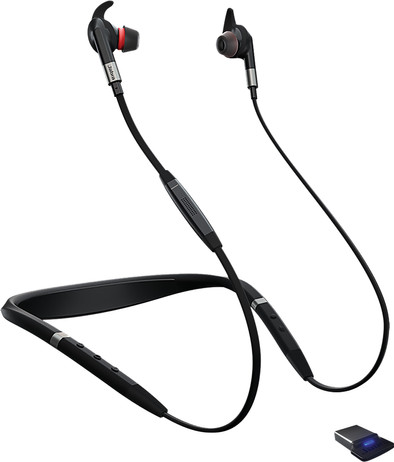
The Jabra Evolve 75th UC Stereo Office Headset has 3 microphones, making your voice sound realistic. You connect the earbuds to your smartphone, tablet, PC or laptop via Bluetooth. From there you have a range of 30 meters, so you can walk to the printer without problems while calling. With the buttons on the cabling you have control over your telephone call within reach. You can adjust the volume or use the mute button to discuss something with a colleague. Do you just not want to be disturbed? The light on the cable lights up when you are on a call. This way your environment knows at a glance that you are busy.
Headphones wearing method | In your ear | |
|---|---|---|
Connection type | Wireless | |
Office headset suitable for device | PC, Smartphone |
5 stars
7
4 stars
4
3 stars
2
2 stars
0
1 star
0
Very nice, easy to operate and the sound quality is very good, used different headphones but switching between devices remains difficult. With this Jabra you have a dongle in your PC and bluetooth on the phone and this works very well, range is more than sufficient, I have already used it with the computer on the second floor and I am connected to the headphones on the ground floor. Use the headphones with MS Teams, Webex, Jabber, Skype and my iPhone, switches effortlessly.
Maurice Nijenhuis
11 May 2020
Automatically translated from Dutch
Noise cancellation is very good.
sven lanckmans
27 June 2019
Automatically translated from Dutch
This Headset is easy to use, fits comfortably in your ears and the battery lasts a long time. You always have to manually switch between your car kit and the headset.
tom van der kruys
5 December 2019
Automatically translated from Dutch
You can use this office headset with various communication software programs (Unified Communications), but it isn't specifically certified for Microsoft Skype for Business (MS). If you use Skype for Business, consider an office headset with MS certification. This allows you to effortlessly use all MS functions after connecting your headset. That way, you're ready to answer and end calls, control the volume, and use the mute function right away.

Product number | 831697 | |
|---|---|---|
Manufacturer code | 7099-823-409 | |
Brand | Jabra | |
Warranty | 2 years | |
Processing of your defect | Via Coolblue |
Office headset suitable for device | PC, Smartphone | |
|---|---|---|
Supported communication software | Cisco, Microsoft Communications, Microsoft Skype for Business, Unified Communications | |
Pick up/hang up phone call | ||
Standby time | 12 hours | |
Spoken notifications |
Built-in microphone | ||
|---|---|---|
Microphone recording type | Mono | |
Microphone mute function | ||
How to mute | Via the button on the cord | |
Collapsible microphone |
Connection type | Wireless | |
|---|---|---|
Bluetooth | ||
Bluetooth version | 4.1 | |
Nano receiver | ||
Software compatibility | ||
USB port |
Type of ear cushions | In-ear | |
|---|---|---|
Ear cushion material | Rubber | |
Headphones wearing method | In your ear | |
Number of ear cups | 2 | |
Rotatable ear cups | ||
Foldable |
Power source | ||
|---|---|---|
Power supply type | USB port PC/laptop | |
Cable length | 1 m | |
Base station |
Weight | 0,05 kg | |
|---|---|---|
Material | Plastic | |
Finish | Matte | |
Color | Black |