Wacom MobileStudio Pro 16
Never available again
View alternatives in the sidebar
View alternatives in the sidebar
According to our drawing tablet expert
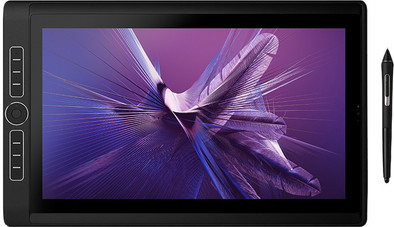
With the Wacom MobileStudio Pro 16, you have a drawing tablet that lets you make the most of your creativity as a professional, both at home and on the go. This Wacom drawing tablet is a stand-alone system, so you don't need a laptop or desktop to design. Thanks to the Ultra HD (4K) screen, you can work accurately. You can also bring the 16-inch device in your bag, so you can start designing on location right away. The screen provides an authentic feeling when you draw, because it feels like you're working with pen and paper. The included Wacom Pro Pen 2 has 8192 pressure levels. As a result, you decide exactly how thick or thin the lines are. In addition, the powerful NVIDIA Quadro P1000 video card doesn't slow down the tablet while you design. And your designs are safely stored, because the Wacom unlocks with your fingerprint.
Compatible with operating system | Windows | |
|---|---|---|
Multi-touch | ||
Connection type | Wired, Wireless | |
Width | 41,6 cm | |
Depth | 26,2 cm |
5 stars
4
4 stars
2
3 stars
0
2 stars
0
1 star
0
After years I made the switch from a Cintiq Companion to this one, as I work quite hard on small screens. And man, this one draws wonderfully. It is a bit of a rib out of your body, but then you also have something. The touchscreen is very fast and smooth and with the pen just the same. The pen has no problem with it if you don't hold it straight on the screen, the pen also has a very nice grip and not too much fuss. The standard is basic but sturdy, sometimes wants to come loose, but you can click it back on again and it has 3 different heights. The buttons are sleek and beautiful, can also be set separately to your own preference. It also comes with 3 USB-C ports and charging also goes via a USB-C, the cable is not insanely long, but it is long enough to stretch out on the couch.
The only drawback is that not all drawing programs work on 4k yet and that finding a decent storage cover is also very difficult (I bought a leather 16' cover via coolblue and it really just fits in there). Same money for taking with you, you have to have a bag that is big enough, but the tablet itself is absolutely not heavy so that is another plus.
Beau Ridders
22 February 2021
Automatically translated from Dutch
This is the replacement of the old model which was also well liked. Too bad the keyboard is no longer available.
Jennifer Gomperts
4 April 2022
Automatically translated from Dutch
The fact that WACOM recommends replacing the motherboard for 1500 euros when cutting the USB-C ports is a downer for such an expensive device. It is better to try a Surface Pro. I dive into one frustration after another with the MobileStudio Pro. I already had to trade one in for a new one.
Jennifer Gomperts
8 December 2022
Automatically translated from Dutch
Product number | 854816 | |
|---|---|---|
Manufacturer code | DTHW1621HK0B | |
Brand | Wacom | |
Warranty | 2 years | |
Processing of your defect | Via Coolblue |
Processor | Intel Core i7 | |
|---|---|---|
Internal memory (Byte) | 16 MB | |
Drawing tablet has integrated screen | ||
Screen size | 16 inches | |
Panel type | IPS panel | |
Resolution height | 2160 pixels | |
Resolution width | 3840 pixels | |
Response time | 25 ms | |
Brightness | 320 cd/m2 | |
Contrast ratio | 850 | |
Color temperature | 6500 K | |
Color gamut | 85 % | |
Height of active drawing area | 19,4 cm | |
Width of active drawing area | 34,5 cm | |
Multi-touch | ||
Left or right-handed | Left-handed, Right-handed | |
Number of buttons | 12 | |
Programmable buttons | ||
Tilt sensitive | ||
Tilts | 60 ° | |
Compatible with operating system | Windows | |
Digital notepad |
Connection type | Wired, Wireless | |
|---|---|---|
Bluetooth | ||
Bluetooth version | 5.0 |
Weight | 2,1 kg | |
|---|---|---|
Width | 41,6 cm | |
Depth | 26,2 cm | |
Height | 2,1 cm |
Power source | ||
|---|---|---|
Power supply type | Rechargeable battery | |
Replaceable battery |