Huion Inspiroy H640P
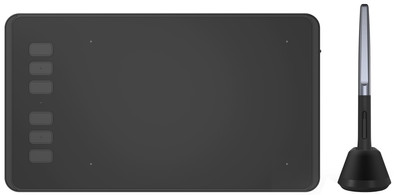
Never available again
View alternatives in the sidebar
Insure your drawing tablet
Receive more coverage in case of damage than with your standard warranty. Coolblue takes care of everything: from taking out the insurance to repairs. Is a repair not possible? You receive the purchase price as CoolblueCredit.
What am I insured for?
- Fall and impact damage
- Water damage
- Manufacturing defects outside the warranty
- Theft(Optional)
What am I not insured for?
- Damage you deliberately cause
- Damage that doesn't affect the product functioning (such as scratches)
- Damage due to gross negligence
XCover insurace
XCover is allowed to arrange and process insurances on behalf of the insurer. The insurances are governed by Belgium law. If you have a complaint, you can contact the or our customer service.
How do I insure my drawing tablet?
First, add your drawing tablet to your shopping cart. On the next page, choose one of the Protection Plans below. You always have a 30-day return window and pay no deductible in case of damage or theft.
XCover Protection Plan with theft cover
- 2-year advance payment8,99 one-time payment (4,50 per year)
XCover Protection without theft cover
- 2-year advance payment7,99 one-time payment (4,- per year)
The insurance can be canceled every year, even if you have paid in advance. If you cancel earlier, you will receive a refund for the overpaid amount.

Specifications
Product
Product number | 873844 | |
|---|---|---|
Manufacturer code | H640P | |
Brand | Huion | |
Warranty | 2 years | |
Processing of your defect | Via Coolblue |
Drawing tablet properties
Drawing tablet has integrated screen | ||
|---|---|---|
Lines per inch (LPI) | 5080 lpi | |
Height of active drawing area | 10 cm | |
Width of active drawing area | 16 cm | |
Multi-touch | ||
Number of buttons | 6 | |
Programmable buttons | ||
Tilt sensitive | ||
Compatible with operating system | Android, Windows, macOS |
Connectivity
Connection type | Wired | |
|---|---|---|
Bluetooth |
Physical properties
Weight | 280 g | |
|---|---|---|
Width | 14,77 cm | |
Depth | 26 cm | |
Height | 0,8 cm |
Power supply
Power source | ||
|---|---|---|
Power supply type | Via a different product | |
Cable length | 1,6 m |