Choose your router
0
- Be the first to know when this product is in stock
0
Receive more coverage in case of damage than with your standard warranty. Coolblue takes care of everything: from taking out the insurance to repairs. Is a repair not possible? You receive the purchase price as CoolblueCredit.
XCover is allowed to arrange and process insurances on behalf of the insurer. The insurances are governed by Belgium law. If you have a complaint, you can contact the or our customer service.
First, add your router to your shopping cart. On the next page, choose the Protection Plan below. You always have a 30-day return window and pay no deductible in case of damage.
The insurance can be canceled every year, even if you have paid in advance. If you cancel earlier, you will receive a refund for the overpaid amount.
Product number | 874760 | |
|---|---|---|
Manufacturer code | TL-ER605 | |
Brand | TP-Link | |
Warranty | 3 years | |
Processing of your defect | Via Coolblue |
Type router | Business router | |
|---|---|---|
WiFi speed class | Basic | |
Number of stations | 1 | |
Can be expanded with extra stations | ||
Built-in modem |
Jumbo frame support |
|---|
Ethernet speed | Gigabit Ethernet (1000Mbps) | |
|---|---|---|
Network connector | ||
Maximum ethernet speed | 1000 Mbit/s | |
Number of Ethernet ports | 5 | |
SFP/GBIC ports | 0 | |
PoE support | ||
USB port |
Automatically switches to 3G/4G | ||
|---|---|---|
SIM card slot |
Quality of Service (QoS) | ||
|---|---|---|
MU-MIMMO | ||
Seamless roaming | ||
Beamforming | ||
Port forwarding | ||
LACP Link aggregation |
Parental controls | ||
|---|---|---|
Firewall | ||
Firewall type | DoS, SPI Firewall | |
Guest network | ||
VPN support | ||
VPN server | ||
VPN client | ||
VPN passthrough |
Mounting possible | ||
|---|---|---|
Width | 10,09 cm | |
Height | 2,54 cm | |
Depth | 15,8 cm | |
Weight | 360 g | |
Color | Black | |
Material | Metal |
Power supply type | Power grid |
|---|

anything for a smile
Current product
60,-
79,-
75,-
60,-
81,-
Gigabit Ethernet (1000Mbps)
Gigabit Ethernet (1000Mbps)
Fast Ethernet (100Mbps)
Gigabit Ethernet (1000Mbps)
Fast Ethernet (100Mbps)
Our digital expert will help you, but it can sometimes make mistakes, like humans do.
According to our router expert
You set up the network connections the way you want, so you can also use them for a backup internet connection.
You configure this router and connected devices entirely via the cloud.
With this router, you provide your company network with optimal protection.
The router doesn't have built-in WiFi, so you need a TP-Link access point for this.
The maximum throughput speed of the integrated VPN server is limited to 42Mbps.
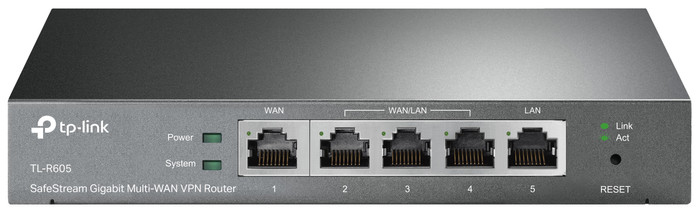
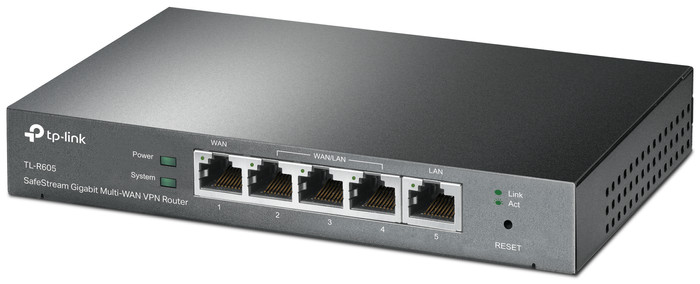
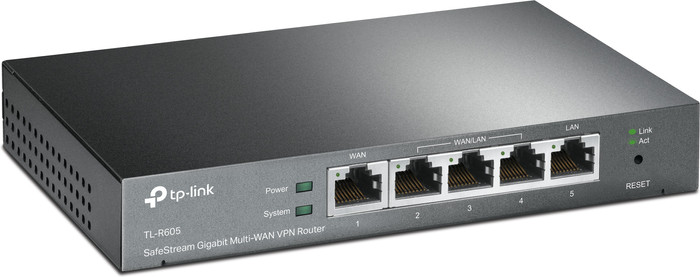
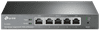
The TP-Link Omada ER605 is a business router that you manage via the cloud and intended for companies with up to 30 employees and an average internet use. Place this router in your network and connect it with TP-Link Omada access points and switches to provide all your employees with internet. Add a controller to manage all these devices at the same time. With this router, you provide your network with optimal protection. For example, you can set up multiple VPN connections and provide your company network with a powerful firewall. You can set up the filters in such a way that attackers can't get their hands on company secrets.
My situation: I use multiple TP-Link AP (3) and Switches (2) in my home network. To manage all this I use the Omada software controller via a Docker on my Synology. This all works very well and adding an extra AP can be done in seconds. Awesome!
Why this router: Because I want to have more control over my router, I used the Ziggo modem/router for this, I decided to also buy an Omada TP-link router. There are two different routers for sale in this professional line. I chose the TL-R605, the TL-ER7206 has an additional SFP port, but I wouldn't use that anyway. The price is also a lot more expensive. Therefore a TL-R605.
Installation: Initially I used the router standalone for a few days, so without including it in the Omada controller. This worked very well and installation and configuration was done in no time. A week later I had some more time and I started to adopt (adopt) the router in the Omada environment. This was difficult and every time I tried to record it, the router got a kind of reset of IP address and admin account. Because of this I couldn't get into the router anymore and I had to bring the router back to factory default. Very frustrating! Then search the TP-Link forum to see if people also have this problem. Several forum users report this problem and luckily a solution has also been posted. Short explanation of the solution: bring your Omada controller to the same subnet as the router's default (subnet: 192.168.0.X). then recording will work. Then you can put the controller and router back on your desired subnet.
Conclusion: Despite the bug when recording in the Omada controller, I recommend this product. You do need some knowledge to install it, but I think if you choose to buy a dedicated router that you also have this knowledge. Furthermore, the router works very stable and the configuration is extensive and easy. Hopefully this bug will be recognized by the manufacturer and fixed soon.
PS. There is no wifi but had to give stars for the range. And because I didn't want to lower the score, I set it to 5.
Auke Boskma
6 May 2021
Automatically translated from Nederlands
After extensive experience with EdgeMax and Unifi before the move, we decided to switch to the Omada environment. The reason for the combination of EdgeMax and Unifi was that Unifi did not work smoothly and turned out to be unstable at the strangest moments. EdgeMax is much more stable, but also more complex. Omada seems to be a very good alternative to Unifi, and so far all the basic settings are simple and effective. VLANs are quick to set up, firewall rules are logical and easy to implement. I opted for an OC200 hardware Omada controller, where the router, switch and EAP are very easy to add to the environment, after which everything is centrally controlled. Very smooth experience so far, I think "pro-sumers" and home lab-ers should seriously consider purchasing this system. Not unimportant; it's a lot cheaper than Ubiquiti, but with the same features.
Pieter
31 July 2021
Automatically translated from Nederlands
I bought this device because kpn had the experia box v10 software update, everything looked different wifi kept turning on automatically while I have an access point and had turned it off manually more often! Because of those stupid updates from kpn a large part of your settings are fucked up and you have to start all over again, especially the port forwarding was also deleted! and I could not set it up anymore because the new software makes the experia box have trouble with it and it no longer works after that update!
I had also called kpn more often but they say they are allowed to do this, I find it antisocial to perform stupid updates without prior notice so after doing some research I found out that you can just buy an alternative box at your own expense of course. I threw that experia box aside and this one took its place.
You need a stand alone router in my case so one without wifi better quality price ratio because I already have an access point. and of course it must have dhcp and firewall and options like port forwarding because those settings were also deleted by kpn I had to reset it to access my nas from outside in this case my nas disk.
You connect this thing to the fiber optic box also called the media converter (restart that thing at least half a minute from the power otherwise it won't work)
Then log in to the box I used the same dhcp settings myself start with 192.168. 2.1 and end at the end with .200 and gateway of course on 254.
With the wan setting you press protocol pppoe user name and password is the same namely kpn nice and easy, you don't have to request it again that's all the same VLAN you set to enable and fill in [6] you can leave the bottom bar empty and wallah with me I had a connection and I could put the experia box defenetively in the bin. It is also not from kpn nice unlocked you can set what you want.
Long story short, Good price-quality ratio good firewall protections and many options that you can set compared to the experia box, was also a good box! only because of those updates that box is just screwed kpn works as a jammer because the wifi always turns on automatically etc, does not give the possibility to downgrade it is about money and never about customers, and you can do something more with it. Recommended
Mr.Bright
24 November 2024
Automatically translated from Nederlands