Logitech MX Keys Keyboard + MX Master 3S Graphite AZERTY
Never available again
View alternatives in the sidebar
View alternatives in the sidebar
According to our keyboard expert
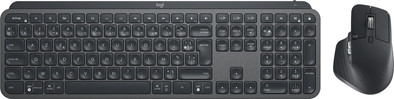
With the Logitech MX Keys Keyboard + MX Master 3S Graphite bundle, you can get to work on your laptop or desktop right away. The keys of the MX Keys were specially designed in the shape of your fingertips, so each stroke feels smooth. The adjustable lighting only turns on when your hands come near the keyboard. In addition, the lighting adjusts itself to its direct environment, so it's never too bright. The Logitech MX Master 3S Graphite is the improved version of the successful MX Master 3, and it's 90% more silent than its predecessor. It has multiple thumb buttons, a horizontal scroll wheel, and the well-known MagSpeed scroll wheel. With the button on the top, you can set the speed of the cursor up to 8000DPI. This makes the mouse more sensitive, and you can work more accurately. Thanks to the Darkfield sensor, you can use this mouse on any surface. With Logitech Flow, you can use the mouse and keyboard on multiple devices at the same time, and switch between these devices at the push of a button.
5 stars
50
4 stars
31
3 stars
4
2 stars
0
1 star
0
Installation ease
Ergonomics
Certainly satisfied with this beautiful and solid keyboard, but I don't understand why Logitech did not make a Belgian variant with this model, while they always did this (in the past) with other models.
It therefore takes some getting used to to use special characters such as parentheses ({,},[,], ...) and the like when programming, because these are in a different illogical place that you are not used to. I solved it by leaving the layout on Belgian Azerty and just typing "blind", because as soon as you look where the parentheses are, it goes wrong.
I know: most developers are more of a fan of Qwerty keyboards and therefore don't have that parenthesis problem, but I've always typed Azerty all my life and would find it unpleasant not to easily use accented words in plain text or French sentences. without having to make special CTRL / ALT / SHIFT / CMD combinations. †
Dirk De Smet
17 February 2022
Automatically translated from Dutch
Top keyboard for all kinds of productivity purposes (office, programming, ...). Slightly heavy allowance for an Apple Magic Keyboard or a Macbook Pro, but you get used to it pretty quickly.
The easy switch buttons are great and make switching devices a no-brainer. Press the right button and type.
Too bad about the FR layout, which means that some buttons do not fully correspond to the labels on the keys according to the Belgian azerty layout and the text is in French, but if you are a bit experienced you usually don't really have to look anymore and that is so it's best with me.
Jeroen Marinus
25 March 2020
Automatically translated from Dutch
Very easy installation, good quality, a pity about the French layout.
Merlijn Pietercil
3 February 2021
Automatically translated from Dutch
Product number | 838635 | |
|---|---|---|
Manufacturer code | 920-009405 | |
Brand | Logitech | |
Warranty | 2 years | |
Processing of your defect | Via Coolblue |
Keyboard layout | AZERTY | |
|---|---|---|
Geographic keyboard layout | FR layout | |
Physical keyboard layout | ISO | |
Typing comfort | Basic | |
Backlit keyboard | ||
Spill-resistant | ||
Color lighting | White | |
Number of colors lighting | 1 | |
Brightness of backlight adjustable | ||
Programmable keys | ||
Multimedia shortcuts | ||
Flat keys | ||
Suitable for gaming | ||
Mechanical keyboard |
Connection type | Wireless | |
|---|---|---|
Cable length | 1,3 m | |
Bluetooth |
Power supply type | Rechargeable battery |
|---|
Keyboard composition | Keyboard, Numpad | |
|---|---|---|
Ergonomic design | ||
Height | 2 cm | |
Width | 43,02 cm | |
Depth | 13,16 cm | |
Wrist rest | ||
Color | Black | |
Weight | 0,81 kg |
Product number | 908518 | |
|---|---|---|
Manufacturer code | 910-006559 | |
Brand | Logitech | |
Warranty | 2 years | |
Processing of your defect | Via Coolblue |
Mouse model | Standard | |
|---|---|---|
Input | Laser | |
Number of buttons | 7 | |
Ergonomic design | ||
Left or right-handed | Right-handed | |
Maximum dots per inch (DPI) | 8000 dpi | |
Adjustable DPI | ||
Mouse controls | Buttons, Scroll wheel | |
Suitable for gaming | ||
Scroll fast | ||
Rechargeable | ||
Programmable buttons | ||
Number of programmable buttons | 3 | |
Lighting peripherals | ||
Silent mouse | ||
Horizontal scrolling | ||
Mouse surface | Any surface | |
Product family | MX |
Connection type | Wireless | |
|---|---|---|
Type of USB port | USB-C | |
Nano receiver | ||
Bluetooth | ||
Bluetooth version | 5.0 | |
Number of devices that can be paired | 1 - 3 |
Plug and Play | ||
|---|---|---|
Compatible with operating system | ChromeOS, Windows, macOS |
Power supply type | Rechargeable battery, USB port PC/laptop | |
|---|---|---|
Battery level indicator | ||
Replaceable battery | ||
Battery included |
Color | Black | |
|---|---|---|
Mouse size | Medium | |
Width | 8,4 cm | |
Height | 5,1 cm | |
Depth | 12,49 cm | |
Material | Plastic | |
Finish | Matte |