Lenovo Precision Pen 2 (Laptop)
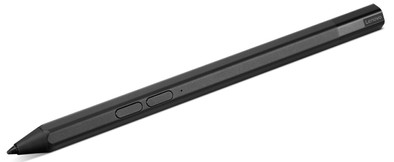
Never available again
View alternatives in the sidebar
Insure your stylus
Receive more coverage in case of damage than with your standard warranty. Coolblue takes care of everything: from taking out the insurance to repairs. Is a repair not possible? You receive the purchase price as CoolblueCredit.
What am I insured for?
- Fall and impact damage
- Water damage
- Manufacturing defects outside the warranty
- Theft(Optional)
What am I not insured for?
- Damage you deliberately cause
- Damage that doesn't affect the product functioning (such as scratches)
- Damage due to gross negligence
XCover insurace
XCover is allowed to arrange and process insurances on behalf of the insurer. The insurances are governed by Belgium law. If you have a complaint, you can contact the or our customer service.
How do I insure my stylus?
First, add your stylus to your shopping cart. On the next page, choose one of the Protection Plans below. You always have a 30-day return window and pay no deductible in case of damage or theft.
XCover Protection Plan with theft cover
- 2-year advance payment9,99 one-time payment (5,- per year)
XCover Protection without theft cover
- 2-year advance payment7,99 one-time payment (4,- per year)
The insurance can be canceled every year, even if you have paid in advance. If you cancel earlier, you will receive a refund for the overpaid amount.

Specifications
Product
Product number | 952423 | |
|---|---|---|
Manufacturer code | GX81J19854 | |
Brand | Lenovo | |
Warranty | 2 years | |
Processing of your defect | Via Coolblue |
Physical properties
Material | Metal, Plastic | |
|---|---|---|
Color | Black |
Styli properties
Number of styli | 1 | |
|---|---|---|
Pen functionality | ||
Made for brand | Lenovo | |
Compatible with product type | Laptop |