Geschreven door Rowan
Bijgewerkt op
9 oktober 2026
·
12.52
Hoe lang krijgt jouw MacBook nieuwe macOS updates?
Koop je een nieuwe MacBook, dan wil je natuurlijk zo lang mogelijk de nieuwste macOS updates en functies krijgen. Gemiddeld krijgt je MacBook tot 7 jaar na de release nog updates. Dit maakt je MacBook geschikt voor jarenlang gebruiksplezier. In dit artikel lees je hoe lang wij verwachten dat je MacBook nieuwe updates ontvangt.
Welke MacBook modellen krijgen nieuwe updates?
Hieronder zie je precies welke MacBook modellen nog nieuwe macOS updates krijgen. Dit zijn momenteel alle MacBook modellen vanaf 2018. Hoe nieuwer je MacBook, hoe langer je geniet van de nieuwste software updates en functies. Daarnaast zijn je bestanden en gegevens het best beveiligd als je altijd de nieuwste updates installeert. Gemiddeld krijgen nieuwe MacBook modellen ongeveer 7 jaar nieuwe updates.
Hoe installeer je nieuwe macOS updates?
Automatisch updaten
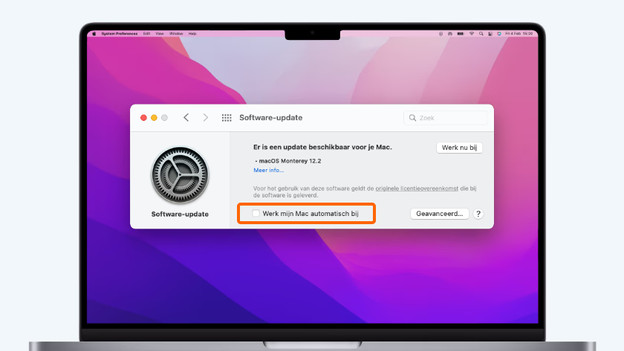
Om te zorgen dat macOS altijd up-to-date is, stel je automatisch updaten in. Dat doe je als volgt:
- Klik linksboven op het Apple logo en kies Systeemvoorkeuren.
- Klik nu op Software Update.
- Zie je dit niet? Haal de update dan op in de App Store.
- Vink het vakje Werk mijn Mac automatisch bij aan.
Vanaf nu installeren updates automatisch. Komt het niet uit? Dan installeer je de update op een later moment.
Handmatig updaten
Bepaal je liever zelf wanneer je nieuwe macOS updates installeert? Je kan ook handmatig updates uitvoeren. Dit doe je zo:
- Klik linksboven op het Apple logo en kies Systeemvoorkeuren.
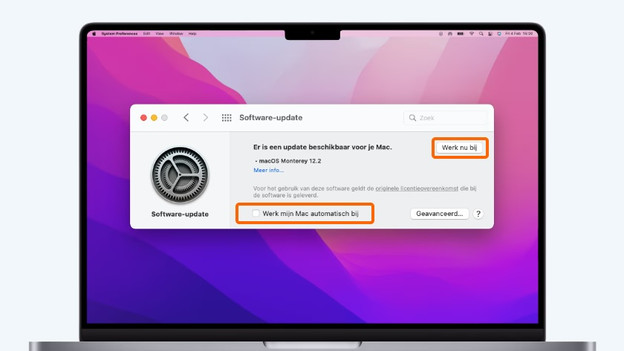
- Klik op Software Update en controleer of er een software update is.
- Klik op Werk nu bij om nieuwe updates te installeren.
Wil je niet dat updates automatisch installeren? Zorg dan dat Werk mijn Mac automatisch bij niet is aangevinkt.
Laatste verwachte macOS update per model
| Model MacBook | Releasejaar | Processor | Verwachte laatste update |
|---|---|---|---|
| MacBook Pro | 2019 | Intel Core i5 / Intel Core i7 / Intel Core i9 | 2026 |
| MacBook Air | 2019 | Intel Core i5 | 2026 |
| MacBook Pro | 2020 | Intel Core i5 / Intel Core i7 | 2027 |
| MacBook Air | 2020 | Intel Core i3 / Intel Core i5 / Intel Core i7 | 2027 |
| MacBook Pro | 2021 | Apple M1 / M1 Pro / M1 Max | 2028 |
| MacBook Air | 2021 | Apple M1 | 2028 |
| MacBook Pro | 2023 | Apple M2 / M2 Pro / M2 Max | 2030 |
| MacBook Air | 2021 | Apple M2 | 2030 |
| MacBook Pro | 2023 | Apple M3 / M3 Pro / M3 Max | 2030 |
| MacBook Air | 2024 | Apple M3 | 2031 |
| MacBook Pro | 2025 | Apple M4 / M4 Pro / M4 Max | 2032 |
| MacBook Air | 2025 | Apple M4 | 2032 |
| MacBook Pro | 2026 | Apple M5 / M5 Pro / M5 Max | 2033 |
| MacBook Air | 2026 | Apple M5 | 2033 |

Wat als je MacBook geen updates meer krijgt?
Heb je een oudere MacBook die geen updates meer krijgt? Je hebt dan geen toegang meer tot nieuwe functies die Apple introduceert. Je krijgt nog een jaar beveiligingsupdates, daarna stoppen deze ook. Ruil je MacBook dan in voor een nieuw model. Je ontvangt dan korting op je nieuwe aankoop.
Overzicht oudere MacBook modellen
| Model MacBook | Releasejaar | Laatst beschikbare macOS versie |
|---|---|---|
| MacBook Air | 2012 | macOS Catalina |
| MacBook Pro | 2012 | macOS Catalina |
| MacBook Air | 2013 | macOS Big Sur |
| MacBook Pro | 2013 | macOS Big Sur |
| MacBook Air | 2014 | macOS Big Sur |
| MacBook Pro | 2014 | macOS Big Sur |
| MacBook (12 inch) | 2015 | macOS Big Sur |
| MacBook Air | 2015 | macOS Monterey |
| MacBook Pro | 2015 | macOS Monterey |
| MacBook (12 inch) | 2016 | macOS Monterey |
| MacBook Pro | 2016 | macOS Monterey |
| MacBook Air | 2017 | macOS Mojave |
| MacBook Pro | 2017 | macOS Mojave |
| MacBook Pro | 2018 | macOS Ventura |
| MacBook Air | 2018 | macOS Ventura |
| MacBook Pro | 2018 | macOS Ventura |
Artikel van Rowan
Apple specialist.