Written by Rowan
Edited on
8 September 2026
·
12:49
How long will your MacBook receive new macOS updates?
When you buy a new MacBook, you want to receive the latest macOS updates and functions for as long as possible, of course. On average, your MacBook receives updates for up to 7 years after its release. This makes your MacBook last and suitable for years of use. In this article, you can read how long we expect your MacBook to receive new updates.
Which MacBook models get new updates?
Below, you can see exactly which MacBook models still receive new macOS updates. At this time, these are all MacBook models starting from 2018. The newer your MacBook, the longer you can enjoy the latest software updates and functions. Your files and data are also best-secured if you always install new updates. On average, new MacBook models receive new updates for about 7 years.
How do you install new macOS updates?
Update automatically
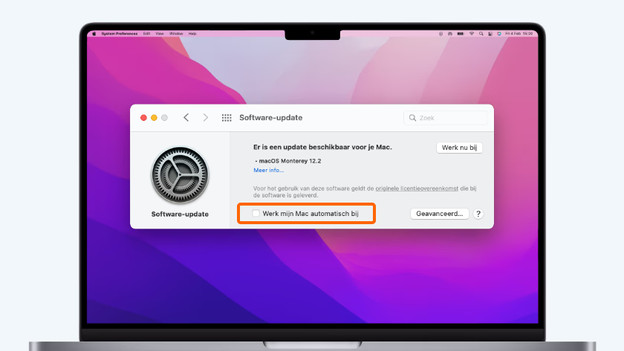
To make sure macOS is always up-to-date, you can set up automatic updates. How to do this:
- Click on the Apple logo in the top left corner and choose System Preferences.
- Click Software Update.
- Don't see this? Get the update in the App Store.
- Check the Automatic Updates checkbox.
From now on, updates will install automatically. Doesn't the moment suit you? Install the update at a later time.
Update manually
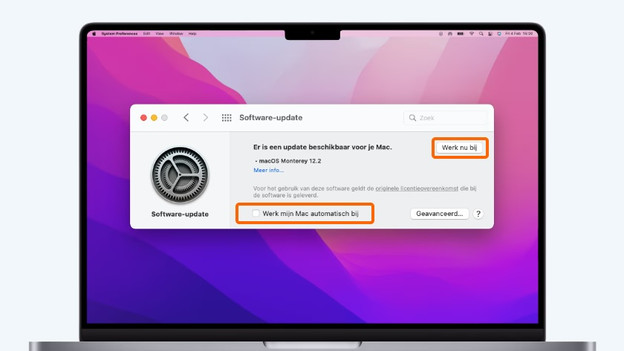
Would you rather decide when you install new macOS updates yourself? You can also perform manual updates. This is how you do it:
- Click on the Apple logo in the top left corner and choose System Preferences.
- Click Software Update and check whether there's a software update.
- Click Update Now to install new updates.
Don't want updates to install automatically? Make sure you don't check the Automatic Updates box.
Last expected macOS update per model
| MacBook model | Release year | Processor | Expected last update |
|---|---|---|---|
| MacBook Pro | 2019 | Intel Core i5/Intel Core i7/Intel Core i9 | 2026 |
| MacBook Air | 2019 | Intel Core i5 | 2026 |
| MacBook Pro | 2020 | Intel Core i5/Intel Core i7 | 2027 |
| MacBook Air | 2020 | Intel Core i3/Intel Core i5/Intel Core i7 | 2027 |
| MacBook Pro | 2021 | Apple M1/M1 Pro/M1 Max | 2028 |
| MacBook Air | 2021 | Apple M1 | 2028 |
| MacBook Pro | 2023 | Apple M2/M2 Pro/M2 Max | 2030 |
| MacBook Air | 2021 | Apple M2 | 2030 |
| MacBook Pro | 2023 | Apple M3/M3 Pro/M3 Max | 2030 |
| MacBook Air | 2024 | Apple M3 | 2031 |
| MacBook Pro | 2025 | Apple M4/M4 Pro/M4 Max | 2032 |
| MacBook Air | 2025 | Apple M4 | 2032 |
| MacBook Pro | 2026 | Apple M5/M5 Pro/M5 Max | 2033 |
| MacBook Air | 2026 | Apple M5 | 2033 |

What if your MacBook no longer receives updates?
Do you have an older MacBook that doesn't receive updates anymore? You won't have access to new functions that Apple introduces. You get security updates for 1 more year, and then these'll stop as well. Trade in your MacBook for a new model at that point. You'll then receive a discount on your new purchase.
Overview older MacBook models
| MacBook model | Release year | Latest available macOS version |
|---|---|---|
| MacBook Air | 2012 | macOS Catalina |
| MacBook Pro | 2012 | macOS Catalina |
| MacBook Air | 2013 | macOS Big Sur |
| MacBook Pro | 2013 | macOS Big Sur |
| MacBook Air | 2014 | macOS Big Sur |
| MacBook Pro | 2014 | macOS Big Sur |
| MacBook (12 inches) | 2015 | macOS Big Sur |
| MacBook Air | 2015 | macOS Monterey |
| MacBook Pro | 2015 | macOS Monterey |
| MacBook (12 inches) | 2016 | macOS Monterey |
| MacBook Pro | 2016 | macOS Monterey |
| MacBook Air | 2017 | macOS Mojave |
| MacBook Pro | 2017 | macOS Mojave |
| MacBook Pro | 2018 | macOS Ventura |
| MacBook Air | 2018 | macOS Ventura |
| MacBook Pro | 2018 | macOS Ventura |
Article by Rowan
Apple Expert.