Written by Nina
Edited on
13 January 2025
·
11:31
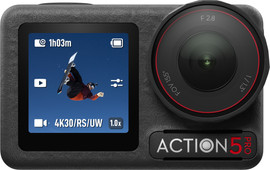
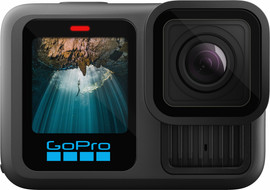
Compare the DJI Osmo Action 5 Pro to the GoPro HERO 13
If you're looking for an action camera for active videos, the DJI Osmo Action 5 Pro and GoPro HERO 13 are both a good choice. These cameras look a lot alike, but have different usage situations. For example, the DJI Osmo Action 5 Pro records extra bright footage in low light, but you can record sharper footage with the GoPro HERO 13. In this article, we'll explain the differences and similarities.
View the DJI Osmo Action 5 Pro and the GoPro HERO 13
- DJI Osmo Action 5 Pro
Thanks to the large 1/1.3-inch sensor, you can record clear 4K videos both during the day and at night.
The camera has a large dynamic range, so you can see many details in shadows and highlights.
Without a waterproof housing, the camera is waterproof up to 20m deep.
The voice controls of the camera only work in English and Mandarin.
From
313,-
- GoPro HERO 13 Black
Thanks to the 5.3K resolution, your videos look sharp.
In the HDR mode, the camera records more details in the highlights and shadows.
Without a waterproof housing, the camera is waterproof up to 10m deep.
The voice controls of the GoPro don't work in Dutch.
From
379,-
Compare the DJI Osmo Action 5 Pro and the GoPro HERO 13
| DJI Osmo Action 5 Pro | GoPro HERO 13 | |
|---|---|---|
| Image sensor | 1/1.3 inches | 1/1.9 inches |
| Maximum resolution | 4K | 5.3K |
| Battery life in Full HD | 4 hours | 2.5 hours |
| Magnetic attachment | Yes | Yes, but not included by default |
| HDR | No | Yes |
| Aspect ratio | 4:3 | 8:7 |
| Internal memory | 47GB | None |
Image quality

DJI Osmo Action 5 Pro: large 1/1.3-inch sensor
The DJI Osmo Action 5 Pro has a large 1/1.3-inch image sensor. This means the lens catches lots of light and you can record extra clear videos. This is useful when you record in dark circumstances, like at night or underwater. This footage has less noise, so they look sharper. You can record in up to 4K resolution with this action camera. That way, you can record detailed footage that's suitable for social media. You can't crop this footage without quality loss though.

GoPro HERO 13: record in 5.3K
With the GoPro HERO 13, you can record in 5.3K resolution. This footage contains more details than 4K footage. The advantage is that you can crop the edges and still have a 4K video in the end. That way, you can easily adjust the image angle later without quality loss. The image sensor of the GoPro HERO 13 is smaller than that of the DJI Osmo Action 5 Pro, so you'll see noise quicker when recording in darker circumstances.
Accessories and lenses

DJI Osmo Action 5 Pro: magnetic mount
There's a strong magnet at the bottom of the DJI Osmo Action 5 Pro. You can easily attach the DJI magnetic mounts to this. Thanks to the magnet, you can quickly switch between different mounts. Do you like to record in circumstances with lots of light, like at a ski slope? Use the DJI ND filters with your camera. These filters reduce the amount of light that enters the lens, so your footage doesn't get overexposed. You can't use other kinds of lens filters with the Osmo Action 5 pro.

GoPro HERO 13: optional lens filters
The GoPro HERO 13 also works with a magnetic mount, but this isn't included by default. You purchase it separately. For special effects while you record, use one of the various GoPro lens filters. For example, you can take razor-sharp images of something from up close with the macro filter, or enlarge your image angle of the lens with the wide-angle lens. If you record in circumstances with lots of light, you can also use ND filters with the GoPro HERO 13. This makes the GoPro suitable for many different usage situations.
Image stabilization

DJI Osmo Action 5 Pro: RockSteady 3.0
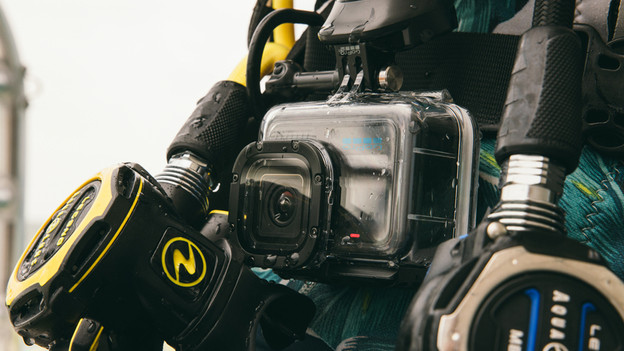
Both the Osmo Action 5 Pro and the GoPro HERO 13 have built-in image stabilization. This technology reduces vibrations, so you record smooth footage. The camera crops a small part of the image for this. DJI calls their image stabilization RockSteady 3.0. Another method of image stabilization is the HorizonSteady function. The horizon in your video always remains straight in this mode, even when you rotate the camera 360 degrees. That can create fun footage when you do a flip, for example. The camera crops the image a little more in this mode.
GoPro HERO 13: HyperSmooth 6.0
The image stabilization of the GoPro HERO 13 is called HyperSmooth 6.0. This technology ensures vibration-free footage, even when you move the camera a lot. The result is comparable to that of the DJI Osmo Action 5 Pro. If you use HyperSmooth image stabilization, the camera also crops a small part of your image. This means that your image angle is less wide. The GoPro Horizon Lock function works the same as DJI HorizonSteade. In this mode, the horizon in your image always remains straight.
Conclusion
With both the DJI Osmo Action 5 Pro and the GoPro HERO 13, you can record impressive activity footage at the ski slope or while you mountain bike, for example. Would you rather always record the clearest footage with many details, even in low light? Choose the DJI Osmo Action 5 Pro, which catches more light thanks to the larger sensor. Do you find it important that the camera records in a high resolution or do you want to use different lenses? The GoPro HERO 13 suits you.