
Written by Robyn
Edited on
1 October 2025
·
10:02
How do you change the strap of your Apple Watch?
You can easily exchange the Apple Watch strap for another strap. This way, you can adjust your Apple Watch to any occasion. Whether you're going to the gym or the office, there is an Apple Watch strap available for every occasion. When buying an Apple Watch strap, make sure to check which watch size the strap is suitable for.

Get started with changing the Apple Watch strap
Changing your Apple Watch strap isn't difficult. How you attach it to the Apple Watch and how you take it off depends on the type of strap.
- Change your Apple Watch Strap
- Remove Milanese Loop strap
- Remove Link Bracelet
Compatibility
You can also use the Apple Watch straps that are suitable for the Apple Watch 38mm for the Apple Watch 40 and 41mm and vice versa. You can also use the Apple Watch 42mm straps for the Apple Watch 44, 45, and 46mm and vice versa. If you plan on changing from the Apple Watch Series 8 45mm to the Apple Watch Series 10 46mm, you can still use the straps that you bought for the Apple Watch Series 8.
Change Apple Watch strap
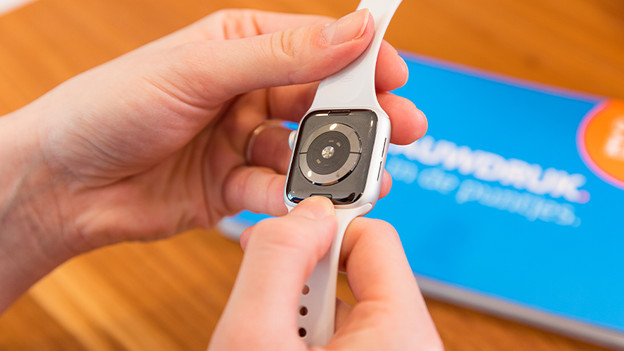
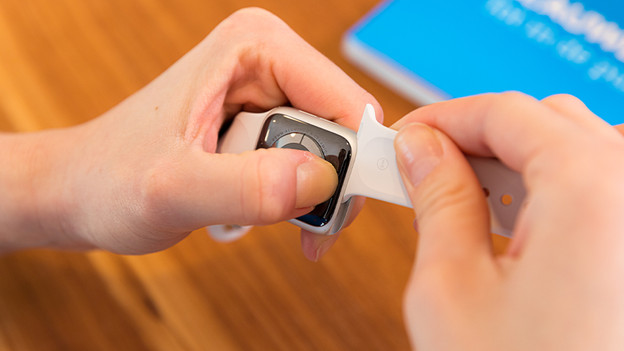
To remove the silicone watch strap from your Apple Watch and attach the new watch strap to the Apple Watch, you have to do the following:
- Place the Apple Watch face down over a clean surface or hold the Apple Watch firmly.
- Press and hold the release button of the watch strap.
- Slide the band out of the slot, either on the left side or on the right side. Is the strap not moving? Press the release button again and try to slide the strap out of the slot.
- Take the new strap. Make sure any text on the strap is facing you. Slide the strap into the slot from the side until you hear a click.
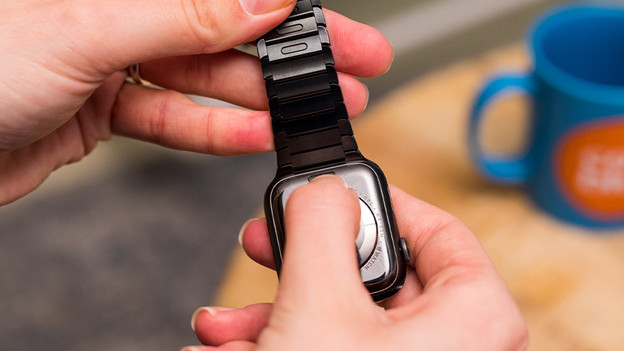
Press the release button on the back of your Apple Watch.
Slide the watch strap out of the slot sideways.
Don't force the watch strap
Never force the strap if you want to put it in or take it out the Apple Watch slot. If you don't feel or hear a click, you have to slide the strap back and forth carefully again. Doesn't the strap attach? Slide the watch strap in the middle of the slot, push it in place, and check if the strap is attached by moving it up and down. Never wear your Apple Watch if it's not secured well.

Remove Milanese Loop watch strap
You can remove the Milanese Loop largely the same as a silicone or nylon strap. Want to make it even easier? Slide the strap through the strap connector. The strap connector is the part that you slide in the Apple Watch slot. The Milanese Loops from 2019 are designed to be able to completely open. With earlier strap models, it wasn't possible to slide the strap end through the strap connector.
Remove Link Bracelet
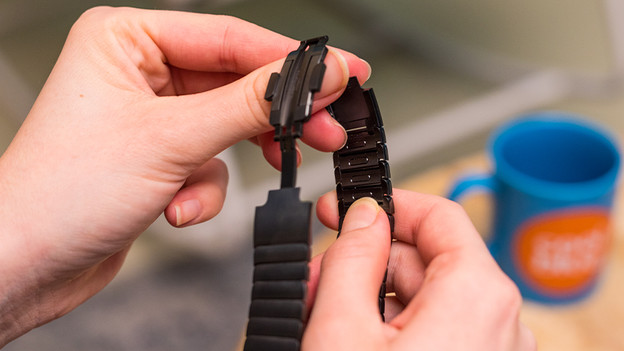
Removing a Link Bracelet from an Apple Watch is different than removing a silicone strap. To take it off, you have to separate the Link Bracelet into two pieces.
- Fold the butterfly closure open by pushing the release buttons.
- Hold down one of the quick release buttons on the inside of the strap.
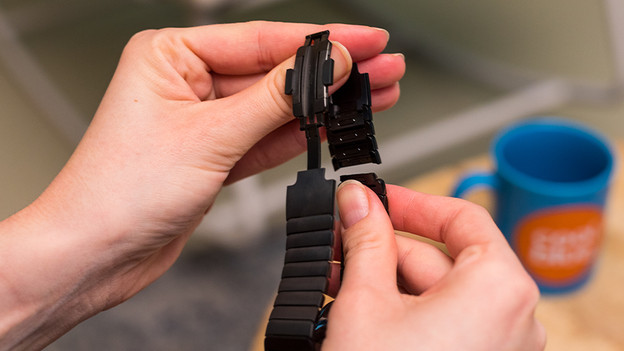
- Carefully pull the two links apart. The Link Bracelet is now separated into 2 parts.
- Press the strap release button on the back of Apple Watch and slide the Link Bracelet out of the slot.
Fold the butterfly closure open.
Hold down the release button on the inside of the strap.
Carefully pull the links apart.
Press the release button on the back of the Apple Watch.
Carefully slide the Link Cracelet out of the slot.


Article by Robyn
Smartwatch Expert.
