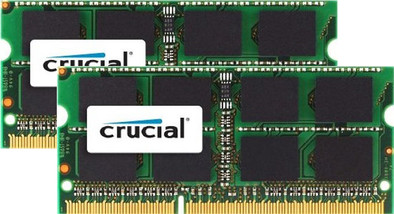
Crucial Apple 16GB SODIMM DDR3L-1600 2x 8GB
Never available again
View alternatives in the sidebar
Product number | 309950 | |
|---|---|---|
Manufacturer code | CT2C8G3S160BMCEU | |
Brand | Crucial | |
Warranty | 2 years | |
Processing of your defect | Carry-in warranty |
Compatible with product type | Laptop | |
|---|---|---|
RAM type | SO-DIMM | |
Memory type | DDR3L | |
Voltage RAM | 1.35V | |
Pins (RAM) | 204 |
Internal RAM | 16 GB | |
|---|---|---|
Memory composition | 2x 8GB |
Memory speed | 1600 MHz | |
|---|---|---|
CAS latency memory module | 11 |
Suitable for gaming |
|---|
anything for a smile
Memory composition | 2x 8GB | |
|---|---|---|
Memory speed | 1600 MHz | |
Internal RAM | 16 GB | |
RAM type | SO-DIMM | |
Memory type | DDR3L | |
CAS latency memory module | 11 | |
Compatible with product type | Laptop |
According to our internal memory expert
These memory modules have been specially developed for use in Apple iMacs, Mac Mini's, and Apple MacBooks.
You get a lifetime warranty on these memory modules.
Make sure that your iMac, Mac Mini, or MacBook has space for two memory modules with a total maximum size of 16GB.
The Crucial Apple 2x 8GB SODIMM DDR3-1600 RAM is suitable for upgrading your Mac. This memory is specially designed for Apple laptops and desktops. The memory comes in 2 modules of 8GB, a total of 16GB. You place this SODIMM in an Apple computer. The maximum clock speed of this DDR3 RAM is 1600MHz.
My mac mini (late 2012) had 4 gigs of ram by default. Bought this 16 gig, opened the box and a little later there was 16 gig of ram in it. A world of difference, programs like Indesign and Photoshop nowadays need a lot more RAM. Considering the price quality, this is a good buy, Crucial is a well-known brand. Everything as it should be, great.
Pieter C.
13 November 2013
Automatically translated from Nederlands
Despite the fact that our older Mac Min can only be expanded to 8GB, it was truly plug and play. Deskseltje off, 2 strips of memory, switch on and ready. The Mac immediately sees 16GB and also switches from 1300 to 1600MHz. And most importantly: no more disk swapping and therefore a considerably faster system.
Paul
27 August 2014
Automatically translated from Nederlands
As beautiful and durable as a new iMac is, the extra memory you order through Apple is just ridiculously expensive. That's why I ordered this extra memory for about half the price that Apple asks. Supplemented with the 8 GB that comes standard in the iMac, I now have 24 GB. Initially I wanted to go for 32 GB, but first I wanted to see if I could also come up with 24 GB (I do a lot of image editing and 3D work). Well, for now it works fine. But should it ever be too little, I quickly ordered another set from Crucial.
Installing the memory is a piece of cake (Apple provides very clear instructions for this), and it is recognized by the OS without any problems.
Whether or not this Crucial memory would be slower than standard Apple memory I can't judge, but my suspicion is that it doesn't matter. There are also stories that it is best to work with equal pairs of memory (8, 16 or 32) because this would be better and faster. Honestly, I haven't experienced any ill effects yet for not having an equal pair of memory now.
All in all, I'm just really happy that I chose this solution.
Toon
26 November 2014
Automatically translated from Nederlands