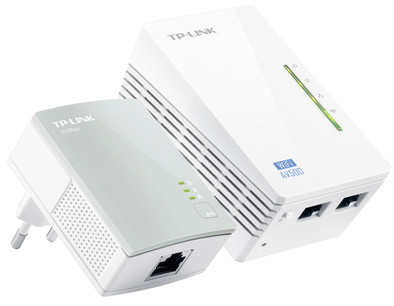
TP-Link TL-WPA4220 WiFi 500Mbps 2 adapters
Never available again
View alternatives in the sidebar
View alternatives in the sidebar
Ethernet speed | Fast Ethernet (100Mbps) | |
|---|---|---|
Built-in WiFi | ||
Frequency bands | Single-band (2.4GHz) | |
Number of powerline adapters | 2 | |
Socket integrated | ||
Maximum ethernet speed | 500 Mbit/s | |
Automatic phase coupling | ||
Integrated switch |
According to our powerline adapter expert
The TP-Link TL-WPA4220 Starter KIT is a set of 2 compact powerline adapters that uses the electricity grid in the house to set up a computer network. With the WiFi-clone button, you can copy the name and password of your wireless network with just one push of the button. Simply plug the powerline adapters into a socket and share an internet connection with other floors, or simply the other end of the room. With the TP-Link TL-WPA4220 Starter KIT, your internet connection is routed via a socket at a speed of 500Mbps with a wired connection and 300Mbps with a wireless connection.
Note: you have to connect the powerline adapters to the same power phase in the house. If you don't do this, the powerline adapter won't work properly.
5 stars
177
4 stars
218
3 stars
27
2 stars
6
1 star
0
In principle it works, only if the steam cable is longer than 20 to 30 meters it already stops unfortunately. The intention was to get wifi in 1 of the barns in my yard, but unfortunately it only works within my home even though the barn is on the same phase/group.
patrick
13 July 2015
Automatically translated from Dutch
The internet reception and speed is now very good in hard to reach places. The installation manual may be described a little more clearly (if router is present = WiFi network):
Herman
19 December 2014
Automatically translated from Dutch
The TP-link starter kit does not only include an internet link, with two connections. It is also a WiFi repeater/amplifier. This is not fully reflected in the user manual. In the beginning, the device did nothing at all. It turns out that the device has to be converted to a different IP address than the default address of 192.168.1.1 . Existing routers in the house often also use this address and then the computer says that it is connected, but cannot connect to any page. This is not clearly stated in the manual. Changing the IP address (to eg 192.168.1.75 ) is the solution to many frustrations.
Martin Prick
6 January 2014
Automatically translated from Dutch
Product number | 338661 | |
|---|---|---|
Manufacturer code | TL-WPA4220KIT | |
Brand | TP-Link | |
Warranty | 3 years | |
Processing of your defect | Carry-in warranty |
Built-in WiFi | ||
|---|---|---|
WiFi standards | Wireless G, Wireless N | |
Frequency bands | Single-band (2.4GHz) | |
2.4GHz band speed | 300 Mbit/s | |
Ethernet speed | Fast Ethernet (100Mbps) | |
Maximum ethernet speed | 500 Mbit/s |
Automatic phase coupling | ||
|---|---|---|
IGMP Snooping | ||
Seamless roaming | ||
Bridge option |
Number of powerline adapters | 2 | |
|---|---|---|
Socket integrated | ||
Integrated switch | ||
Ethernet ports adapter 1 | 1 | |
Ethernet ports adapter 2 | 2 | |
Height | 9,4 cm | |
Width | 5,4 cm | |
Depth | 4 cm | |
Color | White |