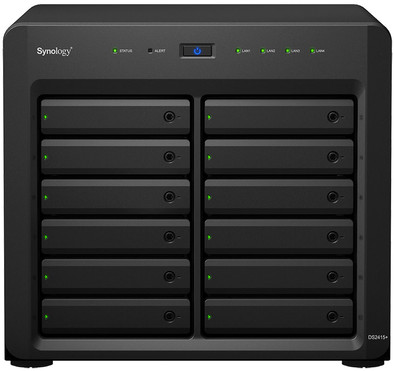
Synology DS2415+
Never available again
View alternatives in the sidebar
View alternatives in the sidebar
According to our NAS expert
The Synology DS2415+, in contrast to its predecessor, the DS2413+, has a Quad-Core processor and the possibility to expand the RAM to 6GB. You can use up to 120TB in this NAS, ideally suited for small and medium-sized companies that want to realize a lot of safe storage. Thanks to the fast Quad-Core processor with AES-NI hardware encryption, you can rapidly transfer encrypted files.
With the easy-to-use DSM (DiskStation Manager), you can use the Synology DS2415+ for more than just backing up and sharing files on the network. In the Package Center, you will find free plug-ins that let you add functionalities, such as a VPN server, mail server, web server, and surveillance station. There are also several free apps for Android and iOS so you can use these functions on your smartphone or tablet.
Number of hard drive slots | 12 | |
|---|---|---|
Suitable for hard drive size | 2.5 inches | |
Internal RAM | 2 GB | |
Processor cores | Quad-Core (4) | |
Built-in hard drive |
5 stars
6
4 stars
3
3 stars
0
2 stars
0
1 star
0
Long doubted, it's a lot of money, but don't regret buying this monster for a second!
Before this I already had experience with the DS209 (now retired) and DS412+, but the DS2415+ is in a class of its own. The interface is the same user-friendly DSM interface; always reliable, continuously developing, always new features, accessible from 'outside', accessible from tablet/phone, many (free) apps that work together seamlessly, etc.
The performance of this machine is not comparable to the aforementioned models. Both in terms of processing (miniatures of photo albums, etc.), but certainly also in terms of throughput. You can link four LAN ports (link aggregation) and he knows how to use all four optimally.
In addition, I added an SSD R/W cache (note: you need two SSDs for this and possibly a RAM memory expansion, depending on the size you want to create) and this works really great. I mainly use the NAS for multi-track recording and video editing and once requested means it's cached and you can jump through the timeline flawlessly; as if the files are cached on the PC/laptop. The content of the cache is determined by the frequency with which you request certain data, which means that you almost never 'misunderstand'. And if you 'mistake', you fall back to the 'normal' performance of the RAID, which is of course already impressive...
Very satisfied and definitely an added value compared to other models. When you compare the price of the NAS to the cost of disks that you will put in it, it is actually not a high amount for the NAS, I personally think.
Ronny van Geel
21 April 2015
Automatically translated from Dutch
Really easy to install, up and running in 10 minutes.
Gert Meertens
11 October 2016
Automatically translated from Dutch
As usual, neatly delivered by appointment by Coolblue. Unpack, load power with 4 included Western digital 4TB red disks. Via find synology (first line in the manual I immediately found the device in my network, and all software installed within 10 minutes. The Disks were ready for use very quickly, I opted for the available Synology Hybrid Raid. This is a variant of other raids, such as raid 5, but in the future offer the possibility to use multiple formats of hard disks but still with the optimal raid format (maximum use of the available terrabytes) Raid control means that if one of the hard disks breaks, you don't lose your files, but in the choice I made, this only happens if 2 disks fail immediately. The Synology software immediately started a disk integrity check that took a while, but I was already able to handle the NAS the hit. Installed some standard apps and also The Plex app. That is an app with which you can directly stream your videos, photos and music to any other device. Then data from other separate 4TB disks that I had transferred. And when those disks were empty added immediately. The Synology software is so intuitive that a child can do the laundry. Super simple. And that with a good help function, and a few youtube videos made installing a piece of cake. Already 7x 4TB in the nas, but luckily still 5 free slots in case I need more disk space. Streaming from the NAS is actually flawless. But I don't think you can do this flawlessly with more than one user. The 4 network ports ensure lightning-fast data transfer. The nose is whisper quiet. All in all a top product!
Reflodark
8 December 2016
Automatically translated from Dutch
Product number | 557255 | |
|---|---|---|
Manufacturer code | DS2415+ | |
Brand | Synology | |
Warranty | 2 years | |
Processing of your defect | Carry-in warranty |
Built-in hard drive | ||
|---|---|---|
Number of hard drive slots | 12 | |
Suitable for hard drive size | 2.5 inches | |
RAID | JBOD, RAID 0, RAID 1, RAID 10, RAID 5, RAID 5 + Spare, RAID 6, Synology Hybrid RAID | |
Internal RAM | 2 GB | |
Total number of RAM slots | 2 |
Connection type | Wired | |
|---|---|---|
LACP Link aggregation | ||
Thunderbolt connector | ||
Number of Ethernet ports | 4 |
NAS functions | Backup server, Download server, FTP server, Media server, Photo server, Print server, Surveillance station, VPN server, Web server | |
|---|---|---|
NAS application center | ||
Plex support | ||
Type of Plex support | Full HD (1080p), HD Ready (720p), SD (480p) | |
Number of IP camera licenses included | 2 | |
DLNA | ||
UPnP AV support | ||
FTP server | ||
On/off switch | ||
Automatic switch on/off | ||
Kensington lock | ||
Apple Time Machine support | ||
Chromecast support | ||
Suitable for IFTTT | ||
Recommended for use | Making a backup, Media streaming, Store photos and videos |
Processor brand | Intel | |
|---|---|---|
Processor family | Atom | |
Processor code name | Atom | |
Processor cores | Quad-Core (4) | |
Clock speed | 2400 MHz |
Depth | 27 cm | |
|---|---|---|
Width | 30 cm | |
Height | 34 cm | |
Type NAS | Upright | |
Color | Black | |
Weight | 9,24 kg |